Back to Blogs
What Is robots.txt? How It Works and Where Its Limits Begin
15 min readAug 19, 2026
Deep Dive

Rosh JayawardenaData & AI Executive
Robots.txt is an origin-scoped plain-text protocol that guides compliant crawlers but cannot secure resources or reliably control indexing. Its effect depends on retrieval status, user-agent groups, path matching, crawler-specific rules, and cache behaviour.
Robots.txt’s role: crawler guidance, not access control
A robots.txt file is easy to mistake for a lock. It contains words like Disallow, after all. But it is closer to a note left for automated visitors.
More precisely, robots.txt is a plain-text implementation of the Robots Exclusion Protocol. It tells automated clients called crawlers which resources they are requested to access or avoid. Search engines use crawlers to follow links and gather information for indexing, but search crawlers are only one kind of automated client covered by the protocol.
One reason for the protocol is practical: letting a crawler visit an entire URI space can put needless load on a service. The formal rules are now set out in RFC 9309, which defines file retrieval, parsing, matching, error handling, and caching behavior.
The key word is requested.
Robots.txt compliance is voluntary. A compliant crawler that successfully retrieves the file is expected to follow its parseable rules; a noncompliant crawler can ignore the file and request the listed URLs anyway. Google likewise describes robots.txt instructions as unenforceable, though Googlebot and other reputable crawlers generally obey them.
This gives robots.txt a fairly sharp boundary. It can guide crawler behavior. It cannot authenticate a visitor, authorize access, make data confidential, or stop an attacker. Indeed, putting a sensitive path in robots.txt makes the path public and discoverable. If a resource must be private, it needs a real security measure such as authentication—not a line in a public file.
The same boundary matters in search. Robots.txt primarily affects crawling, which is the act of requesting a resource. It is not a dependable indexing control. Google may discover a blocked URL from links elsewhere and show the URL, and perhaps public information such as anchor text, in search results even though Google did not crawl the page’s blocked content.
So the first question to ask is not “How do I block this URL?” It is “What am I trying to block?” Crawling, indexing, and access are three different things. Robots.txt addresses the first.
Location, origin scope, and retrieval behavior
The robots.txt location is fixed. Under RFC 9309, the file must be available at the lowercase top-level path /robots.txt, encoded as UTF-8 and served as text/plain. For an HTTPS site at https://example.com, that means:
Text
https://example.com/robots.txtA file at /docs/robots.txt does not govern /docs/. Nor does /Robots.txt satisfy the lowercase protocol location.
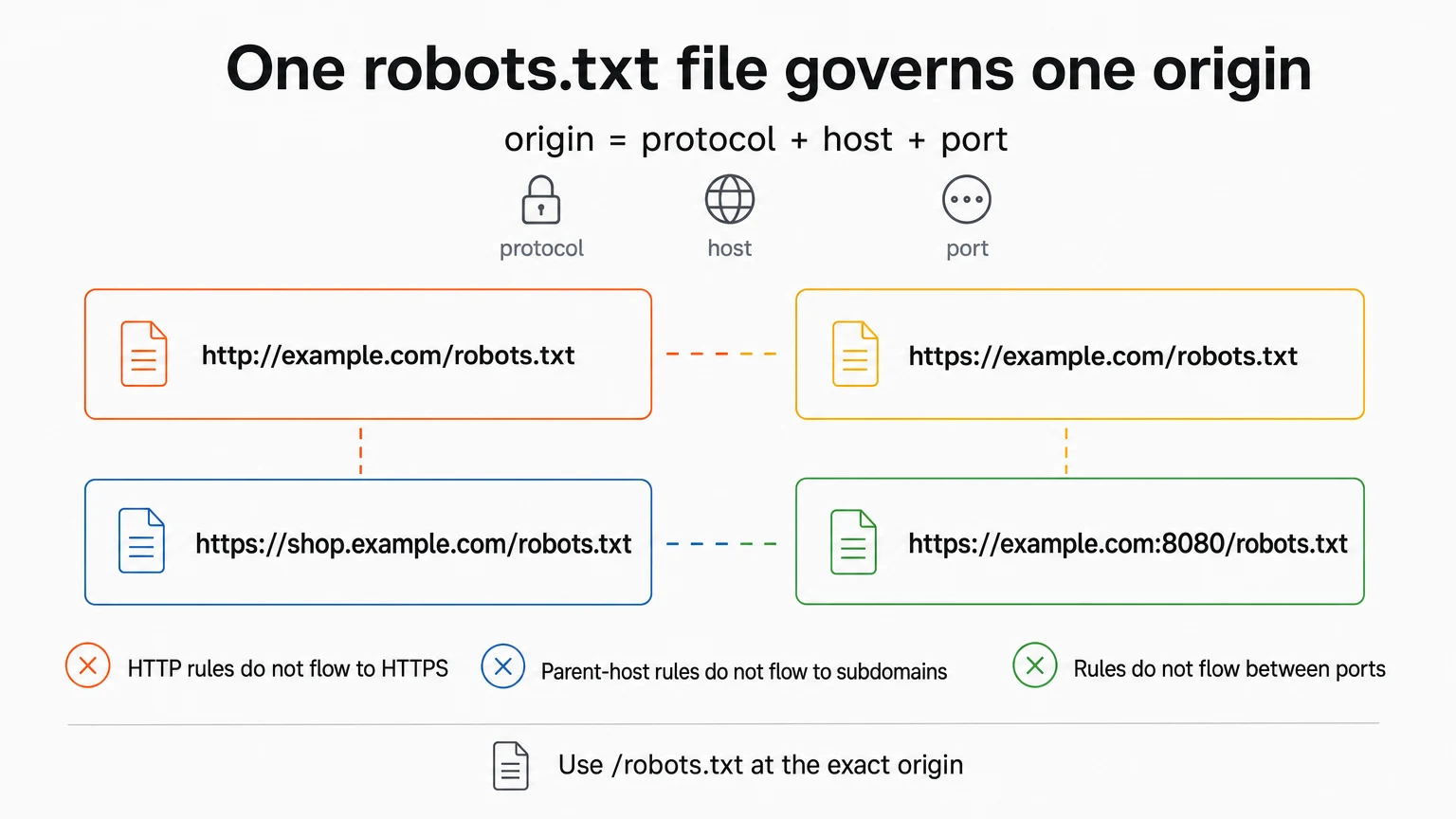
The more subtle rule is scope. A robots.txt file belongs to an origin: the combination of protocol, host, and port from which it is served. Google’s specification states this explicitly. Thus these locations can have separate files and separate rules:
Text
http://example.com/robots.txt
https://example.com/robots.txt
https://shop.example.com/robots.txt
https://example.com:8080/robots.txt
Rules do not flow from HTTP to HTTPS, from a parent domain to a subdomain, or from a standard port to a nonstandard one. This is why finding a robots.txt file is not enough. You have to find the file for the exact URL under examination.
Google’s automated crawlers download and parse robots.txt before crawling a site, subject to documented exceptions for some user-controlled and safety crawlers. For HTTP and HTTPS, Google fetches the file with a non-conditional GET. Crawlers may also cache a fetched file; RFC 9309 says they should not use a cached copy for more than 24 hours unless the file is unreachable. A changed file therefore need not change crawler behavior at once.
Redirects complicate retrieval. RFC 9309 says a crawler should follow at least five consecutive redirects, even across authorities. If it reaches the file within five redirects, it applies the rules in the context of the original authority. Google documents that it follows at least five redirect hops and then, if it still has not reached the file, treats the result as a 404. Google does not follow frame, JavaScript, or meta-refresh redirects for robots.txt.
Status responses matter even more because “no file” and “could not reach the file” are not the same condition. Under RFC 9309:
- An unavailable response, such as an HTTP 4xx response, may lead the crawler to access the service’s resources.
- A server or network failure, represented in the RFC’s HTTP example by a 5xx response, requires the crawler to assume complete disallow.
Google documents its own implementation separately: it treats all 4xx responses except 429 as though no valid robots.txt file existed, meaning no crawl restrictions are assumed. A 404 can therefore open crawling rather than close it.
That is not a full status-code map. The supplied documentation does not establish Google’s exact behavior for 429 or every 5xx variant, so those cases should be checked against current Google documentation rather than inferred from the general 4xx rule.
Parsing failures are not necessarily all-or-nothing either. RFC 9309 requires crawlers to try each line and use the rules they can parse. Google says it ignores invalid lines and uses valid ones, even when a fetched response contains other material. Google also ignores content beyond its 500 KiB parsing limit.
The reveal here is that robots.txt behavior begins before a single Disallow rule is considered. File location, redirects, response status, encoding, parsing, and cache state can determine which rules—if any—a crawler sees.
Syntax and parsing: from lines to crawler rules
Robots.txt syntax is line-oriented. In Google’s documented parser, a valid line consists of a field, a colon, and a value:
Text
Field: valueSpaces around the field and value are ignored, though spacing helps people read the file. Field names are case-insensitive. A # begins a comment, and the rest of that line is ignored.
Rules are organized into groups. A group begins with one or more User-agent lines identifying its intended crawlers, followed by rules for those crawlers. The common fields do different jobs:
User-agentidentifies a crawler product token.Disallownames a root-relative path that should not be crawled.Allownames a root-relative path that may be crawled, often as an exception to a broader block.Sitemapcontains a fully qualified sitemap URL.
For Google, User-agent names are matched without regard to case. Path values are different: they must begin with / and are case-sensitive. So /Private/ and /private/ are not interchangeable in Google’s parser.
Google ignores an Allow or Disallow line that has no path. There is conflicting third-party guidance about empty values, particularly an empty Allow; because the supplied sources do not resolve that conflict across implementations, pathless rules should not be used as portable shorthand. Follow the target crawler’s documentation and state an intended path explicitly.
Path matching starts at the beginning of the URL path. Under RFC 9309, the most specific matching rule is the one with the greatest matching length, measured in octets. If nothing matches, the URL is allowed. If equivalent Allow and Disallow rules conflict, the RFC says Allow should win.
Google, Bing, and other major search engines also document limited wildcard support. In that syntax, * matches zero or more characters and $ marks the end of the URL. But wildcard recognition should not be assumed for every crawler. This is a recurring robots.txt rule: syntax that works in a major implementation is not thereby universal.
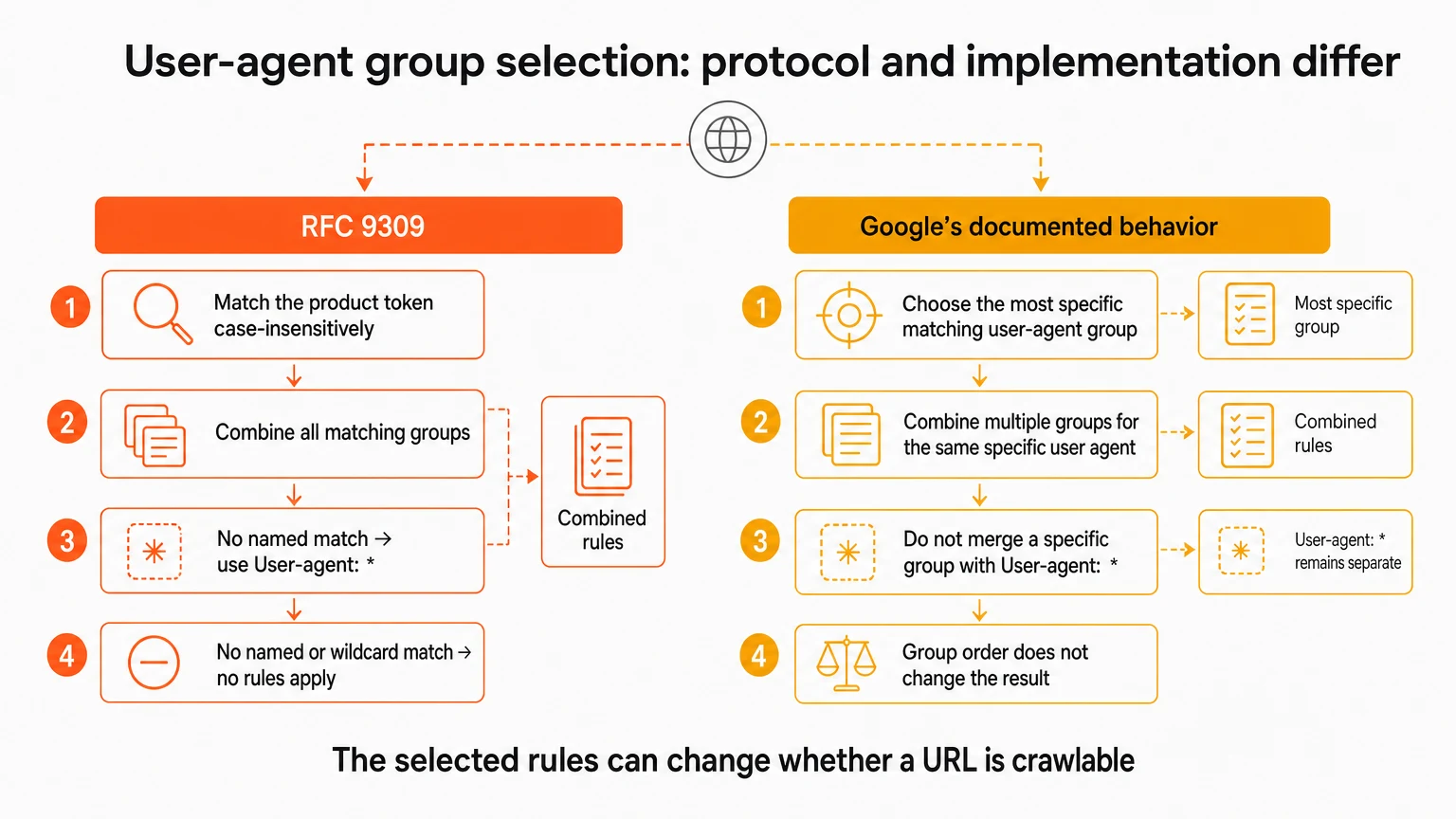
There is also an important split between the formal protocol and Google’s user-agent group selection.
RFC 9309 says a crawler should match its product token case-insensitively and combine all groups that match it. If no named group matches, the User-agent: * group applies. If neither a named nor wildcard group matches, no rules apply.
Google documents a different operational selection rule. Its crawlers choose the most specific matching user-agent group. Multiple groups for the same specific user agent are combined, but a specific group is not merged with the global * group. Group order does not change that result.
This distinction is not a footnote to the syntax. It can change whether a URL is crawlable.
User-agent, Disallow, and Allow: resolving overlapping rules
User-agent: * is the wildcard group: it addresses crawlers for which that group applies. A named group targets a product token such as Googlebot.
Here is the broadest illustrative block:
Text
User-agent: *
Disallow: /
For compliant crawlers that interpret these lines in the usual way, / matches paths across the origin and requests that the whole site not be crawled. It applies only where this file is served—one protocol, host, and port—and it is neither a security barrier nor a guarantee that the URLs will vanish from search.
A path-specific block is narrower:
Text
User-agent: *
Disallow: /private/
In Google’s documented matching behavior, this blocks crawling of paths beginning with /private/ for the applicable wildcard group. Matching is case-sensitive, so it says nothing about /Private/.
A crawler-specific group might look like this:
Text
User-agent: Googlebot
Disallow: /archive/
This asks Googlebot not to crawl the matching path. For Google, this specific group takes precedence over the wildcard group and is not merged with it. Do not assume another crawler makes the same choice merely because it reads the same file; RFC 9309’s formal rule is to combine all matching groups.
Allow becomes useful when a broad blocked area contains a narrower resource that should remain crawlable:
Text
User-agent: Googlebot
Disallow: /private/
Allow: /private/public-guide.html
For Googlebot, the longer, more specific Allow match applies to /private/public-guide.html, while the broader Disallow continues to match other paths under /private/. When Google encounters equally specific conflicting rules, it documents a least-restrictive tie-break, so Allow wins.
The examples are illustrative, not universal templates. They depend on the target crawler’s support for Allow, its group-selection behavior, its path matcher, and its willingness to comply. Some search engines do not recognize every directive, and crawlers can interpret syntax differently.
This is the second useful way to restate the problem: robots.txt does not answer “Is this URL blocked?” in the abstract. It answers “Would this crawler, using this parser, apply this group and this matching rule to this URL at this origin?”
Nonstandard and discovery directives: crawl-delay and Sitemap
Two familiar robots.txt directives sit outside the simple allow-or-disallow model, and they should not be lumped together.
Crawl-delay is a nonstandard, advisory instruction intended to slow requests and reduce server load. It is not part of the formal supported-field set in the Robots Exclusion Protocol. Google does not honor it.
Other crawlers do recognize it, but not under one universal interpretation. The supplied documentation identifies Bing/Bingbot, Yahoo, Yandex, and Swiftbot as supporting it. Yandex documentation describes the value as seconds between visits. Bing is described as treating it as a time window in which Bingbot accesses the site at most once. Swiftbot treats the number as seconds between accesses. Another source describes milliseconds, which shows why a bare Crawl-delay: 10 should never be explained without naming the crawler and its units.
For example, the supplied crawler-specific documentation describes:
Text
User-agent: Yandex
Crawl-delay: 10
as asking Yandex to wait at least ten seconds before another URL request. Separate documentation describes a value of 10 for Bing and Yahoo as a ten-second window with no more than one page fetched in the window. Swiftbot’s own documentation treats Crawl-delay: 5 as five seconds between accesses.
Those are different scheduling models. Since crawl-delay is nonstandard, the target crawler’s current documentation is the rule that matters. Google’s documented alternative is its crawler-specific webmaster control rather than a robots.txt crawl-delay line; the supplied research also identifies webmaster controls for Yandex and Baidu within their respective systems.
And none of this controls an arbitrary bot. A crawler that ignores robots.txt can ignore crawl-delay too.
Sitemap does something else entirely. It provides discovery information rather than a crawl restriction. The directive contains a fully qualified URL:
Text
Sitemap: https://example.com/sitemap.xmlIt is independent of user-agent groups, and a file may contain multiple Sitemap declarations. The Sitemaps protocol also permits a robots.txt file to point to a sitemap on another host under stated cross-host ownership and host-content conditions.
A sitemap declaration says, in effect, “Here is a list of URLs available for discovery.” It does not grant permission that overrides a Disallow, force a crawler to fetch or index the listed URLs, or replace other sitemap-submission methods. Direct submission through a search engine’s interface can provide status and processing-error information that a bare robots.txt declaration does not.
Crawling, indexing, rendering, and page-level controls
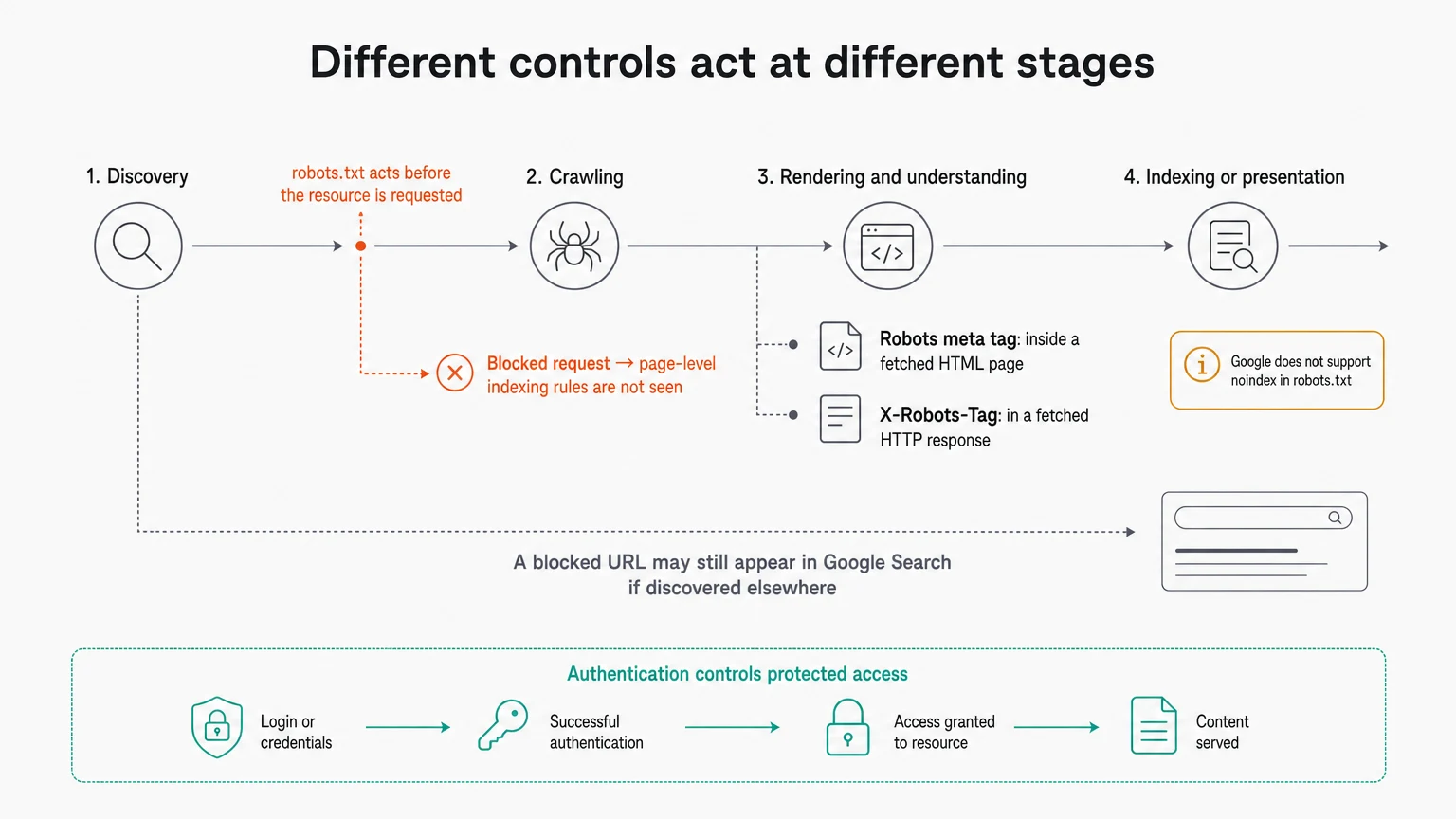
The most costly robots.txt mistakes tend to come from collapsing four separate acts into one:
- discovering a URL;
- crawling, or requesting, it;
- rendering and understanding its content;
- indexing or presenting it in search.
Robots.txt operates before the resource is requested. A robots meta tag operates inside an HTML page after it has been fetched. An X-Robots-Tag operates in an HTTP response header and can also govern non-HTML resources such as PDFs, images, and video.
That order produces a trap. If robots.txt prevents a crawler from fetching a page, the crawler cannot see the page’s meta robots tag or X-Robots-Tag. Google says indexing and serving rules on a robots-blocked URL will not be discovered or applied.
So this combination is self-defeating when the goal is deindexing:
Text
# robots.txt
User-agent: Googlebot
Disallow: /old-page.html
HTML
<meta name="robots" content="noindex">If Googlebot obeys the crawl block, it cannot retrieve the page and see noindex. Google does not support putting a noindex directive in robots.txt. To use page-level noindex, the URL must remain crawlable long enough for Google to read the tag or response header.
A blocked URL may still appear in Google Search if Google discovers it through other links. The result may lack a description because Google did not crawl the blocked content. If the goal is access restriction, password protection serves a different purpose. If the goal is removal or exclusion from Google Search, Google identifies crawlable noindex, password protection, page removal, and its removal process as tools for different circumstances.
Rendering adds another layer. Blocking a page’s required CSS, JavaScript, or API resources can leave Google with a broken or incomplete version of the page. Google typically renders pages for indexing, though rendering is not guaranteed. Resources needed to understand layout and function should therefore remain crawlable when that understanding matters.
Canonical tags belong to yet another category: they signal a preferred version among duplicate or similar pages. The supplied evidence does not establish a specific robots.txt-and-canonical interaction, so canonicalization should not be used to fill gaps in robots.txt reasoning.
The right control follows from the actual aim: robots.txt for crawl guidance; page-level or response-header rules for supported indexing and presentation controls; authentication for protected access. Similar words, different layers.
Examples, testing, and maintenance without false certainty
A useful robots.txt example should say what it assumes. Consider this illustrative file for https://example.com/robots.txt:
Text
# Block a private path for general compliant crawlers
User-agent: *
Disallow: /private/

# Googlebot-specific group; Google does not merge this with the * group
User-agent: Googlebot
Disallow: /archive/
Allow: /archive/public-guide.html

# Discovery, not crawl permission
Sitemap: https://example.com/sitemap.xml
For Google’s documented parser, Googlebot selects its specific group rather than inheriting the wildcard block. Within that group, the narrower Allow exception wins for the named guide. Another crawler may select groups or support Allow differently. And none of these rules governs http://example.com, another subdomain, or another port unless its own applicable robots.txt file says so.
Testing should follow the same chain a crawler follows.
First, inspect the live file at the exact origin’s /robots.txt URL. Confirm that it is publicly reachable and that you are not looking at the file for another protocol, subdomain, or port. Then check the response, redirects, encoding, and actual fetched content—not merely the file in a source repository.
Next, validate the syntax. Check the field-colon-value form, group placement, path casing, leading /, comments, and any wildcard assumptions. A parser can also expose invalid lines that a crawler may ignore while continuing to use the rest of the file.
Then test exact URL and user-agent pairs. Do not test only /private/ and infer the result for every URL beneath it; test the important URLs themselves, including case variants and exception paths. For Google behavior, its robots.txt reporting and URL Inspection workflows can show fetching or parsing issues and whether a specified URL is blocked. Google also publishes an open-source robots.txt parser library, and its specification-test project can compare parser outcomes for supplied file content, URLs, user agents, and expected allow-or-disallow results.
But a robots.txt checker proves only what it actually models. A Google tool tells you about Google’s processing. A parser test tells you how that parser handles the supplied case. Neither proves that every crawler will comply, use the same wildcard syntax, select the same group, or honor Allow. Nor can any checker guarantee that a blocked URL will not appear in search.
Operational failures deserve as much attention as the rules themselves. Disallow: / can accidentally request a sitewide crawl block. A broad wildcard can catch important URLs. Stale paths can keep affecting crawling after a site changes. Blocking CSS, JavaScript, or APIs can impair rendering. Listing a confidential-looking path advertises it publicly without protecting it.
Deployment can change the effective policy too. A missing file may mean no restrictions, while a server or network failure may trigger complete disallow under the RFC. Redirect chains can exceed a crawler’s follow limit. Malformed lines may be skipped while valid lines continue to operate. Cached copies may delay a change.
This suggests a fairly plain maintenance habit: document why each rule exists; inspect and validate the live file after changes; test the exact affected URLs for the relevant user agents; and review crawl reports or server logs where they are available. Revisit rules as the site’s structure changes, but there is no evidence here for one mandatory review schedule.
The final test is conceptual. For every line, ask what promise it really makes. If the answer is “this parser says this compliant crawler should avoid this path on this origin,” robots.txt may be the right tool. If the answer involves secrecy, guaranteed exclusion, or control over every bot, it is not.
Continue Reading
Deep Dive11 min read
What Is Artificial Intelligence Search? A Business Owner's Guide
Artificial intelligence search is the new place customers ask for recommendations. Here's a plain-English guide to what it is, where it happens, and what it means for being found by your customers.
Rosh Jayawardena
Deep Dive9 min read
AI Search Visibility: Why Brands Keep Showing Up
AI search visibility is not just rankings. Learn why some brands get cited in AI answers and how to improve your visibility.
Rosh Jayawardena
Deep Dive9 min read
Answer Engine Optimization: Practical Guide
Answer engine optimization explained simply, with practical steps to improve AI search visibility and earn more citations in answers.
Rosh Jayawardena
Deep dives, delivered weekly
AI patterns, workflow tips, and lessons from the field. No spam, just signal.