
Back to Blogs
How to Choose an AI Visibility Platform for Your Agency
14 min readOct 29, 2026
How To

Rosh JayawardenaData & AI Executive
Seven checks for agencies choosing an AI visibility platform, from client separation and New Zealand location to measurement, reporting and cost.
New Zealand shoppers who use AI are leaning on it to research purchases. PwC New Zealand surveyed 1,000 people who use AI when they shop and found that AI tools are their third most-used way to research a purchase, behind search engines and retailer websites. 44% said AI had cut how much they use search engines when researching purchases (PwC New Zealand, July 2026).
Pew Research Center's US data suggests why clients may see softer search traffic. In a study of 900 US adults, Pew found that when Google showed an AI summary, people clicked a normal search result in 8% of visits, compared with 15% when no summary appeared (Pew Research Center, July 2025). Sooner or later a client asks their agency a simple question: what does ChatGPT say about us?
Answering that once, for one client, takes a spreadsheet. Answering it every month for twenty clients takes a platform. An AI visibility platform asks AI assistants the questions your clients' customers ask, on a schedule, and records which businesses the answers name. Onsomble makes one of these platforms for agencies; the checks below apply to any vendor, including us. This guide sets out seven checks to run on any AI visibility platform before you move your clients onto it, with the evidence behind each one. If the terms are new to you, start with what AI discoverability means.
Key Takeaways
- Judge a platform on how often a client appears across many AI answers, not on a single "AI ranking". ChatGPT and Google's AI features rarely give the same list of brands twice.
- Make sure the platform asks its questions from New Zealand. ChatGPT and Gemini both change their answers with location.
- Recommendations are only useful when each one is tied to a finding and a later scan shows whether it worked.
- Trial the platform on two or three real clients before you move the whole client list.
Before you begin
Have these ready before you contact any vendor. They turn a sales demo into a real test.
- Your client list, with each client's main market: Auckland, Wellington, Christchurch, a regional town, or nationwide.
- Three to five competitors per client. Use the businesses the client loses work to, not the biggest names in the category.
- Ten to twenty questions per client that their customers would ask an AI assistant, such as "best commercial insurance broker in Hamilton" or "who installs heat pumps in Nelson".
- Which AI assistants each client's customers use. Ask the client, and check their website analytics for visits referred by ChatGPT, Perplexity or Copilot.
- Time: about a week for a trial with two or three clients.
If you want a feel for the questions before you start, our AI discoverability self-audit walks through doing it by hand for one business.
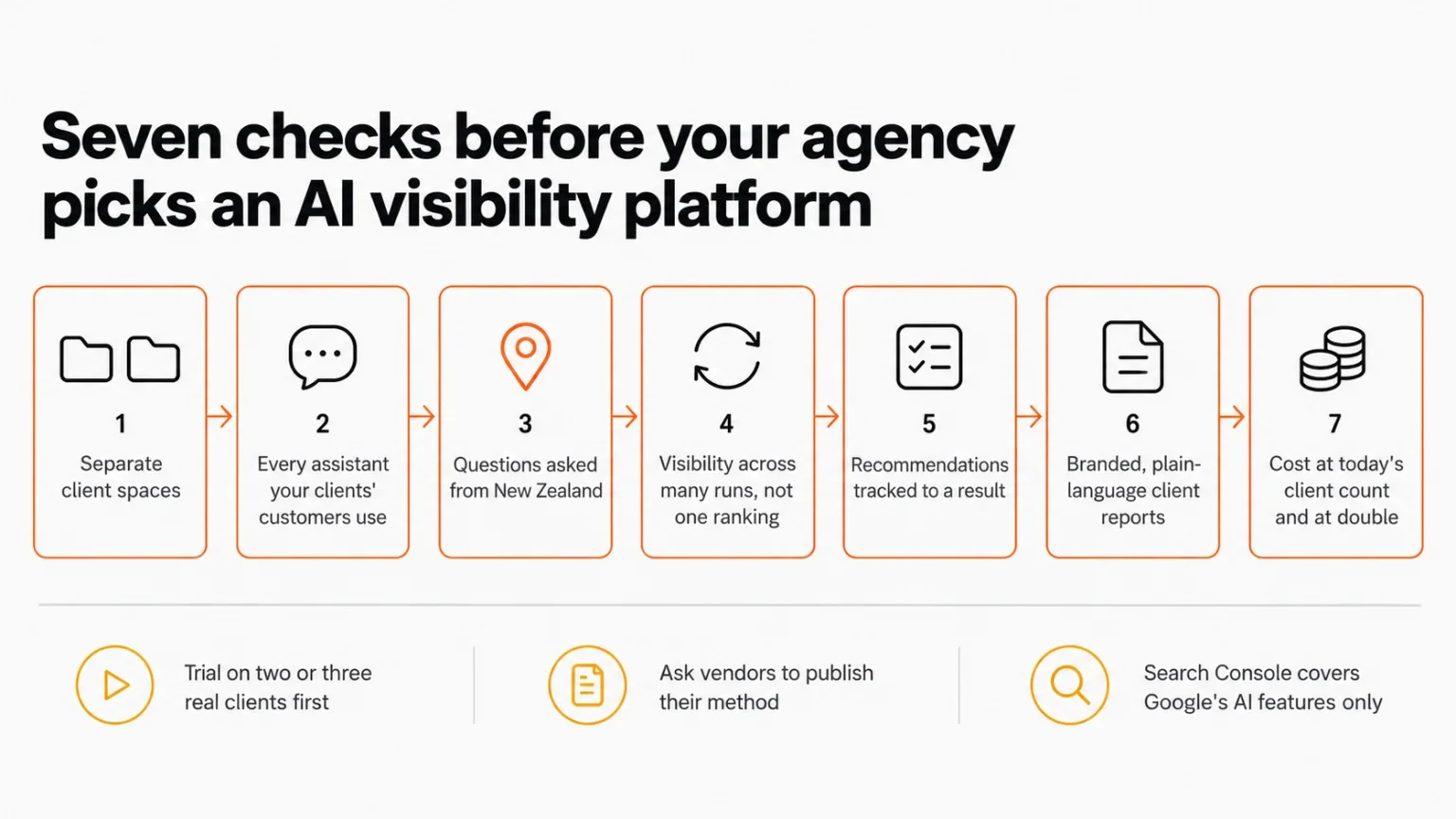
Step 1: Check that every client gets its own space
By the end of this step you'll know whether the platform keeps each client's work apart.
An agency platform holds many brands at once. Each client needs its own sites, competitor set, question list, locations and results. When those live in one shared view, mistakes follow: a competitor list copied to the wrong client, or a report that goes out with another client's numbers in it.
Access matters for the same reason. A team member who works on two accounts shouldn't see the other eighteen.
Test it with two trial clients.
- Set up two clients, ideally in the same industry, so their competitor lists overlap.
- Confirm that each client's questions, competitors and results stay separate.
- Invite a colleague and limit them to one of the two clients.
- Check what adding a third client involves. Adding a client should take minutes, not a new contract.
You've passed this step when neither client can see the other's data, and access can be set person by person.
Step 2: Check which AI assistants it covers
By the end of this step you'll know whether the platform watches the assistants your clients' customers actually use.
Customers don't all use the same assistant. Some use ChatGPT, some see Google's AI Overviews without choosing to, and others use Gemini, Copilot, Perplexity or Claude. A platform that covers only one or two of these shows only part of the picture.
Google now covers part of this for free. Google announced Search Console reports for a site's appearances in AI Overviews, AI Mode and Discover's AI features on 3 June 2026, and finished rolling them out to every website by 31 August 2026 (Google Search Central, June 2026). The reports show impressions, pages, countries, devices and dates. They show no clicks, and nothing from ChatGPT, Claude, Perplexity or Copilot. Use them alongside a platform, not instead of one.
Test it against your client list.
- List the assistants each trial client's customers use.
- Confirm the platform scans every one of them.
- Check that results are reported for each assistant separately, not blended into one number.
You've passed this step when every assistant on your list appears in the platform's results with its own figures.
Step 3: Check that it asks from New Zealand
By the end of this step you'll know whether the platform sees what a New Zealand customer sees.
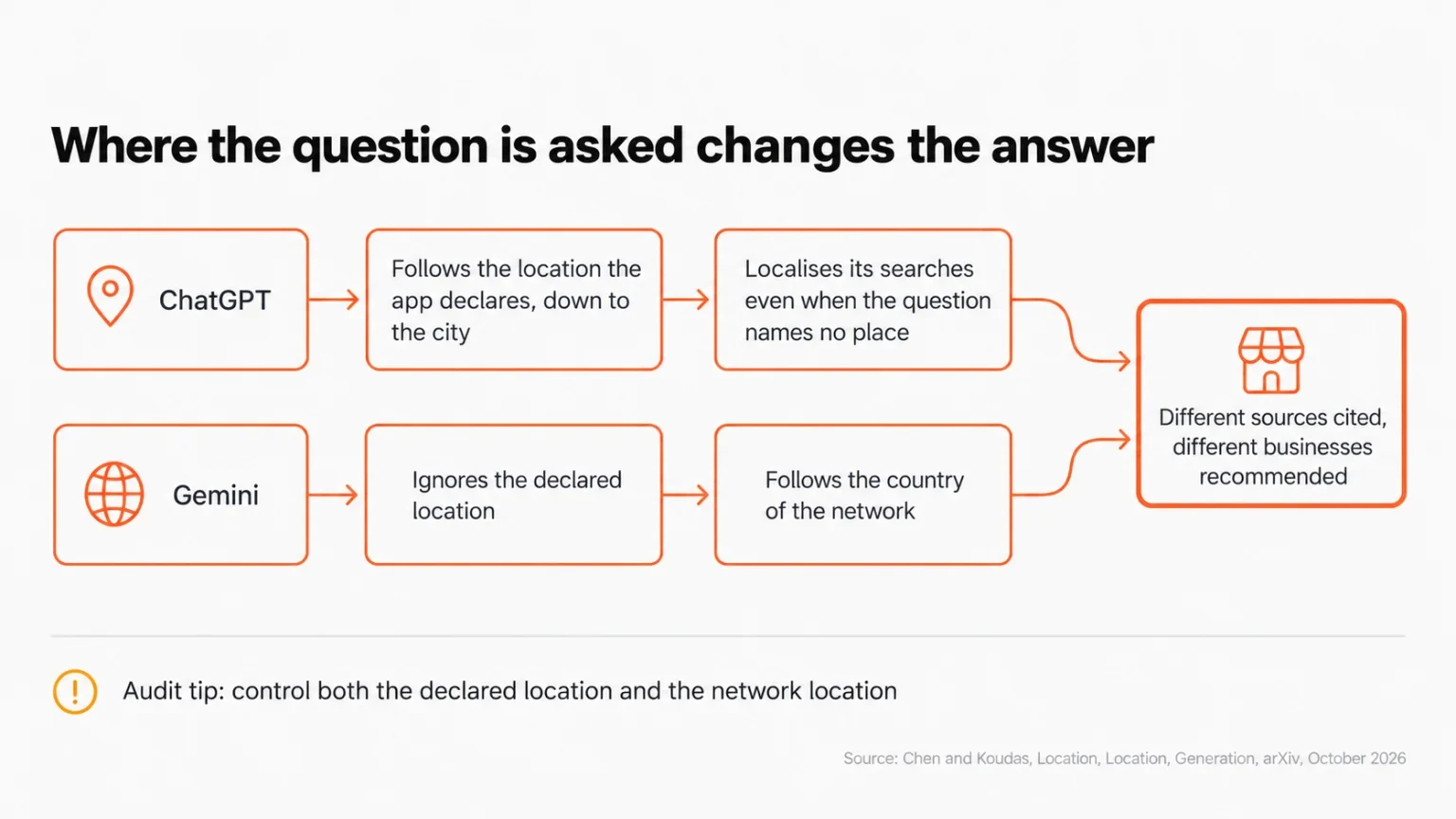
Where a question is asked changes the answer. In a study of 31,200 AI answers published in October 2026, researchers Mahe Chen and Nick Koudas found that ChatGPT follows the location declared by the tool sending the question, down to the city, and localises its searches even when the question names no place. Gemini ignores the declared location and follows the country of the network the question comes from. The sources cited changed with location, and so did the businesses recommended (Chen and Koudas, arXiv, October 2026). The paper is a preprint and hasn't been peer reviewed yet.
For a New Zealand agency, this means a scan that doesn't set a New Zealand location, or that runs from a server in another country, can show a client AI answers that the client's own customers never see. We've written more on why AI answers vary by location and how location affects answer engine optimisation.
Test it with one client.
- Run the same ten questions for one client from two cities, such as Auckland and Christchurch, or from New Zealand and Australia. Use the platform's repeated runs in each place, not a single run, because one run on its own shuffles anyway (see Step 4).
- Compare how often each business appears in each city's answers. A business that shows up in most Auckland answers and few Christchurch ones is a location effect; a one-off difference is not.
- Ask the vendor two direct questions: does the platform set the location at city level, and which country do its requests come from?
You've passed this step when you can choose New Zealand cities per client and the vendor can explain where its questions are asked from.
Step 4: Check how it measures
By the end of this step you'll know whether the platform's numbers will hold up in front of a client.
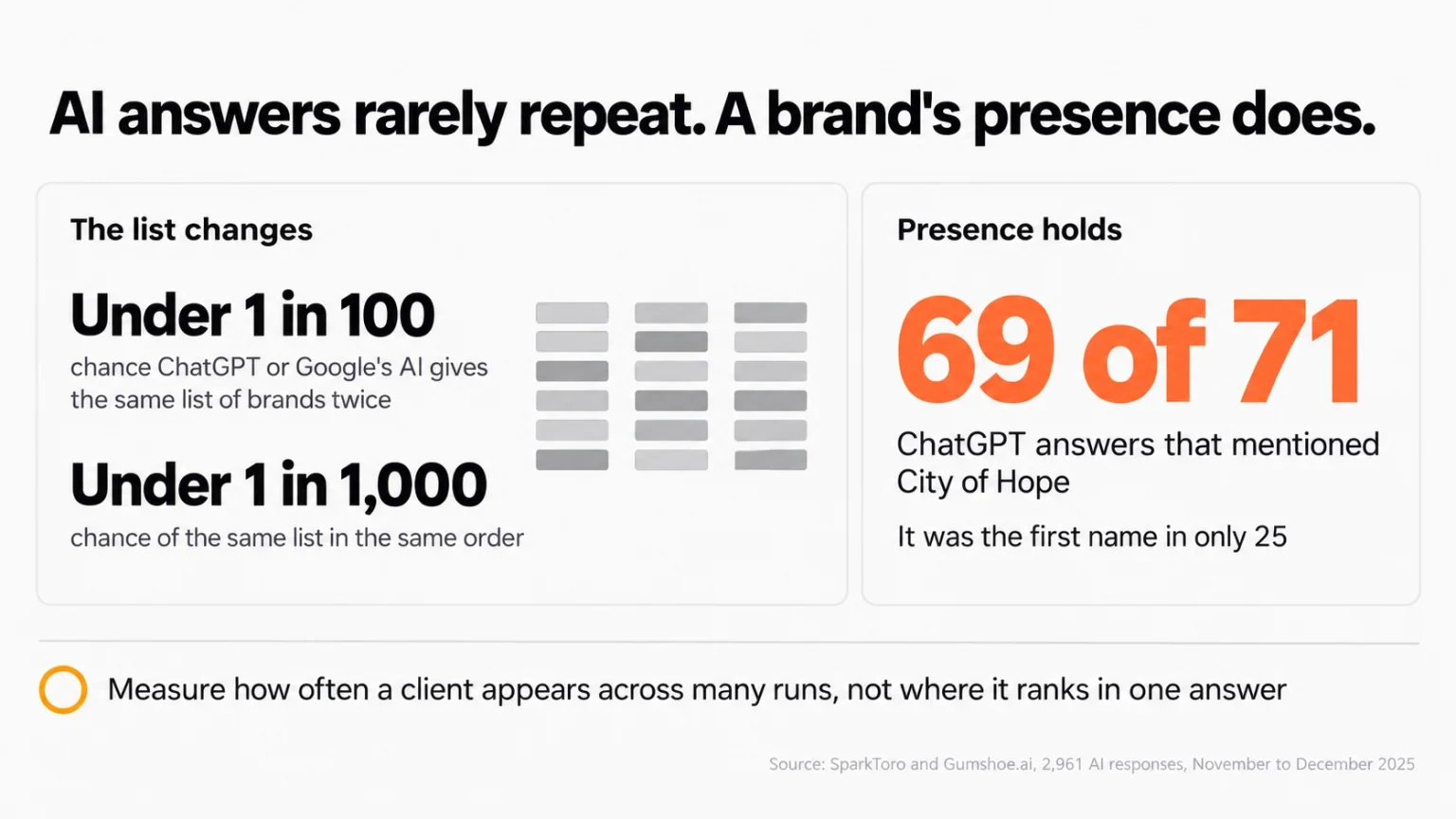
AI answers shuffle. SparkToro and Gumshoe.ai had 600 volunteers run the same prompts through ChatGPT, Claude and Google's AI answers (AI Overviews, or AI Mode when no Overview appeared), collecting 2,961 responses. They found less than a 1-in-100 chance that ChatGPT or Google's AI answers return the same list of brands twice, and less than a 1-in-1,000 chance of the same list in the same order (SparkToro, January 2026).
What held steady was presence. City of Hope appeared in 69 of 71 ChatGPT answers to one prompt, but it was the first name in only 25 of them. The authors' advice is to measure how often a brand appears across many runs (they suggest 60 to 100 runs per question), to treat any "rank in AI" figure with suspicion, and to ask vendors to publish their method. The study wasn't peer reviewed, and one author runs a company that sells AI tracking, so read it as strong field evidence rather than settled science.
Ask the vendor four questions.
- How many times is each question run, and how often? The SparkToro authors suggest 60 to 100 runs per question for a reliable visibility figure.
- Is visibility reported as a share of answers, per assistant?
- Can we compare each client with its competitors on the same questions?
- Is the measurement method written down where we can read it?
You've passed this step when the platform reports visibility as a share of many answers and the vendor can show you how it gets there. Our guide to getting mentioned in ChatGPT shows the same repeat-and-compare approach in practice.
Step 5: Check that recommendations lead somewhere
By the end of this step you'll know whether the platform helps you act, not just report.
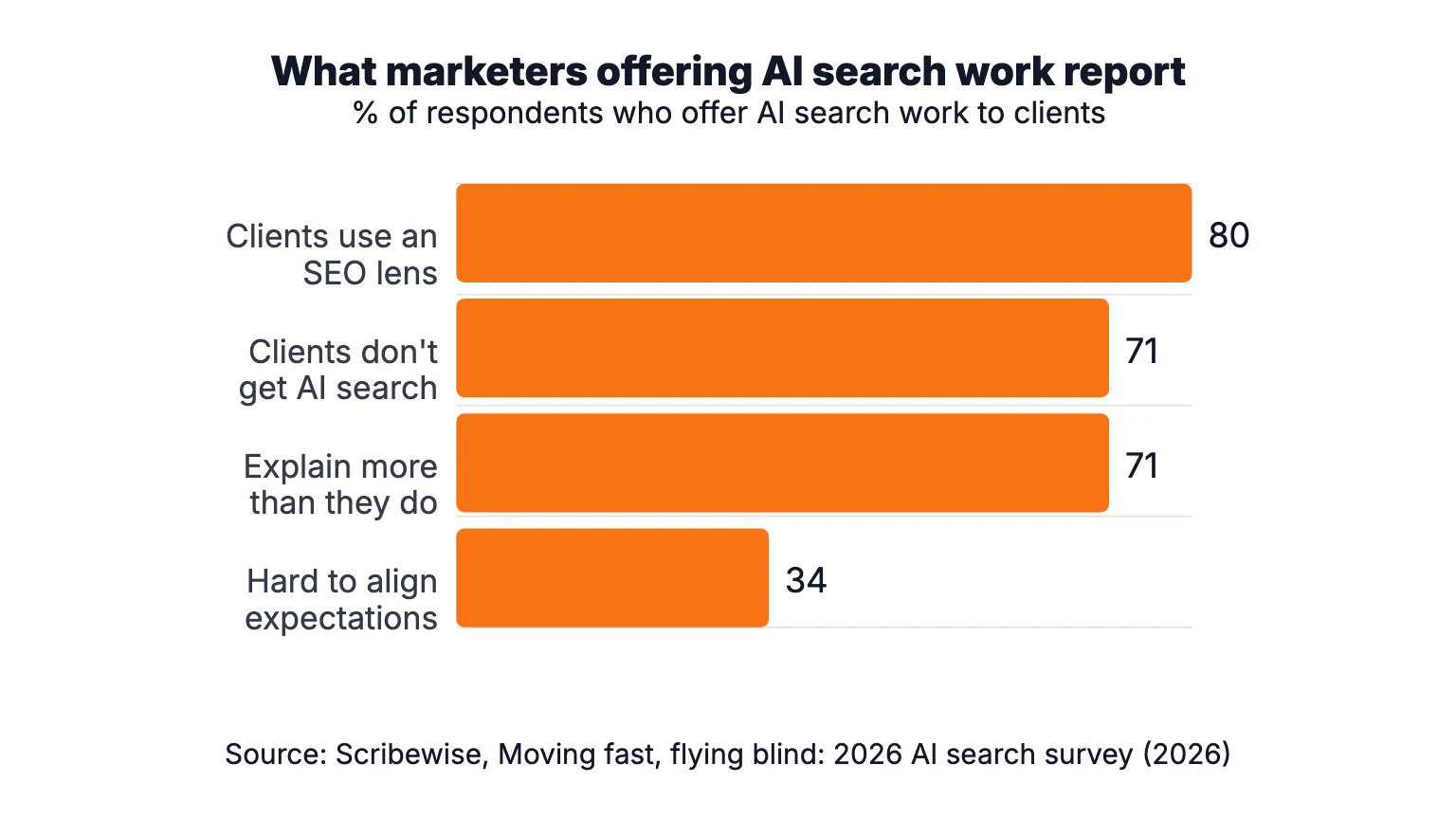
People doing this work say they spend much of their time explaining it. Scribewise surveyed 602 US marketing and PR professionals in May and June 2026 (the survey doesn't publish how respondents were recruited). Among the marketing and PR professionals offering AI search work to clients, 71% said clients don't understand how AI search affects their visibility, and 71% said they spend more time explaining it than doing it. 80% said clients judge search through a traditional SEO lens, and 34% struggle to line up client expectations with measures such as citations or share of voice (Scribewise, retrieved 29 October 2026).
Recommendations that point to a clear finding shorten that conversation. Good ones look like this:
- The client is missing from answers to a question their competitors appear in, and the platform shows which sources those competitors are cited from.
- An answer states something wrong about the client, such as old opening hours or a service they no longer offer.
- Each recommendation has an owner and a status, and a later scan shows whether it made a difference.
Test it with one recommendation. During the trial, act on one recommendation for one client. Then check whether the platform shows the before and after, measured the same way both times.
You've passed this step when you can trace one recommendation from finding to result. For the kind of changes that move Google's answers, see how to get your brand mentioned in AI Overviews.
Step 6: Check the client report
By the end of this step you'll know whether the report will make sense to a business owner.
PwC is already telling New Zealand businesses to report on this. Its advice to New Zealand businesses is to measure how their brand appears across major AI platforms, watch competitor visibility, and begin including AI visibility in performance reporting (PwC New Zealand, July 2026). When a client's board asks how the business shows up in AI answers, the agency's report is where the answer should be.
A good client report has:
- Your agency's branding, so it reads as your advice.
- Plain-language findings, written for a business owner rather than a search specialist.
- A comparison with named competitors on the same questions.
- The recommendations and their status, from Step 5.
- Each measure labelled on its own. Search Console impressions, sampled AI answers and website visits from AI assistants measure different things. Merging them into one "AI score" hides what changed.
Test it with a friendly client. Send one trial report and ask what they would do after reading it.
You've passed this step when the client can tell you, in their own words, what the report says and what happens next.
Step 7: Check what it costs as your client list grows
By the end of this step you'll know what the platform costs at the size you plan to be, not just the size you are.
Pricing models vary. Some platforms charge per client or per brand, some per team seat, and some by usage, such as the number of questions run each month. The same platform can be good value at five clients and expensive at thirty. Usage also grows with the checks above: more assistants, more locations and more runs per question all mean more questions asked.
Work it out on paper.
- Price the platform at your current client count.
- Price it again at double, with the team seats and locations you'd need.
- Check whether adding a client changes the price, or only the usage.
You've passed this step when you know the monthly cost at today's client count and at double, with no surprises in either.
Questions to ask every vendor
| Check | Question to ask | A good answer |
|---|---|---|
| Client spaces | Can each client's data and team access be kept separate? | Yes, per client and per person |
| Assistants | Which assistants do you scan, and are they reported separately? | All the major ones, each with its own figures |
| Location | Can we set New Zealand cities per client? Where are questions asked from? | City-level locations and a clear answer on the network country |
| Measurement | How many runs per question, and is the method published? | Visibility as a share of many runs (SparkToro suggests 60 to 100 per question), with a written method |
| Recommendations | Is each recommendation tied to a finding and tracked to a result? | Yes, with a before and after from later scans |
| Reporting | Can reports carry our branding and label each measure? | Yes, shareable by link or PDF |
| Cost | What does it cost at double our client count? | A clear figure, with no per-client surprises |
Common mistakes to avoid
Choosing on "AI ranking" screenshots. Rankings in AI answers shuffle from one run to the next, so a single screenshot proves little. Ask for visibility across many runs instead.
Scanning from the wrong country. A tool that asks its questions from overseas can miss what New Zealand customers see. Confirm the location for every client before you trust the numbers.
Treating Search Console as the whole picture. Its AI reports cover Google's own features and show impressions without clicks, so they can't tell you what ChatGPT or Perplexity say about a client.
Moving every client at once. Problems with set-up, measurement or reporting are cheaper to find on two clients than on twenty. Trial first, then move the rest.
What success looks like
After a week-long trial you should have:
- Two or three clients set up with their own questions, competitors and New Zealand locations.
- Visibility figures for each assistant, measured across many runs.
- One recommendation acted on, with the next scan showing whether it worked.
- One client report sent, read and understood.
From there, moving the rest of your client list is a matter of repeating the set-up. If you want to brush up on the vocabulary first, our glossary of AEO, GEO and related terms explains each one, and our study of 850,000 sites shows how local businesses are faring in AI answers.
Try it on your own clients
Onsomble is built for agencies that look after many clients: separate client spaces, ChatGPT, Gemini, Google AI Overviews and AI Mode, Copilot, Perplexity and Claude, scans by country and city, recommendations tied to findings, and branded client reports. Run the seven checks above on your own clients with a 30-day free trial, no card needed.
Sources
- PwC New Zealand, "The AI-powered consumer: How shopping behaviour is changing in New Zealand", 21 July 2026. Survey of 1,000 New Zealand consumers who use AI when shopping. https://www.pwc.co.nz/insights-and-publications/2026-publications/the-ai-powered-consumer-how-shopping-behaviour-is-changing-in-nz.html
- Pew Research Center, "Google users are less likely to click on links when an AI summary appears in the results", 22 July 2025. Browsing data from 900 US adults, March 2025. https://www.pewresearch.org/short-reads/2025/07/22/google-users-are-less-likely-to-click-on-links-when-an-ai-summary-appears-in-the-results/
- Google Search Central, "Introducing Search Generative AI performance reports in Search Console", 3 June 2026. https://developers.google.com/search/blog/2026/06/gen-ai-performance-reports
- Mahe Chen and Nick Koudas, "Location, Location, Generation: Where You Ask Matters for Generative Engine Optimization", arXiv preprint 2610.24081, 16 October 2026. https://arxiv.org/abs/2610.24081
- Rand Fishkin (SparkToro) and Patrick O'Donnell (Gumshoe.ai), "AIs are highly inconsistent when recommending brands or products", 28 January 2026. 2,961 responses, November to December 2025. https://sparktoro.com/blog/new-research-ais-are-highly-inconsistent-when-recommending-brands-or-products-marketers-should-take-care-when-tracking-ai-visibility/
- Scribewise, "Moving fast, flying blind: 2026 AI search survey". 602 US marketing and PR professionals, fielded 19 May to 2 June 2026. Retrieved 29 October 2026. https://scribewise.com/ai-search-survey-2026/
Continue Reading
How To13 min read
How NZ Agencies Get Local Clients Cited in AI Answers
A six-step workflow for New Zealand agencies: find which sources AI cites for a local client, sort them, and turn the gaps into recommendations.
Rosh Jayawardena
How To13 min read
How to Get Your Brand Mentioned in Google AI Overviews
Getting a brand mentioned in Google AI Overviews requires indexed, useful pages, credible supporting evidence, carefully chosen queries, and repeated testing that separates mentions, citations, recommendations, and owned-source appearances.
Rosh Jayawardena
How To15 min read
How to Get Your Brand Mentioned in Google Gemini
Google Gemini brand mentions are variable, context-dependent outputs, not permanent rankings. Brands improve accurate discoverability by clarifying identity, maintaining accessible facts, publishing useful evidence, earning legitimate corroboration, and testing defined prompts across named Gemini surfaces.
Rosh Jayawardena