
Back to Blogs
Is Your Website Blocking ChatGPT, Claude, and Perplexity?
11 min readMay 6, 2026
How To

Rosh JayawardenaData & AI Executive
Most robots.txt guides for AI crawlers are written for publishers who want to block the bots. This is the opposite: how to check if your site is accidentally invisible to ChatGPT, Claude and Perplexity — and the exact lines to paste to fix it.
Is your website blocking ChatGPT, Claude, and Perplexity? How to check robots.txt and fix it
Almost every article about robots.txt and AI crawlers is written from the wrong angle for most businesses.
They're written for publishers who want to keep AI bots out. Block GPTBot. Fence off ClaudeBot. Protect the ad impressions. That's a real use case — but it isn't the one most small businesses and marketing agencies have.
The job most readers of this post actually have is the opposite. They want to show up when someone asks ChatGPT "who does commercial plumbing in Christchurch" or when a buyer types their category into Perplexity. They want to be read by AI, not hidden from it. And yet — I've watched this conversation play out more times than I can count — their own robots.txt file is quietly blocking the bots that would put them into those answers.
A single line in a small text file decides whether the three most-used AI answer engines in the world can read your business. Most marketing managers have never opened that file. Most agencies haven't checked it for their clients.
This is the piece I wish existed the first time I had to diagnose one. A 60-second check, a clean list of the bots that matter in 2026, three copy-paste robots.txt AI crawlers configs you can deploy today, and the single biggest trap that catches people even after they paste the right file. If you're still getting your head around the broader picture, it's worth a detour through our piece on what answer engine optimisation actually is before you dive in.
What robots.txt actually does (and doesn't) for AI crawlers
Robots.txt is a polite sign, not a locked door. The reputable AI crawlers — OpenAI, Anthropic, Google, Perplexity, Apple — all respect it. The less reputable ones, Bytespider being the usual example, sometimes don't. For the answer engines your customers actually use, though, the file is the control plane.
The part most articles get wrong is that "blocking AI" isn't a single switch. Each company runs multiple bots, each doing a different job, and they don't share permissions.
OpenAI runs three: GPTBot (training), OAI-SearchBot (the crawler that builds ChatGPT's search index), and ChatGPT-User (the real-time fetch when a user asks ChatGPT to visit a page). Anthropic mirrors that with ClaudeBot, Claude-SearchBot, and Claude-User. Perplexity has PerplexityBot and Perplexity-User.
Here's the distinction that decides most of this: if you block GPTBot, you're opting out of OpenAI training on your content. You are not blocking ChatGPT from citing you. That job belongs to OAI-SearchBot. Most guides treat the two as interchangeable — including the first couple I read when I started on this. They aren't the same, and getting it right is the difference between "accidentally invisible" and "actually in the answers."
Before you touch anything, you need to know what your file currently says.
The 60-second check: is your site blocking AI crawlers right now?
The diagnosis takes a minute. Do it first. The fix is useless if you don't know what you're fixing.
Method one, no tools. Type your domain into a browser, add /robots.txt on the end, hit enter. So: https://yourdomain.com/robots.txt. You'll see a short text file. Scan it for lines that look like this:
User-agent: GPTBot
Disallow: /
If you see that pattern under any of the bot names in the cheat sheet below, you're blocking that bot. Also check the very top of the file for User-agent: * followed by Disallow: /. That's the nuclear option — it blocks everything — and about one in every fifteen small-business sites I check has it there by accident, usually left over from a staging environment that went live.
Method two, one level deeper. Open a terminal and run one command:
curl -A "GPTBot" -I https://yourdomain.com/
The -A flag tells curl to pretend to be GPTBot. The -I flag asks only for the response headers. You want a 200 status back. If you get a 403, something is blocking the bot — and the "something" might not be robots.txt, which we'll get to in a moment.
Method three, if neither of the above is your thing. Free checkers will do it for you. AEOTester's AI Robots.txt Checker and MRS Digital's AI Crawler Access Checker are both fine. Use them if you prefer. The two methods above are faster and more honest about what's actually happening.
Once you can see what's in the file, you need a map of who the bots actually are.
The 2026 AI crawler cheat sheet
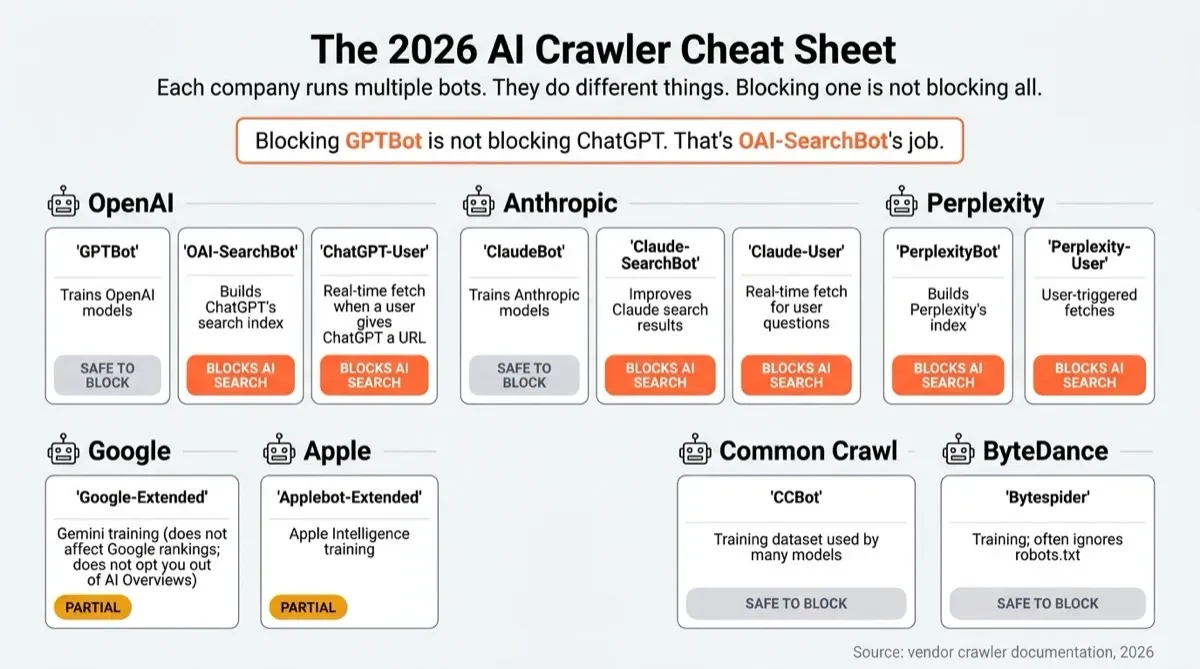
Most reference lists you'll find online are at least one bot behind, and many still include crawlers Anthropic officially retired. Here's the current picture as of early 2026.
| Bot | Operator | Purpose | Affects AI search visibility? |
|---|---|---|---|
GPTBot |
OpenAI | Trains OpenAI models | No |
OAI-SearchBot |
OpenAI | Builds ChatGPT's search index | Yes |
ChatGPT-User |
OpenAI | Real-time fetch when a user gives ChatGPT a URL | Yes |
ClaudeBot |
Anthropic | Trains Anthropic models | No |
Claude-SearchBot |
Anthropic | Improves Claude search results | Yes |
Claude-User |
Anthropic | Real-time fetch for user questions | Yes |
PerplexityBot |
Perplexity | Builds Perplexity's index | Yes |
Perplexity-User |
Perplexity | User-triggered fetches | Yes |
Google-Extended |
Gemini training | Partial (see below) | |
Applebot-Extended |
Apple | Apple Intelligence training | Partial |
CCBot |
Common Crawl | Dataset used by many models | No |
Bytespider |
ByteDance | Training; often ignores robots.txt | No |
Two things in this table catch most people out.
First: Claude-Web and anthropic-ai are deprecated. You'll find them in almost every robots.txt tutorial published before 2025. Anthropic retired both. You don't need them in your file any more — ClaudeBot, Claude-SearchBot, and Claude-User are the current names. If your existing robots.txt references the old names, it isn't broken, it's just obsolete.
Second: Google-Extended is a trap if you misread what it does. Google built it as an opt-out for Gemini training, and Google confirmed publicly in September 2023 that blocking it has zero effect on your organic Google Search rankings. That part is true. What's less advertised is that Google-Extended does not opt you out of AI Overviews. Nieman Lab reported on this in May 2025: AI Overviews source content from the regular Googlebot index, not the Google-Extended crawl. If you block Google-Extended thinking you're opting out of Google's AI products entirely, you haven't actually done that.
Now you know who the bots are. Pick a stance.
Pick a stance, then pick a robots.txt
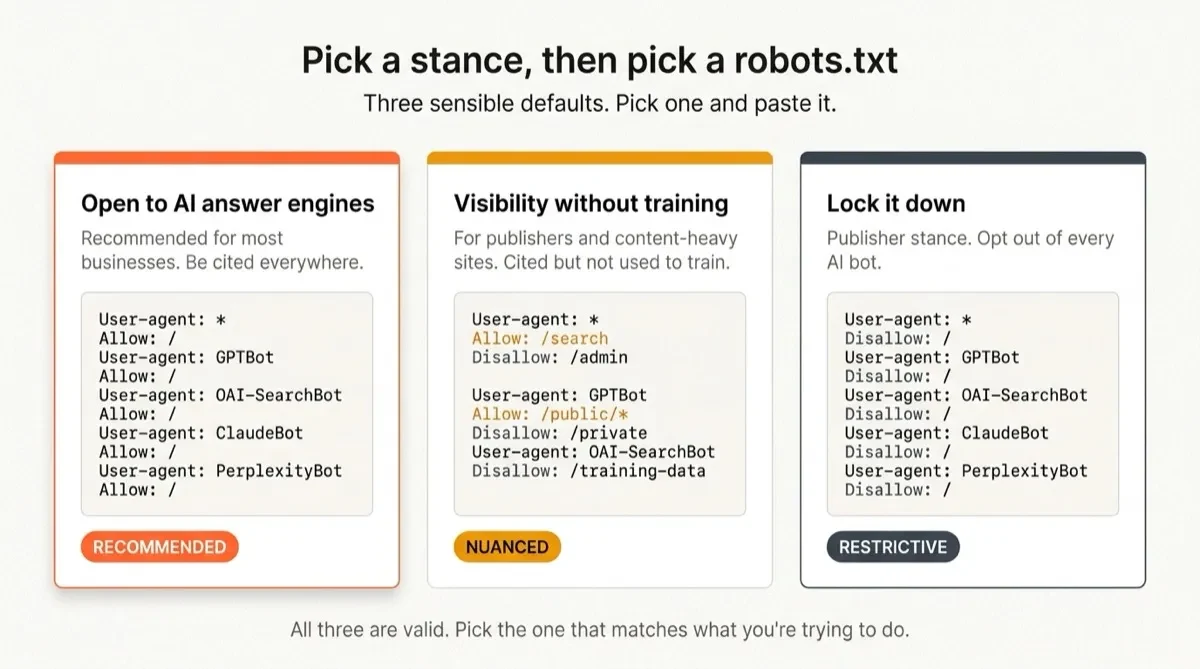
There are three sensible stances for a business site. Pick the one that matches what you're trying to do, paste the block, commit.
Stance 1: Open to AI answer engines (recommended for most businesses)
You want to be cited. You don't mind if your public marketing pages contribute to training. You want the simplest possible file, and you want it to keep working even as new bots appear through 2026.
User-agent: GPTBot
Allow: /

User-agent: OAI-SearchBot
Allow: /

User-agent: ChatGPT-User
Allow: /

User-agent: ClaudeBot
Allow: /

User-agent: Claude-SearchBot
Allow: /

User-agent: Claude-User
Allow: /

User-agent: PerplexityBot
Allow: /

User-agent: Perplexity-User
Allow: /

User-agent: *
Allow: /
This is the block most small businesses and agency clients should paste. It's explicit, it's boring, it's hard to misread — and "boring and hard to misread" is what you want in the file that decides your AI visibility.
Stance 2: Visibility without training
You want to appear in ChatGPT, Claude and Perplexity answers, but you don't want your content used to train the underlying models. This is a coherent position for content-heavy sites — publishers, consultancies, anyone whose writing is the product.
User-agent: OAI-SearchBot
Allow: /

User-agent: ChatGPT-User
Allow: /

User-agent: Claude-SearchBot
Allow: /

User-agent: Claude-User
Allow: /

User-agent: PerplexityBot
Allow: /

User-agent: Perplexity-User
Allow: /

User-agent: GPTBot
Disallow: /

User-agent: ClaudeBot
Disallow: /

User-agent: Google-Extended
Disallow: /

User-agent: Applebot-Extended
Disallow: /

User-agent: CCBot
Disallow: /
It's a more nuanced file. Agencies running this for clients should document the reasoning somewhere visible — either in a comment block at the top of the file or in the client's content playbook — so nobody later "cleans it up" and breaks the logic.
Stance 3: Lock it down
You disallow every AI bot. This is the publisher stance — protect ad impressions, protect IP, opt out of the whole conversation. It's coherent for specific businesses. It's not what most readers of this post should pick, so I'm not going to spend the paragraphs on it.
Stance 1 is the right starting point for almost every business I've worked with. Paste it, commit, deploy. Then keep reading — because robots.txt is only half of what decides whether the bot actually reaches your content.
The Cloudflare trap (the one almost nobody warns you about)
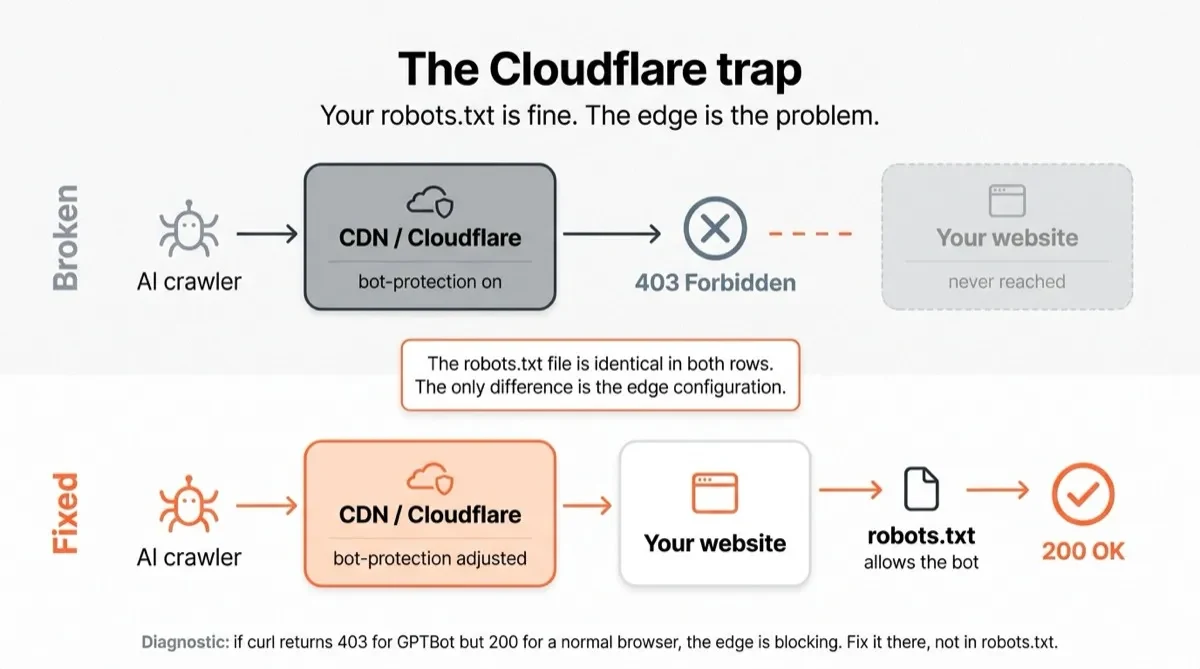
Here's where I've seen more wasted time than anywhere else in this process.
You've checked the file. You've pasted Stance 1. You've deployed. You run the curl command from earlier — curl -A "GPTBot" -I https://yourdomain.com/ — and you get a 403. But your robots.txt clearly allows GPTBot. What's going on?
What's going on is Cloudflare. Or your WAF. Or Fastly. The edge.
Most modern sites sit behind a CDN with bot-protection features turned on. Cloudflare's Super Bot Fight Mode is the most common culprit, and on several plan tiers it ships with "block AI scrapers and crawlers" as a default-on option. The way it works: a request comes in with user-agent GPTBot, the edge recognises it as an AI crawler, and returns a 403 before the request ever reaches your origin. Your robots.txt is still saying "come in." The bot never gets close enough to see it.
The fix depends on your edge. In Cloudflare, the setting lives in Security → Bots. Turn off "Block AI Scrapers and Crawlers" if it's enabled. If you're running a WAF rule that filters by user-agent, find it and exempt the bots you want to allow. On Fastly or another CDN, the equivalent setting is in the security policy for the site.
This is the gap almost every robots.txt tutorial skips. The file looks perfect, the stance is right, and the bot still can't read you — because you're fighting the wrong layer.
One check catches it cleanly: if your curl test returns 403 with GPTBot but 200 with a normal browser user-agent, the edge is blocking you. Fix it there, not in the file. And once the bot does reach your pages, what it finds matters just as much as whether it arrived — we covered that side of it in why HTML still beats Markdown for AI crawler visibility.
Four other mistakes that make the fix useless
With the edge covered, here are the four smaller traps worth knowing about.
Wildcards that undo your allows. If the top of your file has User-agent: * followed by Disallow: /, every specific Allow: line below it is fighting an uphill battle. Different crawlers resolve conflicts in different ways and you can't rely on any single precedence rule working everywhere. The fix: make sure any blanket Disallow lives under a specific user-agent, not under the wildcard.
Off-by-one paths. Disallow: / and Disallow: /blog are one character apart and entirely different outcomes. Read twice, deploy once.
Case sensitivity in the wrong place. Robots.txt treats user-agent names as case-insensitive — GPTBot and gptbot both match. Paths are case-sensitive. /Blog/ and /blog/ are different to a crawler. If your site has mixed-case URLs, account for both.
Cache that won't die. You edited robots.txt in the CMS and confirmed the change in the admin. But the CDN is still serving last week's version to crawlers. After deploying, purge the CDN cache for /robots.txt specifically, then re-fetch in an incognito tab to confirm.
None of these are exotic. All of them I've seen in the wild, several of them more than once.
How to verify the fix actually worked
Four checks. Run them in order.
- Open an incognito tab and visit
https://yourdomain.com/robots.txt. Confirm the lines you pasted are actually there, are rendered as plain text (not HTML-escaped — yes, some CMSes do this), and don't have strange prefixed whitespace. curl -A "GPTBot" -I https://yourdomain.com/— expect a200.curl -A "PerplexityBot" -I https://yourdomain.com/— expect a200.- Run both of those commands against your homepage, one product or service page, and one blog post. Crawlers don't only fetch the root. If you have per-path rules or URL-based WAF policies, a single-page check isn't enough.
One patience note: even once the fix is in and verified, AI crawlers re-cache on cycles of 24 hours to a week. Citation visibility shifts slowly. Don't expect ChatGPT to cite you tomorrow just because you fixed the file today. It's a necessary condition for AI visibility, not a sufficient one.
You've opened the door. Now what?
Robots.txt is the gate. It isn't the building.
Opening the gate is necessary — if your file is blocking the bots, nothing else you do for AI visibility matters, because the crawlers never arrive to read any of it. But opening it doesn't guarantee anyone walks through. What the bot finds once it gets to your page matters just as much: your HTML structure, your internal linking, your headings, whether the content is actually worth citing.
The useful next step, once your robots.txt is sorted, is to run a quick diagnosis on what the bots actually see when they do get in. Our 10-minute AI visibility self-audit walks you through the prompts to run, what the answers mean, and where the gaps are. And if you're ready for the broader playbook, how to get cited by ChatGPT for your business sits around all of this.
If you want to see what ChatGPT and Perplexity currently say about your business without running any checks yourself, we run free scans at onsomble.com.
A text file shouldn't be the thing deciding whether your business exists in AI search. But right now, it is. Go look at yours.
Continue Reading
How To13 min read
How to Get Your Brand Mentioned in Google AI Overviews
Getting a brand mentioned in Google AI Overviews requires indexed, useful pages, credible supporting evidence, carefully chosen queries, and repeated testing that separates mentions, citations, recommendations, and owned-source appearances.
Rosh Jayawardena
How To15 min read
How to Get Your Brand Mentioned in Google Gemini
Google Gemini brand mentions are variable, context-dependent outputs, not permanent rankings. Brands improve accurate discoverability by clarifying identity, maintaining accessible facts, publishing useful evidence, earning legitimate corroboration, and testing defined prompts across named Gemini surfaces.
Rosh Jayawardena
How To16 min read
Get Your Brand Mentioned in ChatGPT: An Evidence-Led Process
Getting a brand mentioned in ChatGPT requires crawlable, clear information, relevant independent evidence, and repeated testing across realistic prompts; these actions can improve discoverability and accuracy but cannot guarantee a mention, citation, or recommendation.
Rosh Jayawardena
Deep dives, delivered weekly
AI patterns, workflow tips, and lessons from the field. No spam, just signal.