You uploaded a 40-page contract to an AI tool last week. Asked it “what are the penalty clauses?” and it pulled the exact sections, cited page numbers, and summarised the terms in plain English. Useful. Then you tried a different AI tool with the same document, same question. It gave you a confident, well-structured answer citing clauses that don’t exist in the contract.
Same document. Same question. Completely different results.
The difference wasn’t the AI model. It was how each tool connected the model to your document, and whether it actually read the thing at all. That connection layer is what this module is about.
In Module 3, we established that LLMs predict text based on statistical patterns in their training data. They don’t actually “know” anything. That limitation is the starting point for everything in this module. RAG, agents, and tool use are all ways of giving AI access to information and capabilities beyond its training data. They’re what turn a clever text predictor into something you can put to work.
The problem RAG solves
Back to that contract. When you asked the first AI tool about penalty clauses, something specific happened: the tool found the relevant sections of your contract, pulled them into the model’s context window, and the model generated its answer based on your actual text. When you asked the second tool, it had no access to your document at all. It generated the most plausible-sounding answer about penalty clauses based on patterns from its training data. Contracts it had seen during training. Not your contract.
This is the hallucination problem applied to your specific documents. In Module 3, we covered how LLMs generate text by predicting what comes next. When you ask about a specific document the model hasn’t seen, it doesn’t say “I don’t have access to that.” It generates whatever continuation sounds most plausible. For something like contract law, where the language follows predictable patterns, the output sounds convincing. That’s what makes it worth understanding.
We wrote about why this happens in The Real Reason AI Invents Facts (And How to Make It Stop). The short version: the model isn’t lying. It’s doing exactly what it was trained to do, predicting statistically likely text. It just has no way to distinguish between “likely true based on patterns” and “actually true about this specific document.”
RAG fixes this by changing what the model can see.
Key Term: RAG (Retrieval-Augmented Generation) — A pattern that grounds AI responses in specific source material rather than relying on the model’s training data. When you upload a PDF to ChatGPT or ask NotebookLM about your documents, you’re using RAG. See the Glossary for details.
Instead of asking the model to answer from memory, RAG retrieves the relevant parts of your documents and puts them in the context window alongside your question. The model generates its answer based on what it can actually see, not what it vaguely “remembers” from training.
86% of enterprises now augment their LLMs with RAG frameworks (Menlo Ventures, 2025 State of GenAI report). It’s the most widely adopted AI pattern beyond basic chat. For any task involving your specific data, documents, or knowledge base, RAG is what makes AI output trustworthy rather than just plausible.
RAG isn’t the only approach. Fine-tuning changes the model itself (useful when you want consistent behaviour shifts, like matching your company’s writing style). Long-context windows let you paste entire documents directly into the prompt (works for small document sets, but costs roughly 100x more at scale and quality degrades when documents get long, an effect researchers call “Lost in the Middle”). We covered these trade-offs in detail in RAG vs Fine-Tuning: A Decision Framework for Real Projects and RAG vs Long-Context LLMs: The Decision Framework That Actually Helps You Choose. In practice, RAG works best for frequently changing documents you need to search across. Fine-tuning is better for behaviour. Long context suits small document sets where you want the model to see everything.
How RAG works: the pipeline
When you upload a PDF to Claude or ChatGPT and ask a question, what’s actually happening? From your side, it looks simple: upload, ask, receive answer. Behind the scenes, there’s a three-step pipeline doing the work.
Step 1: Chunk. Your document gets split into pieces, typically 500-1,000 words each. Think of it like creating an index for a textbook. But instead of page numbers, each chunk gets a mathematical fingerprint called an embedding: a long string of numbers that captures the meaning of that chunk. “The vendor shall pay a penalty of 5% per day for late delivery” and “What are the late delivery penalties?” would get similar fingerprints because they’re about the same thing, even though they use different words.
Step 2: Retrieve. When you ask a question, the system converts your question into the same mathematical format and searches for the chunks with the closest matching fingerprints. This is semantic search: finding content by meaning rather than by matching exact keywords.
Step 3: Generate. The relevant chunks get placed into the context window alongside your question, and the LLM generates a response grounded in your actual content. The model can now answer based on what it sees, not what it remembers.
Key Term: Embedding — A numerical representation of text that captures its meaning. Similar content gets similar numbers, which is how RAG systems find the right chunks. See the Glossary for details.
We walked through this pipeline in detail in From Documents to Answers: How RAG Actually Works.
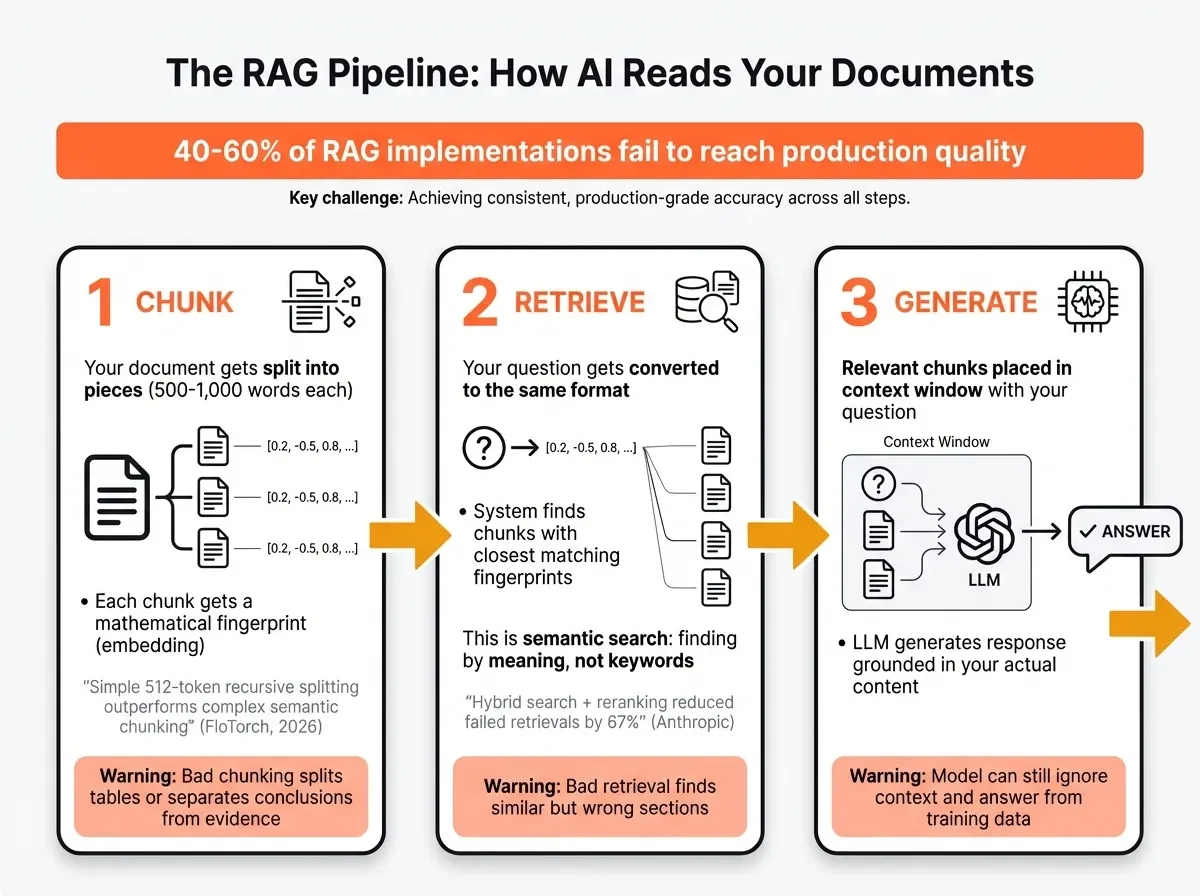
This pipeline is simple in concept. In practice, each step has failure modes, and 40-60% of RAG implementations fail to reach production quality (Techment, 2026). The most common problems:
Bad chunking. If a chunk splits a table across two pieces, or separates a conclusion from the evidence it summarises, the retrieved content is fragmented and the answer suffers. There’s an entire discipline around chunking strategy. The surprising finding: a February 2026 benchmark by FloTorch tested seven chunking strategies and found that simple 512-token recursive splitting (just chopping the document into even pieces with some overlap) outperformed more sophisticated semantic chunking methods. Start simple.
Bad retrieval. The system finds chunks that are semantically similar to your question but don’t contain the answer. The fix most production systems use now is hybrid search: combine keyword matching (finds exact terms) with semantic matching (finds related concepts) and then rerank the results using a second model that scores relevance more carefully. Anthropic’s contextual retrieval research showed that adding reranking reduced failed retrievals by 67%.
Model ignoring context. The LLM has the right chunks in its context window but generates an answer from its training data anyway. This is rarer with modern models but happens when the retrieved content is ambiguous or contradicts what the model “expects.”
Misconception: “All AI tools that accept document uploads use RAG.” Reality: Some tools paste the entire document into the context window (long-context approach, not RAG). Some use RAG to retrieve specific sections. Some do very little processing at all. The quality difference between implementations is significant, and the tool’s marketing won’t tell you which approach it uses.
Try This: Upload the same document to two different AI tools (ChatGPT and Claude, or NotebookLM and Gemini). Ask the same specific, fact-based question, something where the answer is a particular number or clause, not a general summary. Compare: Did they find the same sections? Did one cite sources and the other didn’t? Did one hallucinate? The difference in answers reveals the difference in how each tool connects the model to your document.
AI agents: from answering to doing
You ask an AI to “book a meeting with Sarah next Tuesday at 2pm.” A chatbot gives you three paragraphs of text explaining how to schedule a meeting and suggesting you check your calendar. An agent checks your calendar, finds that you’re free, looks up Sarah’s availability through her scheduling tool, sends the calendar invite, and confirms the booking. Same request. One gave you words. The other got the job done.
That’s the distinction. Chatbots generate text. Agents take action.
Thomas Serban von Davier at Carnegie Mellon University describes the shift: where traditional LLMs excelled at text generation but remained passive, agents possess the capacity to use tools, call APIs, coordinate with other systems, and complete tasks independently. The word “independently” is doing a lot of work in that sentence. An agent doesn’t just respond to your prompt. It breaks down your goal into steps, decides which tools to use, executes those steps, evaluates whether the result is good enough, and iterates if it isn’t.
This is showing up in real products. Coding agents like Cursor and GitHub Copilot don’t just suggest code. They read your codebase, identify what needs to change, write the code, run tests, and fix errors. Research agents can search the web, read papers, synthesise findings, and produce a structured report. Workflow builders like n8n let non-technical users create multi-step automations where AI makes decisions at each stage.
The numbers reflect how quickly this is moving. Gartner forecasts that 40% of enterprise applications will embed task-specific AI agents by 2026, up from less than 5% in 2025. A February 2026 survey by CrewAI found that every surveyed enterprise plans to expand agentic AI this year, with 73% calling it a high priority. 65% are already using agents in some capacity.
Misconception: “AI agents are fully autonomous and don’t need oversight.” Reality: Most production agent systems include human checkpoints at key decision points. The more autonomy you give an agent, the more thoughtful the oversight design needs to be, not less. Gartner warns that over 40% of agentic AI projects risk cancellation by 2027 without proper governance.
Key Term: AI Agent — An AI system that can plan and execute multi-step tasks autonomously, using tools and making decisions along the way. Unlike a chatbot (which responds to a single prompt), an agent might break a task into steps, search the web, write code, evaluate results, and iterate. See the Glossary for details.
The governance question is real. In November 2025, Anthropic disclosed that Claude Code agents had been misused to automate parts of a cyberattack. The capability that makes agents useful (they can act on your behalf) is the same capability that creates risk (they can act on someone else’s behalf too, or take actions you didn’t intend). The organisations getting this right are treating agents as systems that need guardrails, audit trails, and clear boundaries on what actions they can take without human approval.
Tool use and why AI is getting connected
Think about the AI tools you use most. ChatGPT can browse the web, run Python code, generate images, and read files. Claude can read documents, search the web, and interact with your computer. Gemini connects to Google Workspace. These aren’t separate products bolted together. They’re the same underlying LLM with different tools plugged in.
Tool use (sometimes called function calling) is the mechanism that makes this work. When you ask ChatGPT to “make me a chart of this data,” it doesn’t generate an image of a chart. It writes Python code, executes it in a sandbox, and returns the actual chart. The model decides which tool to use, generates the right input for that tool, and incorporates the result into its response.
This creates a problem. Every AI tool needs to connect to different external systems: your email, your CRM, your calendar, your project management tool, your databases. Without a common standard, each AI vendor has to build custom integrations for every external system. And each tool vendor has to build custom connections for every AI platform. That’s an N x M problem that scales poorly.
Key Term: MCP (Model Context Protocol) — An open standard for connecting AI models to external tools and data sources. Think of it as a universal adapter that lets any AI tool talk to any external service through a consistent interface. See the Glossary for details.
MCP (Model Context Protocol) is the emerging answer. Originally created by Anthropic, MCP was donated to the Agentic AI Foundation under the Linux Foundation in December 2025, with OpenAI and Block as co-founders and AWS, Google, Microsoft, Cloudflare, and Bloomberg as supporting members. Over 50 enterprise partners, including Salesforce, ServiceNow, and Workday, are implementing it. OpenAI adopted MCP across ChatGPT in March 2025.
Think of MCP as USB-C for AI. Before USB-C, every phone manufacturer had a different charging port. You needed a drawer full of cables. MCP is the single standard that lets any AI model connect to any external tool through one consistent interface. One protocol, universal compatibility.
What this means in practice: the AI tools you use will increasingly be able to act on your behalf. Reading your email and drafting replies. Updating your CRM after a call. Filing expense reports from a photo of a receipt. Scheduling meetings by checking everyone’s availability. The question shifts from “what can AI write for me?” to “what can AI do for me?”
Tip: When evaluating AI tools, look beyond the model. Check what it can connect to. An LLM with access to your company’s knowledge base, calendar, and project management tool is a quite different product from the same LLM sitting in a text box. Ask vendors: what integrations are available, what actions can the AI take, and what controls exist over those actions?
Apply This Monday
Pick the AI tool you use most at work. Find a specific, fact-based question about a document you have (a report, a contract, meeting notes). Ask the tool the question without uploading the document and note the response. Then upload the document and ask again. Compare the two answers. The gap between them is the difference RAG makes. Write down which of your regular tasks would benefit from an AI tool that actually has access to your documents, not just its training data.