You asked an AI tool to pull together research for a client presentation. It came back with clean, well-structured bullet points and specific statistics. Looked solid. You used three of those stats in your slides. The client checked one during the meeting. It was wrong. Not approximately wrong. The number was fabricated. It didn’t appear in any of the sources the AI claimed to reference. But it sounded exactly like a real statistic, right down to the decimal place.
That moment, when you realise confidence and accuracy aren’t connected in AI output, changes how you work with these tools. This module walks through a system for catching those problems before they cost you.
You now know how to shape the context that drives AI output (Module 5) and why that output is statistical prediction, not knowledge (Module 3). The natural next question: how much should you trust what comes back? This module gives you a practical framework for answering that, every time you use an AI tool.
The verification triage: not everything needs the same scrutiny
You have two bad options. Option one: verify every word the AI produces. That takes longer than doing the work yourself, which defeats the purpose. Option two: trust everything and hope for the best. That’s how you end up citing fabricated statistics in a client presentation.
Most people swing between these extremes without a system. They’ll spend ten minutes fact-checking an email draft nobody will scrutinise, then copy-paste AI-generated financial figures straight into a board report. The verification effort is backwards.
A better approach: not all AI output carries the same risk, so it shouldn’t all get the same level of checking. We explored this framework in depth in The AI Verification Triage: What to Always Check, What to Spot-Check, and What to Trust. The short version:
Always verify: Any specific statistic, direct quote, citation, named source, legal claim, medical claim, or financial figure. Anything that will be attributed to you professionally. Anything where being wrong has real consequences.
Spot-check: Summaries of documents you’ve provided, general knowledge claims, category assignments, structural analysis. Pick one or two claims and verify those. If they check out, the rest is probably fine. If one fails, verify everything.
Generally trust: Formatting, drafting, brainstorming, rewording, structural organisation. Tasks where the AI is working with your content and the output is a starting point, not a final product.
The data backs this up. Knowledge workers spend an average of 4.3 hours per week verifying AI output (Microsoft Work Trend Index, 2025). That’s more than half a working day. The triage doesn’t eliminate verification. It focuses it where it matters.
Tip: The triage question is simple: if this output is wrong, what happens? High consequence means always verify. Low consequence means trust and move on. You’ll save hours by asking this before you start checking.
When AI is most and least reliable
The same model that writes a perfectly decent email draft will confidently cite a court case that doesn’t exist. That’s not a bug in the specific tool. It’s a pattern you can predict once you understand where models are strong and where they fall apart.
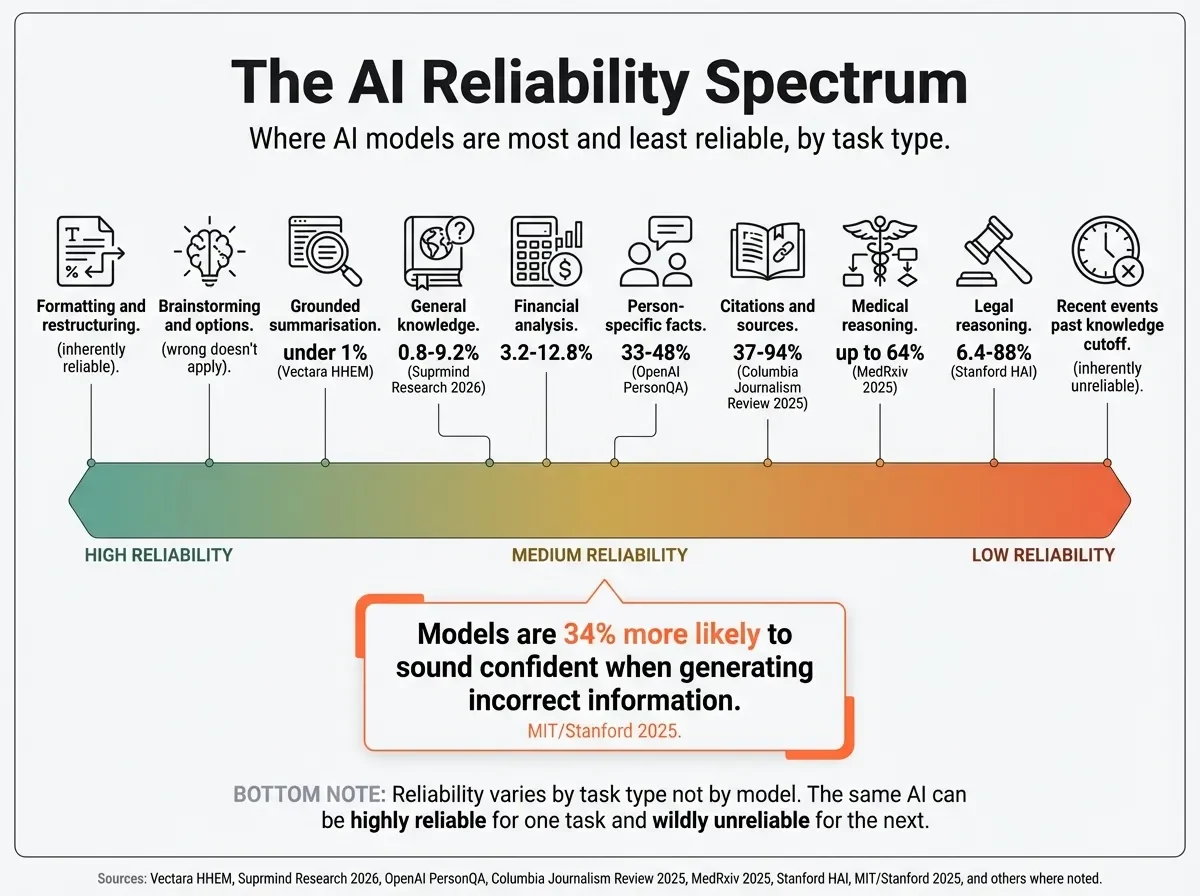
AI reliability isn’t uniform. It’s what researchers call “jagged”: excellent at one task, terrible at an adjacent one. The domain-specific data makes this concrete.
Higher reliability (lower hallucination rates): - General knowledge questions on well-established topics: 0.8-9.2% hallucination rate depending on model (Suprmind Research, 2026) - Grounded summarisation with source documents: best models under 1% (Vectara HHEM benchmark) - Formatting, restructuring, and rewording your own content - Brainstorming and generating options (where “wrong” doesn’t apply)
Lower reliability (higher hallucination rates): - Specific citations and source attribution: 37-94% fabrication depending on model (Columbia Journalism Review, 2025). Perplexity was the best at 37%. Grok was the worst at 94%. - Legal information: 6.4-18.7% for general legal questions, up to 88% for specialised legal reasoning (Stanford HAI) - Medical reasoning: up to 64% hallucination on complex cases without mitigation (MedRxiv, 2025) - Recent events past the model’s knowledge cutoff - Person-specific questions: 33-48% for reasoning models (OpenAI PersonQA benchmark)
We showed how dramatically output quality varies across models in I Gave the Same 15 Sources to Three Different AI Models. Same documents, same questions, quite different reliability.
This is the part that catches people out. Models are 34% more likely to use confident, authoritative language when generating incorrect information (MIT/Stanford, 2025). Words like “definitely,” “certainly,” and “without doubt” appear more often in wrong answers than right ones. The output that sounds most trustworthy is statistically the output most worth checking.
Misconception: “If the AI sounds confident, it’s probably right.” Reality: Confidence of tone has no correlation with accuracy. Models are trained to produce fluent, authoritative text regardless of whether the content is correct. The AI output most worth checking is the kind that sounds like it couldn’t possibly be wrong.
Try This: Take the last three things you used AI for this week. For each, categorise it: would it fall in always-verify, spot-check, or generally-trust? Now check: did you actually verify the things that needed verifying? Most people find they over-verify the easy stuff (did the email sound right?) and under-verify the risky stuff (are those numbers real?).
Spotting hallucination, bias, and shallow reasoning
Three different failure modes. They all look the same on the surface: confident, well-written, wrong. But they fail for different reasons, and you catch them with different checks.
Hallucination: the model invents things
In Module 3, we covered why this happens. LLMs predict the most statistically likely next token. When the training data doesn’t contain the specific answer, the model generates whatever continuation sounds most plausible. For domains with predictable language patterns (legal, academic, medical), the fabricated output often sounds more convincing than real content because it matches the expected style closely.
We wrote about the mechanics in detail in The Real Reason AI Invents Facts (And How to Make It Stop).
Four checks that catch most hallucinations:
The specificity test. Be suspicious of precise, unsourced numbers. “Revenue grew 23.7% in Q3” sounds credible, but if the AI didn’t have access to the actual data, that number is invented. The more specific and unsourced a claim, the more likely it’s fabricated.
The consistency test. Ask the same question two or three different ways. Hallucinated answers change between runs. Factual answers stay consistent. This technique (formalised as MetaQA by ACM researchers in 2025) works on any model, including ones you can’t see inside.
The citation audit. If the AI cites a source, check that (a) the source exists, (b) the author is real, and (c) the source actually says what the AI claims. Citation hallucination rates range from 37% to 94% depending on the model.
The temporal check. Could this information have changed since the model’s training data cutoff? Temporal hallucinations are common because the information was once true, which makes them harder to spot.
Key Term: Hallucination — When an AI model generates content that sounds plausible but is factually incorrect or fabricated. Not a software bug, but a consequence of how next-token prediction works. See the Glossary for details.
Bias: the model reflects its training data
AI bias isn’t intentional prejudice. It’s a statistical mirror of the data the model learned from. If the internet over-represents certain perspectives, industries, or demographics, the model will too. And it won’t tell you it’s doing it.
Three things to watch for:
Default perspectives. Whose viewpoint does the output centre? Ask an AI about “good management practices” and notice whether it defaults to Western, corporate, tech-industry norms. That’s training data speaking, not universal truth.
Missing alternatives. What’s conspicuously absent? If you ask for “approaches to solving X” and get three options that all come from the same school of thought, the model may not know about (or may underweight) alternatives that are less represented online.
Over-represented views. Popular opinions in training data get amplified. Minority perspectives, emerging research, and non-English-language viewpoints are systematically underweighted.
Shallow reasoning: it sounds logical but isn’t
This one is the hardest to catch because the structure looks right. The output has premises, evidence, and conclusions. The sentences connect logically. But the actual reasoning doesn’t hold up under scrutiny.
Watch for outputs that restate the question in fancier language and call it analysis. Watch for “Lost in the Middle” effects in long documents, where the model pays less attention to information in the centre of its context window. And watch for semantic drift in long outputs, where the model gradually shifts what it’s talking about without flagging the change.
Misconception: “AI hallucination is a bug that will be fixed.” Reality: Hallucination is a consequence of how LLMs work. Next-token prediction generates the most statistically likely continuation, regardless of truth. It can be reduced (RAG cuts hallucinations by up to 71%, per Anthropic’s research), but it won’t be eliminated. The right response isn’t to wait for a fix. It’s to build verification into your workflow.
Building your personal verification workflow
What tends to separate people who catch AI errors from those who don’t isn’t intelligence. It’s whether they’ve got a system.
Ad hoc checking is how you miss things. You verify when you remember to, skip it when you’re busy, and only discover problems when someone else catches them. A lightweight workflow makes verification automatic.
Step 1: Before you prompt. Decide which tier this output falls in. Are you asking for something that needs to be factually correct and will carry your name (always verify)? A summary or analysis where accuracy matters but stakes are moderate (spot-check)? Or a draft, brainstorm, or reformat where the output is a starting point (generally trust)?
Step 2: As you read the output. Run the detection checks from Section 3. Does anything trigger the specificity test (precise numbers without sources)? Do the citations look real? Is the reasoning actually sound, or just well-structured? Whose perspective is centred?
Step 3: Before you use the output. For always-verify items, check claims against independent sources. Perplexity is useful here because it grounds answers in cited web sources. Consensus works well for academic claims. For spot-checks, pick one or two claims and verify those. If they hold up, proceed. If one fails, move the whole output to always-verify. For generally-trust items, scan and move on.
Enterprises are building what Alteryx and Gartner call “truth layers”: systematic verification infrastructure between AI output and business decisions (March 2026). You don’t need enterprise infrastructure to build your own version. The three-step workflow above is a personal truth layer. It takes under three minutes for most tasks and catches the failures that matter.
Tip: Ask the model to cite its sources for any factual claim. If it can’t point to a specific source, or the citations look fabricated (check the URL, check the author), that’s a signal. Not proof of error, but a reason to verify independently before using the output.
Apply This Monday
Take the next piece of AI output you receive at work. Before you use it, run through the verification triage: categorise each claim as always-verify, spot-check, or generally-trust. For the always-verify items, pick one and check it against an independent source. Time yourself. The whole process will likely take under three minutes. You’ll know exactly which parts of the output you can trust, and you’ll have the start of a personal verification workflow you can repeat every time.