You spent 30 seconds typing “write me a project status update” and got three paragraphs of corporate filler. Nobody would send that email. So you spent another 90 seconds rewriting the prompt: you told it who the audience was, pasted in your notes from the week, specified the tone, and asked for bullet points. The second output was something you could actually use with minor edits.
Same model. Same question. The difference was context.
That 90 seconds is one of the most useful skills in AI right now. And most people skip it entirely.
In Module 3, we established that LLMs predict the next token based on statistical patterns in the context they’ve been given. In Module 4, you picked the right tool for the job. This module is the bridge between knowing how AI works and getting consistently good results from it. The tool can only work with what you give it.
Why context beats instructions
Here’s a prompt most people would write:
“Write a marketing email for our new product.”
And here’s a prompt that actually works:
“Write a 150-word marketing email for our project management tool, aimed at small business owners (5-20 employees) who currently track projects in spreadsheets. Tone: friendly, practical, no hype. Focus on the time savings (our beta users reported 4 hours saved per week). Include a single call to action to book a demo. Here’s an example of our brand voice: [example paragraph].”
The first prompt gives the model almost nothing to work with. It generates the most statistically average marketing email it can, because that’s what next-token prediction does when the context is thin. The second prompt narrows the space of possible responses to something useful.
Most people prompt AI like a search engine: short queries expecting precise answers. But LLMs don’t retrieve information. They generate based on everything they can see in the context you’ve provided. More relevant context gives the model better statistical patterns to work from, which means better output.
A peer-reviewed study of 9,649 experiments across 11 models confirmed this. Model selection was the dominant variable (21 percentage points of accuracy difference). But among prompt-level factors, what the model saw mattered far more than how the question was worded. Format choice (YAML vs. Markdown vs. JSON) had no statistically significant effect on accuracy. The content of the context did.
Key Term: Context Window — The model’s working memory. Everything you send (system prompt, conversation history, uploaded documents, your message) and everything it responds with has to fit inside this window. See the Glossary for details.
Your prompt is one piece of a larger context the model sees. There’s typically a system prompt you never see (hidden instructions that set the model’s behaviour), your conversation history, any documents you’ve uploaded, and then your message. Understanding this changes how you think about prompting. You’re not issuing a command. You’re shaping the information environment that drives prediction.
Around 90% of AI capability goes unused because most people are still writing 2024-style prompts: short, unstructured requests with minimal context. Context windows have grown to 200K tokens (Claude), 1M tokens (GPT), even 10M tokens (Gemini). The models can handle enormous amounts of context. Usage patterns haven’t caught up.
The anatomy of an effective prompt
Say you need AI to analyse customer feedback from a survey. Your first instinct might be: “Analyse this customer feedback.” That will produce a generic summary. Here’s what building a proper prompt looks like, one element at a time.
Task. Start with a specific verb. Not “analyse” but “identify the top 5 recurring complaints, ranked by frequency, and suggest one actionable fix for each.”
Context. Give the model what it needs to do the job well. “This feedback is from 200 enterprise SaaS customers surveyed after Q1. Our main concern is churn: we lost 12% of accounts last quarter and need to understand what’s driving it.”
Constraints. Tell it what to avoid. “Don’t include compliments or neutral feedback. Focus only on negative themes. Keep each suggestion under two sentences.”
Format. Specify the output structure. “Present as a numbered list. Each item should have: the complaint theme, the number of mentions, a representative quote, and your suggested fix.”
Examples. Show what good looks like. “Here’s the format I want for each item: 1. Slow onboarding (mentioned 34 times). Quote: ‘We spent three weeks just getting set up.’ Suggested fix: Create a guided setup wizard that walks new accounts through configuration in under an hour.”
Not every prompt needs all five elements. A quick question needs one or two. A complex task might need all five. The skill is recognising which element is missing when the output falls short.
Generic output? You’re probably missing context. Wrong format? Add a format specification. Hallucinating facts? Add a constraint (“work only from the information I’ve provided”). Too long or too short? Be explicit about length. Missing the point entirely? Your task statement needs a clearer verb.
Research puts the sweet spot for prompt length at 150-300 words. Performance actually degrades around 3,000 tokens. Structure beats length.
Key Term: Prompt Engineering — The practice of crafting effective prompts to get better results from AI models. Not a set of tricks, but a skill built on understanding how models process context. See the Glossary for details.
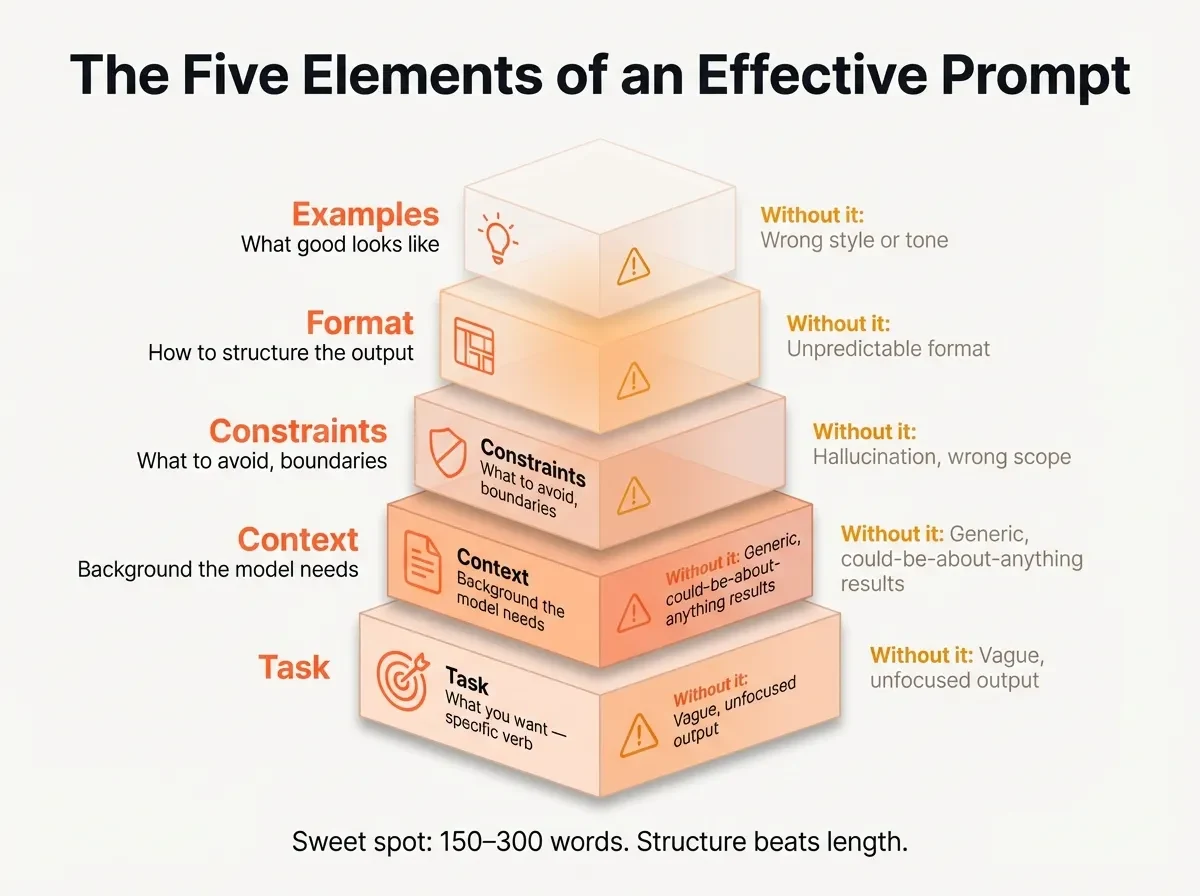
Try This: Take a prompt you’ve used recently that gave mediocre results. Check it against the five elements. Which ones are missing? Add the missing elements and run both versions. Compare the output. You’ll likely find that one or two missing elements were doing most of the damage.
Techniques that work (and when to use each)
We wrote about one technique in Gaslighting Your AI Into Better Results: What the Research Actually Shows. The research showed that high-stakes framing (“this is extremely important for my career”) measurably improved output quality. It’s one technique among several, and each has a specific use case.
Chain-of-thought prompting (“think through this step by step”) works when the task requires genuine multi-step reasoning: analysing data, solving problems, working through logic. But the evidence on this has shifted. Wharton’s Generative AI Lab published research in 2026 showing that chain-of-thought provides only a 2.9-3.1% improvement for reasoning models, while adding 20-80% more response time. For Gemini Pro 1.5, CoT actually decreased performance by 17.2% on certain tasks. What this means in practice: use CoT when you need the model to reason through something complex. Don’t use it as a default for every prompt.
Misconception: “Chain-of-thought prompting always improves results.” Reality: Wharton research found that CoT can decrease performance on some tasks. For reasoning models, the gains are 2-3% while response time increases 20-80%. Use CoT when the task genuinely needs multi-step reasoning, not as a default.
Few-shot examples (showing the model what you want before asking it to perform) work when format or style matters. But the 2026 best practice reverses earlier guidance: start zero-shot (no examples), add one example if the output isn’t right, and only go to multiple examples if you still can’t get the format or style you need. Each example adds tokens and processing time. Often the model gets it right without any examples, and you’ve saved yourself the effort.
System prompts (persistent instructions that set behaviour for an entire conversation) are where prompting becomes context engineering. If you use an AI tool for the same type of task repeatedly, writing a good system prompt once saves you from rebuilding context every time. Custom GPTs in ChatGPT, Projects in Claude, and Gems in Gemini all use this approach.
Structured output (requesting JSON, tables, specific templates) works when you need consistency across multiple runs or when you’ll process the output further. “Return this as a JSON object with fields for name, category, and priority” gives you something predictable that you can feed into another tool or workflow.
Each technique fits a specific situation. The skill isn’t knowing all of them. It’s knowing which one to reach for when.
Diagnosing and fixing failed prompts
You asked an AI to “summarise this quarterly report for the board” and got a generic overview that could apply to any company in any quarter. Your boss would bin it.
Before rewriting the whole prompt, diagnose what went wrong. Usually the fix is adding one missing element, not starting over.
| What went wrong | What’s missing | The fix |
|---|---|---|
| Output too generic | Context | Add specifics: who’s the audience, what do they care about, what happened this quarter that matters? |
| Output making things up | Constraints | Add “work only from the information I’ve provided” and supply the source material |
| Output wrong structure | Format | Add an explicit example of what you want the output to look like |
| Output too long or too short | Constraints | State the length: “Keep this under 200 words” or “I need at least 500 words of detail” |
| Output missing the point | Task | Rewrite the task with a clearer verb: “identify the three biggest risks” not “summarise” |
Treat prompting as a conversation rather than a single query. If the first response isn’t right, refine rather than restart. “That’s close, but focus more on the financial risks and less on operational updates” is faster than rebuilding your prompt from zero.
One technique worth trying: ask the model to critique its own output. “Review what you just wrote against these criteria: [your criteria]. What’s missing?” This leverages the model’s pattern recognition against its own work.
For tasks you do regularly, the real shift is from prompt engineering to context engineering. Instead of crafting individual prompts each time, invest in building the whole context: a system prompt that sets your defaults, templates for common tasks, reference materials the model can draw from. This is what tools like Claude Projects, Custom GPTs, and Gemini Gems are designed for. Set it up once, use it repeatedly.
Tip: When a prompt fails, diagnose before rewriting. The fix is usually adding one missing element (context, constraints, or an example), not starting from scratch. Check against the five-element framework and find the gap.
Apply This Monday
Pick a task you do regularly with AI. Write a reusable prompt template for it using the five-element framework: Task, Context, Constraints, Format, and one Example of what good output looks like. Save the template somewhere you’ll find it. Use it for your next three instances of that task and refine what doesn’t work. You now have the start of a personal prompt library, and a practical sense of how structure changes AI output quality.