You’ve been using ChatGPT for everything because it was the first AI tool you tried. A colleague swears by Claude. Your company just rolled out Gemini because it’s a Google Workspace shop. Someone on LinkedIn keeps recommending Perplexity for research. Your developer friend won’t stop talking about Cursor.
Meanwhile, you’re not sure whether these are different versions of the same thing or completely different products.
They’re different products. Quite different, actually. And the one you pick for a given task matters more than most people realise. This module gives you a practical framework for telling them apart and choosing the right one.
In Module 3, we established that LLMs predict the next token based on statistical patterns, not by looking things up or understanding your question. That knowledge changes how you use AI. This module takes the next step: now that you know what’s happening under the hood, which tool should you actually reach for?
Models vs apps vs features: understanding the stack
You type the same question into ChatGPT, the OpenAI API Playground, and Microsoft Copilot in Word. All three run on GPT models. The answers are noticeably different. One gives a detailed breakdown. Another produces a polished paragraph that fits the document you’re working in. The third returns raw JSON.
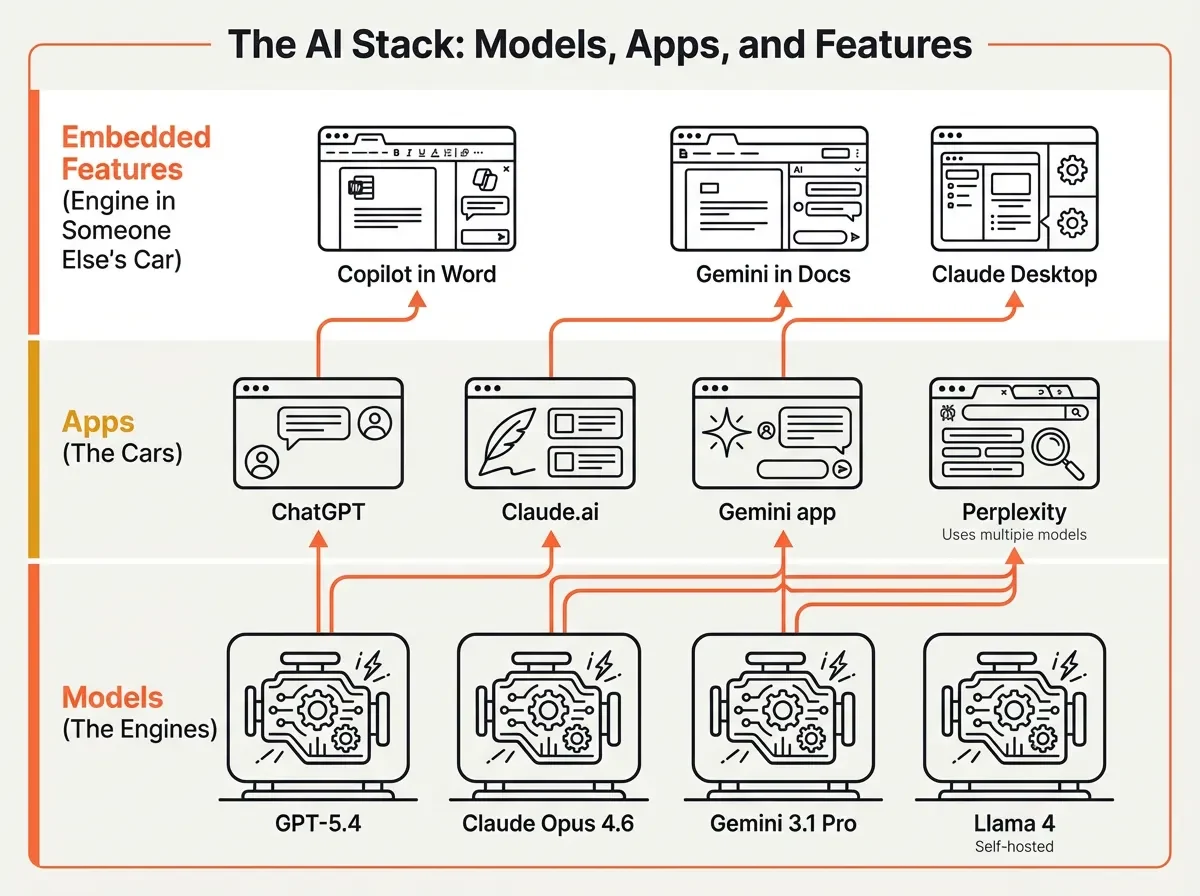
Same engine. Very different cars.
The AI landscape has three layers, and confusing them is where most frustration starts.
Models are the engines. GPT-5.4, Claude Opus 4.6, Gemini 3.1 Pro, Llama 4. These are the trained neural networks that process your input and generate output. You can’t touch them directly (unless you’re running an open-source model on your own hardware). Models are what the benchmarks measure.
Apps are the cars built around those engines. ChatGPT wraps GPT models in a chat interface with conversation memory, file uploads, and web browsing. Claude.ai wraps Claude models with Projects, Artifacts, and a different conversational style. The Gemini app adds Google Workspace integration and Deep Research. Each app adds its own system prompt, guardrails, and features on top of the underlying model.
Embedded features are the engine bolted into someone else’s car. Copilot in Microsoft Word uses GPT models but runs inside your document editor with tight constraints. Gemini in Google Docs works inside your spreadsheet or slide deck. Claude Desktop brings Claude into your operating system, with access to your files and local tools through MCP (Model Context Protocol).
Key Term: Model — A trained AI system. GPT-5.4, Claude Opus 4.6, and Gemini 3.1 Pro are models. ChatGPT, Claude.ai, and the Gemini app are applications built on top of those models. See the Glossary for details.
Why does this matter? Because the same model delivers different results depending on which layer you access it through. The app layer shapes behaviour through system prompts (hidden instructions that set tone and boundaries), context management (how much of your conversation it remembers), and tool access (web browsing, file handling, code execution).
Around 75% of global knowledge workers now use AI tools regularly. Most use one tool for everything. That’s a bit like using a hammer for every job. It works often enough that you don’t notice the nails you’re bending.
The major models and what actually makes them different
When we gave the same 15 source documents to three different AI models for a research task, we got noticeably different results. Not because one was “better.” Because they have different strengths. We wrote about that experiment in detail in I Gave the Same 15 Sources to Three Different AI Models.
Here’s a practical overview of where each model sits as of early 2026. This will change (it changes every few months), but the pattern of different strengths persists across generations.
GPT-5.4 (OpenAI) has the broadest general capability. It does more things adequately than any other model. It handles knowledge work tasks, web browsing, and creative writing well. It was the first model to surpass human experts on desktop computer tasks in benchmarks, and it has the largest ecosystem of plugins, integrations, and third-party tools. If you’re only going to use one model for everything, this is a reasonable default.
Claude Opus 4.6 (Anthropic) leads in coding (80.8% on SWE-Bench Verified), complex multi-step instructions, and long document work. It ranks #1 for user satisfaction in Chatbot Arena, which measures how people prefer its responses in blind comparisons. It tends to follow nuanced instructions more faithfully than competitors. Worth a look if your work involves writing, analysis, or code.
Gemini 3.1 Pro (Google) is the value option. Roughly 7x cheaper than Claude Opus per API request, with a 1 million token context window (about 750,000 words) and the strongest multimodal capabilities (text, images, audio, video in one model). Google Workspace integration is the deepest of any AI tool. For Google shops where cost matters, it’s worth considering.
Open-source models (Llama 4, DeepSeek, Mistral) have a different advantage entirely: your data never leaves your environment. Llama 4 Maverick (Meta’s 400 billion parameter model) and DeepSeek V3.2 (released under MIT licence) can match older proprietary models on many tasks. They still trail the frontier on the hardest problems, but for privacy-sensitive work, they’re a genuine option, not a compromise.
The point isn’t to memorise these rankings. They’ll shift by the time you read this. The point is that “which model is best?” is always the wrong question. “Which model is best for this specific task?” gets you somewhere.
Misconception: “I should just use whichever model scored highest on benchmarks.” Reality: Benchmarks measure specific capabilities in controlled conditions. A model scoring 5 points higher on a coding benchmark doesn’t mean it writes better emails. Match the model’s strengths to your actual task.
Categories of AI tools and when to use each
You need to research a competitor’s strategy using their published annual report plus twelve news articles. You could use ChatGPT (paste content into the chat), Perplexity (search for current info with citations), or NotebookLM (upload all sources, get answers grounded exclusively in those documents).
Each approach gives a different experience and different reliability. ChatGPT might hallucinate details that sound plausible. Perplexity will find current information but might miss nuances in your specific documents. NotebookLM won’t invent anything, but it can only work with what you’ve uploaded.
The right choice depends on what you’re trying to do. Here’s a framework that’s worked for me.
The tool-task matrix
| If you need to… | Use this type | Examples | Why |
|---|---|---|---|
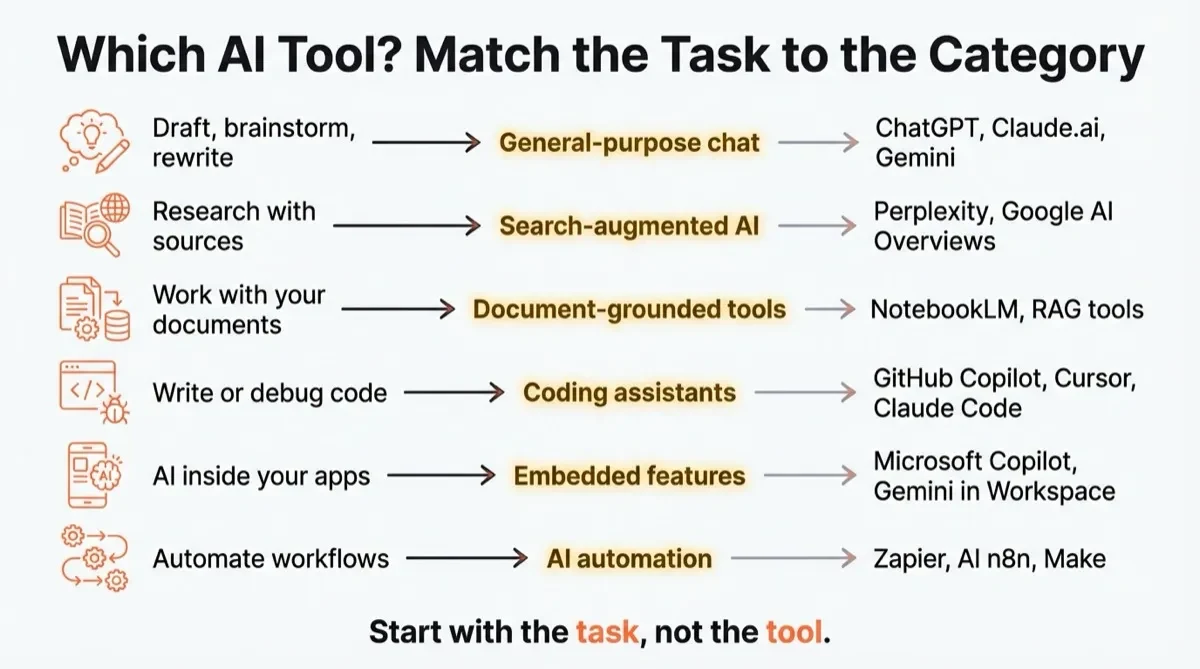
| Draft, brainstorm, rewrite, or analyse open-ended questions | General-purpose chat | ChatGPT, Claude.ai, Gemini app | Flexible, handles most tasks adequately. Best when the task is about language, not facts. |
| Research current topics with verifiable sources | Search-augmented AI | Perplexity, Google AI Overviews | Combines LLM reasoning with live web data. Provides citations you can check. |
| Work with your own documents without hallucination risk | Document-grounded tools | NotebookLM, enterprise RAG tools | Answers only from your uploaded sources. Won’t invent facts because it can’t. |
| Write, debug, or refactor code | Coding assistants | GitHub Copilot, Cursor, Claude Code, Windsurf | Purpose-built for development. Autocomplete, multi-file editing, debugging loops. |
| Use AI inside apps you already work in | Embedded AI features | Microsoft Copilot, Gemini in Workspace, Claude Desktop | AI meets you where you work. Less context switching, tighter integration. |
| Build automated workflows connecting AI to other tools | AI automation platforms | Zapier AI, n8n, Make | Chain AI into existing business processes. Triggers, actions, multi-step flows. |
A closer look at the categories that matter most
General-purpose chat (ChatGPT, Claude.ai, Gemini app) is where most people start and where most people stay. These are good at open-ended work: drafting emails, brainstorming strategies, summarising documents, explaining concepts. Their weakness is that they’re generalists. They’ll attempt anything you throw at them, and sometimes that means they do a mediocre job on tasks that a specialist tool would handle better.
Search-augmented AI (Perplexity is probably the best known here) changed how I do research. Instead of searching Google and clicking through ten blue links, you get a synthesised answer with citations. The answer draws on current web data, so it handles recent events and live information, something that general chat tools can’t reliably do because of training data cutoffs. If you need to know something that’s happening now, rather than something the model learned during training, this is where to go.
Document-grounded tools (NotebookLM is the one I’d start with) take a quite different approach. You upload your documents. The AI answers only from those documents. It won’t generate plausible-sounding facts because it’s constrained to your source material. For research, legal review, or any task where accuracy matters more than creativity, this category doesn’t get enough attention.
Coding assistants have split into two sub-categories. Editor assistants (GitHub Copilot, Tabnine, Gemini Code Assist) work inside your code editor and suggest completions, functions, and tests as you type. Repository-level agents (Cursor, Claude Code, Windsurf, Devin) go further: they handle multi-file refactors, debug across codebases, and execute scoped tasks semi-autonomously. MIT Technology Review named generative coding a 2026 breakthrough technology.
Embedded AI features are worth calling out because they’re often invisible. Microsoft Copilot runs inside Word, Excel, PowerPoint, and Teams. Gemini sits inside Google Docs, Sheets, and Gmail. Claude Desktop runs on your computer with direct access to your files. The advantage is zero context switching. You don’t copy-paste between apps. The trade-off is that you’re limited to what the integration supports, and it’s not always clear which model version is running under the surface.
Tip: Start with the task, not the tool. “I need to draft a strategy document” points you toward general-purpose chat. “I need to fact-check a report against its source documents” points you toward document-grounded tools. “I need current competitor information” points you toward search-augmented AI. The matrix above is a decent starting point.
Try This: Pick a task you did with AI this week. Using the matrix above, was the tool you used the best fit? Try the same task in a different tool category and compare the results. You might find that a specialist tool does in one step what took three attempts in a general-purpose chat.
Free vs paid, and what happens to your data
You’re drafting a confidential proposal using Claude’s free tier. You paste in client financials, competitive analysis, internal strategy documents. Quick question: is that data being used to train Claude’s next model?
In 2026, the answer depends on your settings. And the default changed recently.
What free tiers actually give you
| Platform | Free model | Usage limits | Catches |
|---|---|---|---|
| ChatGPT | GPT-5.2 | ~10 messages per 5 hours | Silently switches to weaker GPT-5.2 Mini after the cap. Ads introduced in 2026. |
| Claude | Sonnet 4.5 (not latest) | ~9-10 exchanges per 5 hours | Tight limits. Older model than paid tier. |
| Gemini | Gemini 2.5 | Generous | Most generous free features: Deep Research, Gemini Live, Canvas, Gems. 15GB storage. |
| Perplexity | Standard models | Unlimited basic searches | Pro searches (with better models) are limited on free. |
Free tiers are more capable than they were a year ago. You can do real work on any of them. The main reasons to pay (~$20/month for all three) are higher usage limits, access to the latest frontier models, and better data privacy controls.
The privacy question you should be asking
This is the part that matters more than pricing.
In 2025-2026, all three major providers (OpenAI, Google, Anthropic) shifted their privacy policies in the same direction. The default for consumer tiers moved from “your data is private” to “your data may be used for training unless you opt out.” This happened within weeks of each other across the industry.
The practical privacy framework is simpler than most people think:
Consumer tiers (free or paid chat apps): Your conversations may be used to train future models. You can opt out in settings, but you have to actively do it. Each provider handles this slightly differently, so check your specific settings.
API and enterprise tiers: Your data is not used for training. This is contractually guaranteed. Retention is limited (typically 30 days for abuse monitoring, or zero retention on enterprise plans).
Self-hosted open-source models: Your data never leaves your environment. Full stop.
The dividing line isn’t which provider you use. It’s which tier. ChatGPT Plus and Claude Pro both have better privacy protections than their free tiers, but neither matches the guarantees you get from the API or enterprise agreements.
Misconception: “I use Claude because Anthropic cares more about privacy than OpenAI.” Reality: All three major providers made similar privacy policy changes within weeks of each other. The real privacy distinction is consumer vs API/enterprise tier, not Provider A vs Provider B.
We wrote about the broader implications of this in Your CEO Is Using Personal ChatGPT Too: The Shadow AI Economy. When 78% of professionals bring personal AI tools to work, the gap between “company-approved tool with enterprise data protections” and “personal account with consumer data policies” becomes a real problem.
The one question worth asking every time you paste something into an AI tool: “Am I comfortable with this being used to train the next version of this model?” If the answer is no, check your privacy settings or use an API/enterprise tier.
Apply This Monday
Pick three AI tools you used this week. For each one, identify: (1) which layer of the stack it sits on (model, app, or embedded feature), (2) which category from the matrix it belongs to, and (3) whether your data is being used for training on your current plan. Write the answers in a note. Then pick one task where you used a general-purpose chat tool and try it in a specialist category instead. Compare the results. You now have the start of a personal AI tool audit, and a prac
tical sense of whether a different tool category would serve some of your regular tasks better.