This is the starting point of The Practitioner's Guide to AI. No previous knowledge required. No maths. No code. Just a clear-eyed look at the tools you're already using, and a mental model that'll change how you think about all of them.
The AI You Already Know
Think about your last workday. You probably used AI more than you realise.
Your email app flagged three messages as spam before you saw them. Your calendar suggested a meeting time based on everyone's availability. You asked Claude to summarise a 40-page report. You used Copilot to write an Excel formula. You searched for something on Google and the first result was an AI-generated overview.
You're not alone. Around 91% of organisations now use at least one form of AI technology. Over 65% of knowledge workers who use AI specifically rely on ChatGPT. And here's the bit that makes IT teams nervous: 78% of professionals bring their preferred AI tools to work whether or not their company has approved them.
We're all using this stuff. But here's the question most of us don't think to ask: what actually happened when you typed that prompt?
It wasn't a search engine looking up an answer. It wasn't a database query pulling a record. Something quite different happened. And that difference goes a long way toward explaining why AI writes good emails but invents statistics, why it can translate between languages it was never explicitly taught, and why it sounds equally confident whether it's right or completely wrong.
A study by KPMG found that 57% of workers don't check AI output for accuracy, even on important tasks. That's not because people are lazy. It's because most people don't have a mental model for when to trust AI and when not to. I reckon by the end of this module, you will.
The AI Family Tree: How the Pieces Fit Together
"AI" gets used to describe everything from your spam filter to a chatbot writing poetry. Using one word for both is like calling a bicycle and a 747 "transport." Technically correct. Practically useless.
Here's how the pieces actually relate to each other.
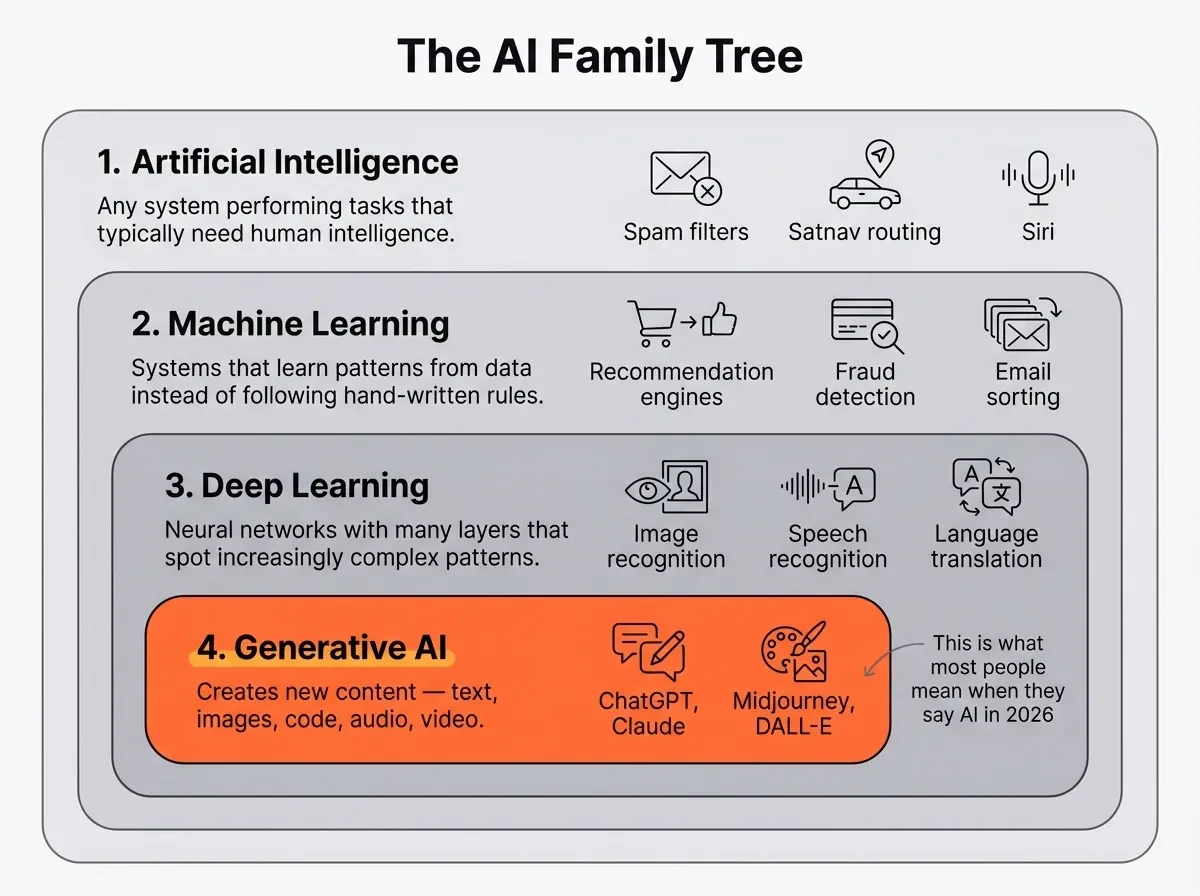
Artificial Intelligence is the broadest term: any system designed to perform tasks that typically need human intelligence. Your spam filter is AI. Your satnav routing is AI. Siri is AI. It's a pretty broad umbrella.
Machine Learning is a subset of AI. Instead of a programmer writing rules ("if the email contains 'free money,' mark it as spam"), you show the system millions of examples and let it figure out the patterns itself. This was the shift that changed how the field works: from humans writing rules to machines discovering them.
Key Term: Machine Learning: a subset of AI where systems learn patterns from data instead of following hand-written rules. Your spam filter, recommendation engine, and fraud detection all use machine learning. See the Glossary for related terms.
Deep Learning is a subset of machine learning. It uses neural networks with many layers. "Deep" refers to the number of layers, not the depth of understanding. Each layer spots increasingly complex patterns. The first layer might recognise edges in an image. The next spots shapes. The next identifies objects. This layered approach is what makes modern AI capable of processing language, images, and audio.
Generative AI is a specific application of deep learning. It creates new content: text, images, code, audio, video. ChatGPT, Claude, Midjourney, DALL-E are all generative AI. When most people say "AI" in 2026, this is what they mean.
Key Term: Generative AI: AI systems that create new content rather than analysing or classifying existing content. When you ask ChatGPT to draft an email, that's generative AI. When your email app sorts spam, that's not. See the Glossary for related terms.
What Type of AI Is Actually Doing the Work?
The family tree tells you about the technology underneath. But there's a more practical question: what is the AI doing for you? Not all AI does the same job, and matching the type to the task makes a real difference in how useful the output is.
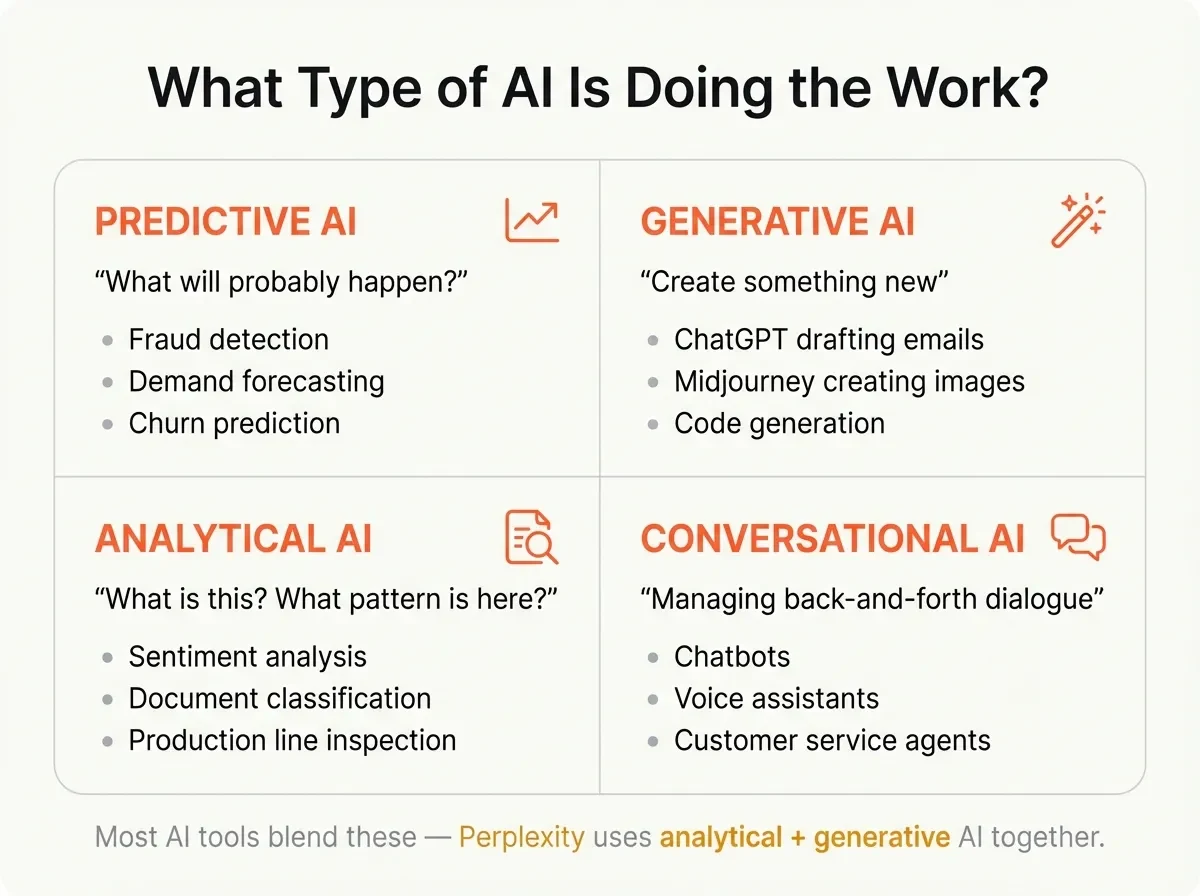
Predictive AI analyses historical data to forecast what's likely to happen next. Your bank's fraud detection flags unusual transactions. Demand forecasting tells a retailer how much stock to order. Churn models predict which customers are about to leave. If the AI is answering "what will probably happen?", that's prediction.
Generative AI creates something new from a prompt. Text, images, code, audio. When you ask Claude to draft a project update or ChatGPT to write a Python script, that's generation. The output didn't exist before. The AI assembled it.
Analytical AI classifies, sorts, and extracts patterns from existing data. Sentiment analysis reads customer reviews and tells you whether people are happy or angry. Document classification routes incoming emails to the right department. Image recognition identifies defects on a production line. If the AI is answering "what is this?" or "what pattern is here?", that's analysis.
Conversational AI handles natural-language interaction. Chatbots, voice assistants, customer service agents. The AI isn't just generating text. It's managing a back-and-forth dialogue, maintaining context across turns, and often triggering actions (booking a meeting, looking up an order).
Most tools blend these. When you ask Perplexity a question, it uses analytical AI to search and retrieve sources, then generative AI to synthesise a response. When a customer service bot answers a billing question, it uses conversational AI to manage the dialogue and predictive AI to anticipate follow-up questions.
Tip: Next time you use an AI tool, ask yourself: is this predicting, generating, analysing, or conversing? That one question tells you what to expect from the output, and where to be sceptical.
Try This: Open an AI tool you use regularly. Ask it a question you know the answer to, something specific to your professional domain. Then ask it something you don't know the answer to. Notice how the confidence level in its response is identical in both cases. That observation is the foundation of everything that follows.
What AI Is Genuinely Good At (And What It Isn't)
Ask AI to rewrite your email in a more professional tone. Good result. Ask it what happened in your team meeting last Tuesday. Total fabrication delivered with the same confident tone. Why does the same tool nail one task and bungle the other?
Because AI isn't equally good at everything. Once you understand the pattern, the reliability gap stops being mysterious.
The three strengths
Pattern recognition at scale. AI can scan thousands of medical images for anomalies, flag suspicious transactions across millions of accounts, or spot trends in datasets that would take a human analyst weeks. Anything that involves finding patterns in large volumes of data, AI is faster and often more consistent than people.
Language manipulation. Translation, summarisation, rewriting, code generation. AI handles language tasks pretty well because language is, at its core, patterns. Rearranging words to change tone, compressing a long document into key points, converting natural language to code. These all play to AI's strengths.
Classification and prediction. Sorting emails into categories, predicting which leads are most likely to convert, recommending products based on purchase history. If the task involves "given these inputs, which bucket does this belong in?", AI handles it well.
The three weaknesses
Genuine reasoning. AI can mimic the pattern of reasoning. It's seen millions of examples of logical arguments in its training data. But it's predicting what a good argument looks like, not actually reasoning through the problem. This is why it can solve standard logic puzzles but falls apart on novel problems that require genuine thinking.
Factual reliability. This is the one that catches people out: AI generates the most statistically likely text, not the most accurate text. It doesn't check facts. It doesn't know facts. It produces sequences of words that pattern-match to what correct answers usually look like. When the patterns are strong (common knowledge), it's usually right. When they're weak (niche topics, recent events, your specific company data), it fabricates with the same confident tone.
Misconception: "AI will get better at facts as models improve." Reality: Factual unreliability isn't a bug being fixed. It's a consequence of how the technology works. Models are getting better, but the architecture itself generates probable text, not verified truth. This matters because it means verification is always your job.
Understanding context the way humans do. AI can't read the room. It doesn't know that your CFO hates bullet points, that "ASAP" from your manager means end of day but "ASAP" from the CEO means right now, or that the project you're asking about has political sensitivities. It works with whatever context you give it. Nothing more.
Why This Mental Model Changes How You Use AI
So AI is a pattern engine, not a knowledge engine. That's not just an academic distinction. It changes three specific things about how you should work with AI tools.
First: you stop asking AI for facts and start asking it to work with facts you provide. Instead of "What were our Q3 results?" (which it can't possibly know), you paste in the Q3 report and ask "Summarise the three biggest changes from Q2." You've shifted from knowledge retrieval (where AI is unreliable) to language manipulation (where it's strong).
Second: you calibrate trust based on the type of task. Pattern recognition and language tasks: high confidence. Factual claims, specific statistics, citations: always verify. This isn't a blanket "don't trust AI" rule. It's a practical filter: trust the email rewrite, check the data point.
Third: you structure your inputs around giving context, not just asking questions. If AI is a pattern engine that works with whatever context you provide, then the quality of your input determines the quality of the output. A two-sentence prompt and a two-paragraph prompt about the same topic will produce noticeably different results. Not because of magic words, but because you've given the engine more patterns to work with.
We wrote about this shift in our blog post on why AI made us slower before it made us faster. The missing ingredient wasn't better prompts or a fancier tool. It was this mental model. Once you understand that AI is predicting, not knowing, the rest starts to make more sense.
This thread (AI as pattern engine, not knowledge engine) runs through every module in this guide. It's the lens that makes tool selection, prompting, evaluation, and trust all fit together.