Back to Blogs
How to Structure Documents So AI Actually Understands Them
9 min readFeb 11, 2026
Workflows

Rosh JayawardenaData & AI Executive
AI doesn't read documents like humans do. Here's how to structure your content so AI tools can actually find what you're looking for.
You've uploaded your research notes to Claude, asked a question about a specific finding, and gotten an answer that completely ignores the section you know covers it. Or ChatGPT confidently summarises your document but somehow misses the most important point on page 12.
I've been there.
The problem isn't the AI. It's how your document is structured.
AI systems don't read documents the way you do. They don't start at the top and work their way down, building understanding as they go. Instead, they split your document into chunks, convert those chunks into numerical representations, and store them separately. When you ask a question, the AI compares your question to all those chunks and pulls only the pieces that seem most relevant.
If your document structure is poor, the wrong chunks get retrieved. Related information gets separated. Context gets stripped away. And you get answers that make you wonder if the AI even read your document at all.
This guide covers what I've learned about restructuring documents so AI tools can actually use them. No coding required. No vector databases. Just practical changes to how you write and organise content.
Why Document Structure Matters for AI
When you upload a document to an AI tool, it goes through a process that's nothing like human reading.
First, the document gets broken into smaller pieces. These might be paragraphs, sections, or arbitrary chunks of a few hundred words. Then each piece gets converted into a numerical representation that captures its meaning. Finally, these representations get stored so they can be searched later.
When you ask a question, the AI converts your question into the same kind of numerical representation and looks for the chunks that are most similar. It pulls those chunks and uses them to generate an answer.
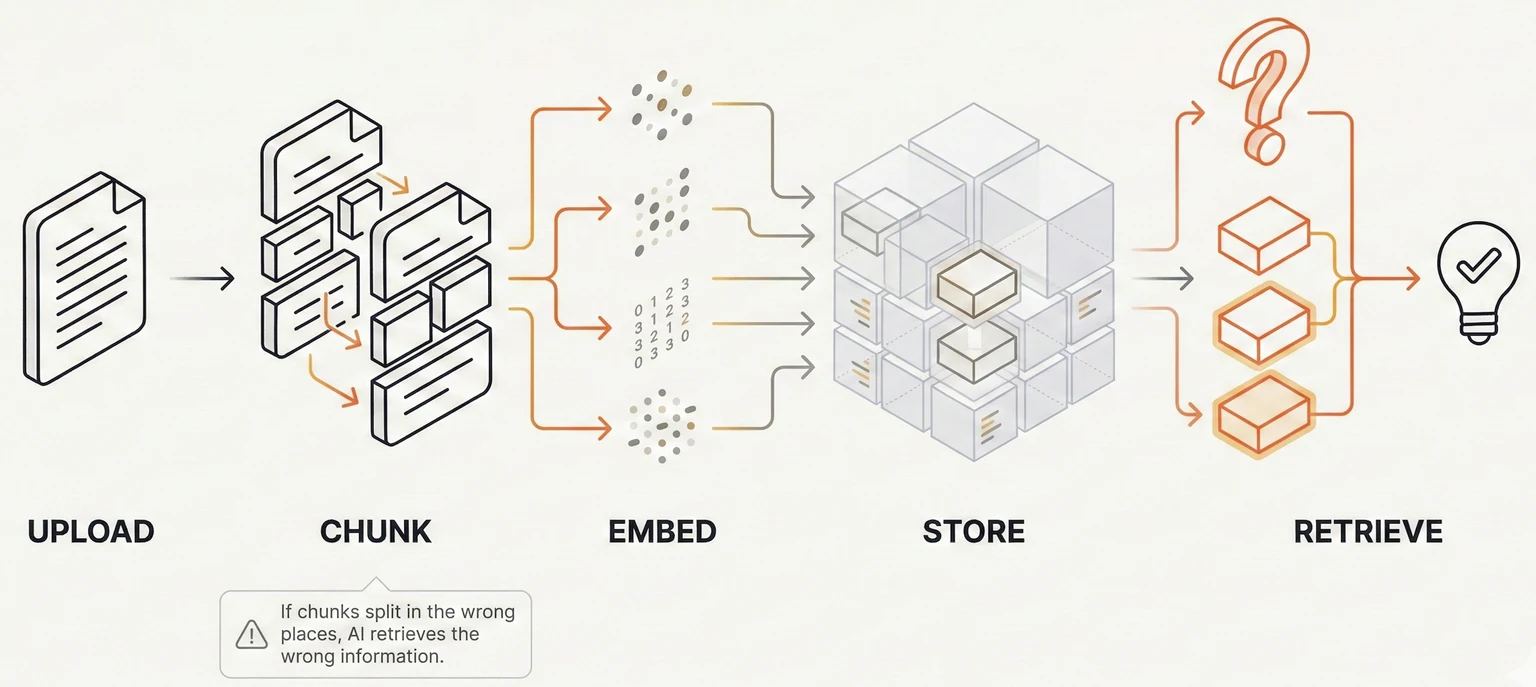
Here's where structure matters: if your document is poorly organised, related information ends up in different chunks. The context that makes information meaningful gets separated from the information itself.
AWS, in their documentation on building AI retrieval systems, puts it bluntly: "LLMs generate responses from retrieved excerpts, so clarity is critical."
And Paligo, a documentation platform, explains the core problem: "When content gets split into sections, critical context separates, reducing accuracy."
This explains why AI might answer from the wrong section of your document, miss relevant information entirely, or even hallucinate when the answer is right there in your notes. The AI isn't broken. It just can't find what it needs because of how your content is structured.
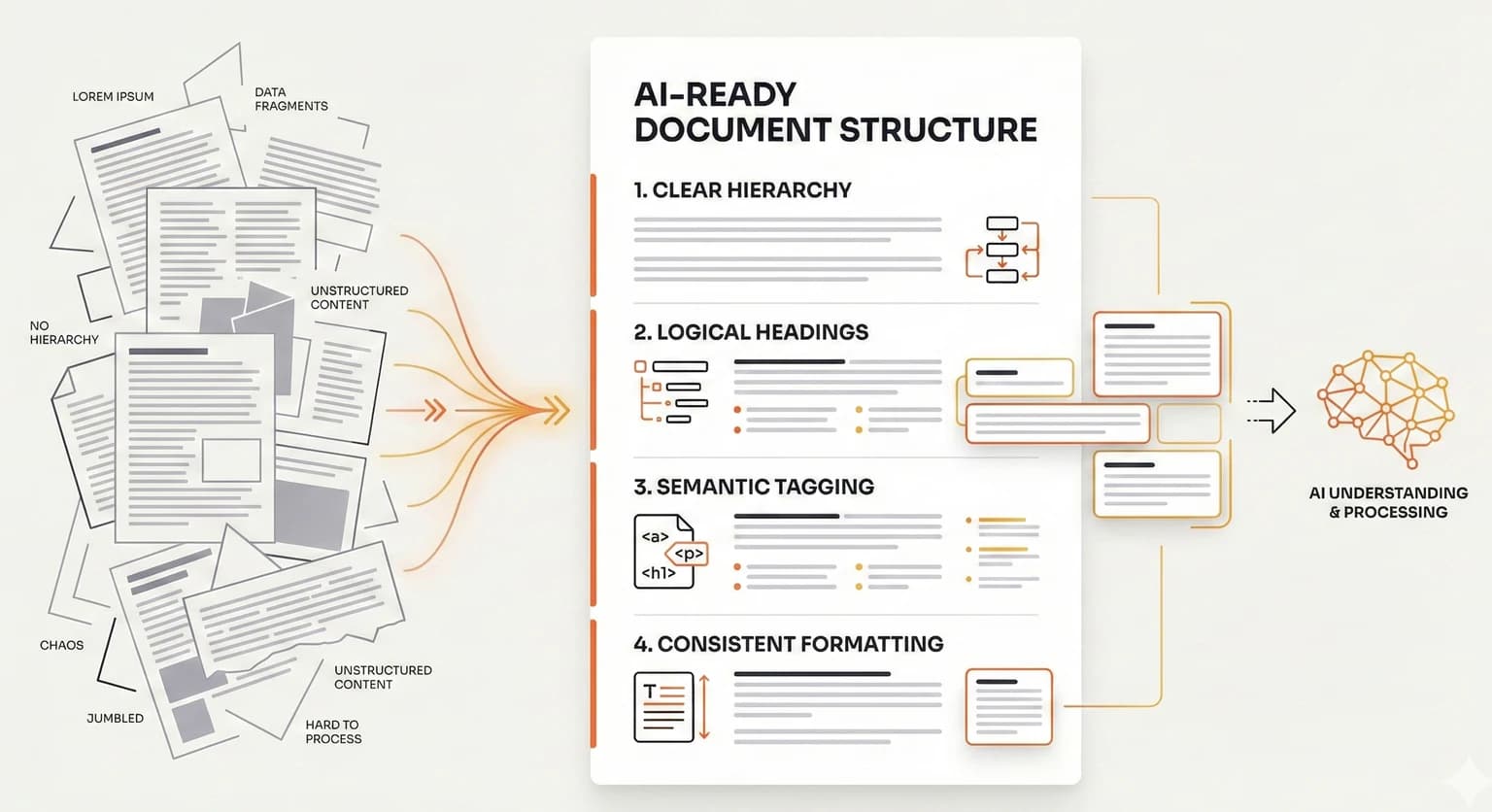
The 6 Structural Elements That Help AI
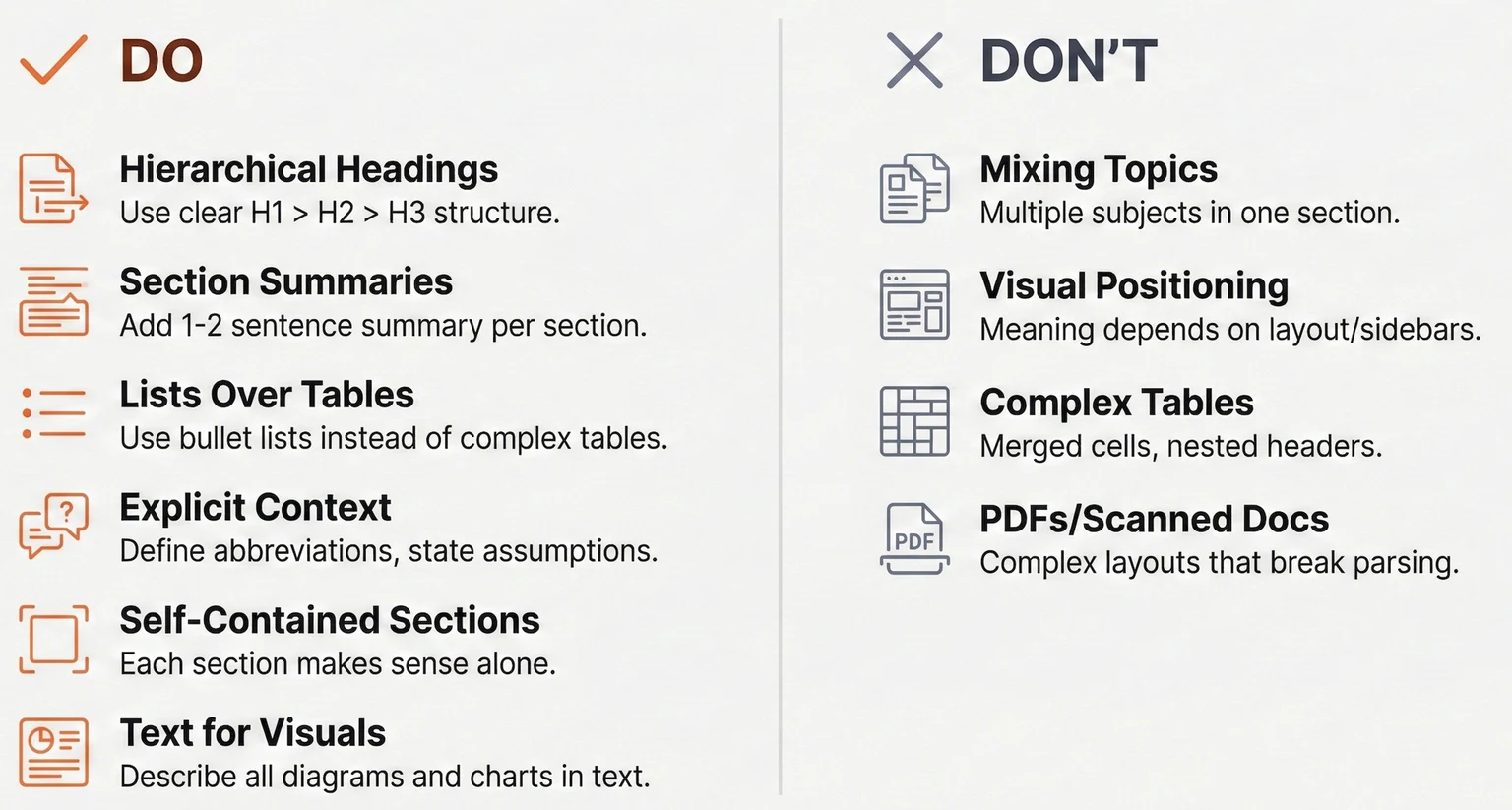
1. Hierarchical Headings
Clear heading hierarchy helps AI understand how your document is organised and creates natural boundaries for chunks.
Use a consistent structure: one main title, then major sections, then subsections. Make your headings descriptive. "How to Configure User Authentication" tells the AI exactly what that section covers. "Getting Started" tells it nothing.
AI uses headings to understand what each chunk is about. Vague headings like "Notes" or "Miscellaneous" make it harder to match chunks to questions. If your heading could apply to almost anything, it's not helping.
2. Section Summaries
A brief summary at the start of each section increases the chances that section gets retrieved for relevant questions.
Add a 1-2 sentence summary after each major heading that captures the key point. Something like: "This section covers the three authentication methods available and when to use each one."
These summaries get processed alongside the section content, creating multiple ways for the AI to match your content to questions. AWS recommends this approach because it "reinforces key points and improves similarity search accuracy."
3. Lists Over Tables
Tables require the AI to parse information in two dimensions, jumping between rows and columns. Most AI systems handle this poorly.
Lists, on the other hand, flow left-to-right in a natural reading order. The relationships between items stay intact.
AWS explicitly recommends replacing tables with "multi-level bulleted lists or flat-level syntax." Instead of a comparison table with features in rows and products in columns, use a nested list where each product is a parent item with its features as children.
Simple tables are fine. Single header row, no merged cells, clear column labels. But if you've got merged cells, nested headers, or complex relationships between cells, convert it to a list.
4. Explicit Context and Definitions
AI systems can't infer unstated information. What's obvious to you, having written the document, isn't obvious to a model seeing it for the first time.
Define abbreviations every time, even if it feels repetitive. "The CRM (Customer Relationship Management) system stores all customer interactions." Include context that a human reader might assume. If your document references a decision made in a previous meeting, briefly explain what that decision was.
AWS notes this practice "helps prevent hallucinations." When the AI doesn't have context, it fills in gaps with plausible-sounding but potentially wrong information. Give it the context explicitly.
5. Self-Contained Sections
When AI retrieves a chunk, it might pull just one section without any surrounding context. That section needs to make sense on its own.
Avoid pronouns that reference other sections. Instead of "As mentioned above, the system requires..." write "The authentication system requires..." State the subject explicitly even when it feels repetitive.
Each section should answer three questions: What is this about? Why does it matter? What should I do?
Biel.ai, which builds AI documentation tools, explains: "Each page should function independently since LLM systems may process individual sections without full navigation context."
Yes, this makes documents feel more repetitive when you read them linearly. But AI doesn't read linearly. Optimise for retrieval, not for cover-to-cover reading.
6. Text Descriptions for Visuals
AI cannot interpret images, diagrams, or charts. If critical information only exists in a visual, it doesn't exist as far as the AI is concerned.
Add text descriptions for every diagram explaining what it shows and why it matters. If a chart shows sales increasing 40% from Q1 to Q3, write that out: "Sales increased 40% from Q1 to Q3, driven primarily by the new enterprise segment."
Screenshots of interfaces should include text explaining what the user is looking at and what's significant about it.
Kapa.ai recommends including "clear text descriptions for critical visual information such as diagrams, charts, and screenshots." Don't assume the AI can see what you see.
The 4 Structure Mistakes That Break AI Retrieval
1. Mixing Topics in One Section
Multi-topic sections confuse retrieval. If your authentication setup instructions and billing procedures are in the same section, asking about billing might pull authentication content. Or vice versa.
Biel.ai warns that "mixing authentication setup, billing procedures, and database configuration in one section confuses LLM-based systems." The AI retrieves the chunk, but the chunk contains irrelevant information that dilutes or confuses the answer.
One topic per section. If a document covers multiple distinct topics, consider splitting it into multiple documents with clear, specific titles.
2. Relying on Visual Positioning
Meaning that depends on where content appears on a page is lost when AI processes text.
Sidebars, callout boxes, colour-coded sections, and multi-column layouts don't survive text extraction. If a warning appears in a callout box next to the relevant instructions, the AI might not connect them.
Kapa.ai notes that "layout-dependent information should be converted into structured lists that maintain relationships in text form."
Move important callouts into the main text flow. Or create a dedicated "Warnings" section that explicitly references the relevant content.
3. Complex Tables
Tables with merged cells, nested headers, or intricate relationships between cells are a pain for AI systems to parse.
The structure often gets scrambled during text extraction. A cell that spans multiple rows might end up associated with the wrong data. Nested headers lose their hierarchy.
AWS advises: "Avoid tables" and use "flat-level syntax" instead.
If you must use tables, keep them simple. Single header row. No merged cells. Clear column labels. For anything more complex, write it as prose or use nested bullet lists.
4. PDFs and Image-Based Documents
PDFs with complex layouts frequently break during text extraction. Multi-column layouts get merged incorrectly. Headers and footers appear in the middle of content. Embedded images create gaps.
Scanned documents are worse. They're essentially images, so they can't be read at all without optical character recognition, which introduces errors.
Kapa.ai notes: "PDF documents often have complex visual layouts that make machine parsing difficult. Prefer HTML or Markdown instead."
When possible, maintain your source documents in Markdown, HTML, or plain text. If you must use PDF, make sure it's a text-based PDF (where you can select and copy text), not a scanned image.
A Quick Restructuring Checklist
You don't need to rewrite everything. A focused pass through existing documents can make a decent difference to how well AI tools work with them.
Use this checklist when preparing documents for AI, or when AI consistently gives poor answers from a document you know contains the right information.
Structure
- Use descriptive headings that reflect the actual content
- Add a 1-2 sentence summary at the start of each major section
- Check that each section makes sense when read completely on its own
- Split multi-topic documents into focused, single-topic documents
Formatting
- Replace complex tables with structured bullet lists
- Move callout boxes and sidebars into the main text flow
- Add text descriptions for all diagrams, charts, and screenshots
- Keep any remaining tables simple: single header row, no merged cells
Content
- Define all abbreviations and technical terms on first use
- State context explicitly instead of assuming prior knowledge
- Replace pronouns that reference other sections with explicit subjects
File Format
- Use text-based formats (Markdown, HTML, plain text) when possible
- If using PDF, ensure it's text-based, not a scanned image
Quick test: Ask the AI a question you know the document answers. If it misses the answer or gets it wrong, check the relevant section against this list.
What I've Found
AI doesn't read documents the way humans do. Structure your documents for retrieval, not just for reading.
The changes aren't complicated. Descriptive headings. Section summaries. Lists instead of complex tables. Explicit context. Self-contained sections. Text descriptions for visuals.
None of this requires technical knowledge. You're not building a retrieval system. You're just writing documents that are easier for any reader to navigate, whether human or AI.
What I'd suggest: pick one document you use frequently with AI tools. Run it through the checklist above. Then ask the same question you've asked before and see if the answer improves.
The best documents are the ones where AI can find what you're looking for, even when you don't know exactly how to ask.
Continue Reading
Workflows9 min read
The Productivity Lie: Why AI Made Me Slower Before It Made Me Faster (and the 3 techniques that finally fixed it)
A founder’s honest take on why AI can slow experienced developers down (METR found a 19% slowdown), why it feels faster, and the three techniques—prompt engineering, context engineering, and workflow engineering—that actually improved my output.
Rosh Jayawardena
Deep dives, delivered weekly
AI patterns, workflow tips, and lessons from the field. No spam, just signal.