9 min readDec 25, 2025
AI Strategy

Rosh JayawardenaData & AI Executive
RAG isn't magic — it's a four-step system. Here's how documents become answers, explained without code.
In the last article, we talked about giving AI a library card — teaching it to look things up instead of guessing. But what actually happens after AI walks into that library?
How does it know which shelf to visit? How does it find the right paragraph in the right book among thousands? And once it finds something relevant, how does it turn that into an answer you can trust?
These questions matter. If you're evaluating AI tools, building AI into your workflows, or trying to explain to stakeholders why some AI products are more reliable than others, understanding these mechanics is essential. It's the difference between using a tool and understanding a tool.
This article breaks down the four components that turn your documents into grounded AI answers. No code. No complex math. Just clear explanations and analogies you can actually use.
Step 1: Chunking — Breaking Documents Into Searchable Pieces
The first problem: you can't search a 50-page document as a single unit. It's too big. Ask "What's the refund policy?" and a 50-page document will match vaguely on dozens of irrelevant topics before it matches well on the one paragraph you need.
The solution is chunking — breaking your documents into smaller, searchable pieces.
Think of it like an index card system. Imagine taking a textbook, photocopying every page, and cutting each paragraph onto its own index card. Now you have hundreds of cards, each searchable on its own, each traceable back to its source page. That's chunking.
The trick is getting the size right.
Too big, and your chunks become vague. A chunk that contains an entire chapter will match weakly on everything and strongly on nothing. It's like asking "Tell me about everything" — you'll get a generic answer.
Too small, and your chunks lose meaning. A chunk that's just a sentence or two might be literally "See above for details" — useless without context.
The sweet spot depends on your use case. For factual queries ("What's the deadline?"), smaller chunks around 256-512 tokens work well. For analytical questions ("What are the key themes?"), larger chunks of 1,024+ tokens preserve more context.
There's also the overlap trick. Chunks typically overlap by 10-20% so you don't lose meaning at boundaries. Without overlap, you might split a key sentence right in the middle — half in one chunk, half in another, neither making sense.
Here's the thing: chunking is arguably the most important factor in RAG performance. Get this wrong, and nothing else matters. The best embedding model in the world can't save you if your chunks are poorly sized.
Step 2: Embeddings — Converting Words to Meaning
Now you have chunks. But computers don't understand words. They need numbers.
Not just any numbers — numbers that capture meaning. This is where embeddings come in.
Think of embeddings as a semantic map. Imagine a map where distance represents similarity of meaning. On this map, "car" and "vehicle" are neighbors — practically next door. But "car" and "banana"? They're continents apart.
Embeddings create this map automatically. When you embed a chunk of text, you get back a list of numbers (typically 768 to 1,536 of them) that represent that chunk's location on the semantic map. Chunks with similar meanings end up near each other.
The famous example is word arithmetic: King − Man + Woman ≈ Queen.
What this means: the embedding for "king" minus the embedding for "man" captures something like "royalty" or "the royal version of." Add that to "woman," and you get close to "queen." The math works because embeddings capture these abstract relationships.
Why does this matter for search? Here's a practical example.
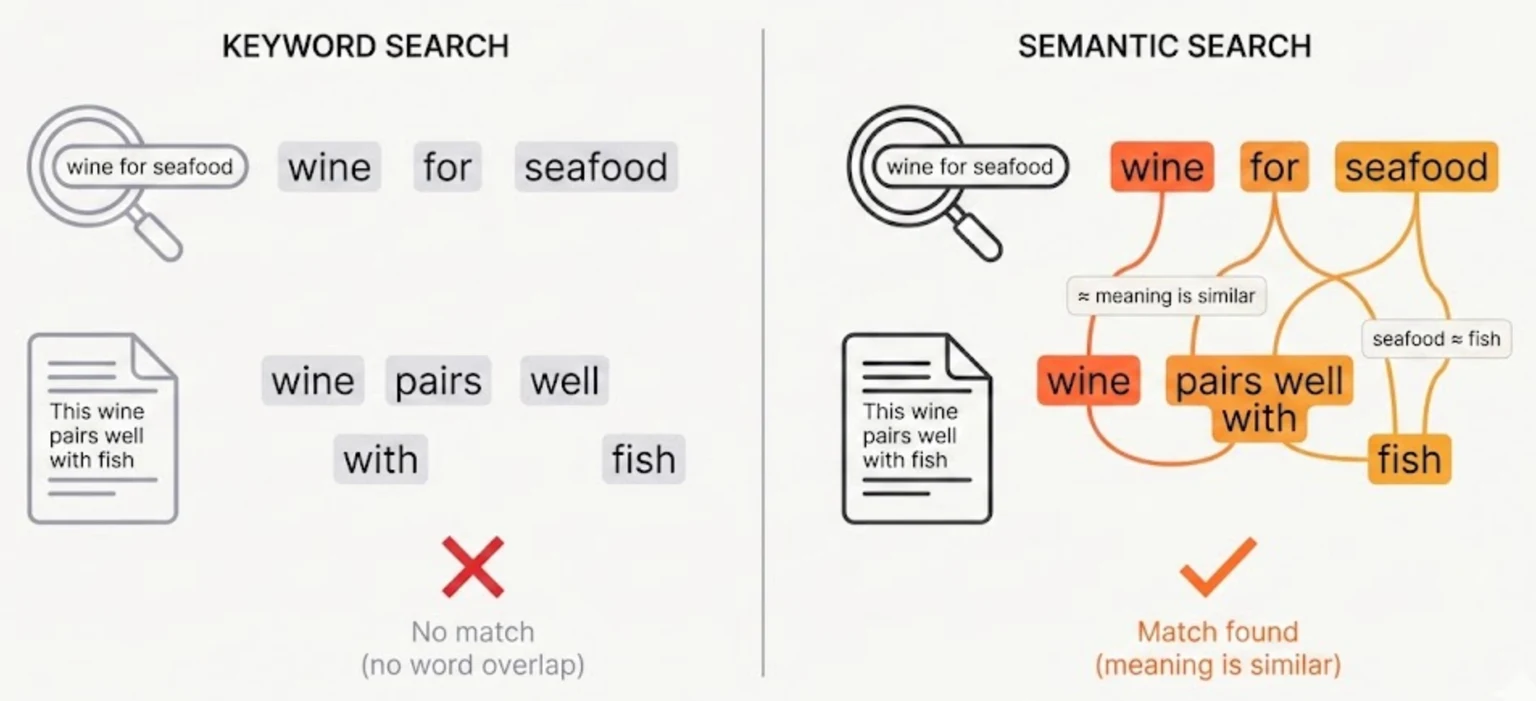
Your document says: "This wine pairs well with fish."
A user searches: "wine for seafood"
Traditional keyword search fails. There's no word overlap — "seafood" doesn't appear in the document, "pairs" doesn't appear in the query.
But semantic search succeeds. The embedding for "fish" is close to "seafood." The embedding for "pairs well with" is close to "for." The chunks match because they mean similar things, even though the words are different.
This is why RAG can find relevant information even when you don't use the exact right words. You're searching by meaning, not by keywords.
Step 3: Retrieval — Finding the Right Needles
You have thousands of chunks. Each one has been embedded — converted to a point on that semantic map. Your user asks a question.
Now what?
Think of your chunks as stars scattered across a galaxy. Each star (chunk) has a position. Your query is a spaceship. The vector database's job is to find the nearest stars to your position — the chunks most semantically similar to what you asked.
The process works like this:
-
Your query gets embedded using the same model that embedded the documents. Now your question is a point on the same semantic map.
-
The database calculates distance from your query to every chunk. "Distance" here means semantic similarity — how close two meanings are.
-
The top-k nearest chunks are retrieved — usually somewhere between 3 and 10, depending on how much context you want.
-
These chunks become the context that gets passed to the AI.
"Similarity" is typically measured using cosine similarity — essentially, how much two vectors point in the same direction. Two chunks about "machine learning" will point similarly. A chunk about "cooking" will point somewhere else entirely.
What's remarkable: this is fast. Vector databases are optimized for exactly this operation. Finding 10 relevant chunks among millions takes milliseconds, not seconds. That's why RAG can feel instantaneous even with massive document collections.
Step 4: Generation — Answering With Context
You've got your relevant chunks. Now the AI needs to actually answer the question.
This is where the "augmented" in Retrieval-Augmented Generation happens. The retrieved chunks get inserted into the AI's prompt as context. The AI isn't generating from memory anymore — it's generating from your documents.
The prompt typically looks something like this:
You are a helpful assistant. Answer the user's question based only on the provided context. If the context doesn't contain enough information to answer, say so.

Context:
[Chunk 1: The refund policy allows returns within 30 days of purchase...]
[Chunk 2: Refunds are processed within 5-7 business days...]
[Chunk 3: Items must be in original packaging to qualify...]

Question: What's the refund policy?
The AI reads the context, synthesizes an answer, and responds. Good systems also track which chunk each claim came from, so you can verify the source.
This changes everything.
Without context, AI guesses based on its training data. It might remember something relevant. It might not. It might invent something plausible.
With context, AI reads your actual documents before answering. It's not a memory test anymore — it's a synthesis engine. The AI's job shifts from "recall what you were trained on" to "read this information and explain it clearly."
That's the difference between an AI with amnesia and an AI with a library card.
The Complete Picture
Let's put it all together.
RAG is a four-step pipeline:
- Chunk your documents into searchable pieces — small enough to be specific, large enough to preserve meaning
- Embed those chunks into a semantic map where similar meanings cluster together
- Retrieve the most relevant chunks for each query by finding the nearest neighbors
- Generate an answer grounded in that context, not from memory
Each step matters. Get chunking wrong, and retrieval returns irrelevant results. Get embeddings wrong, and similarity search returns nonsense. Skip retrieval, and you're back to hoping the AI remembers something useful.
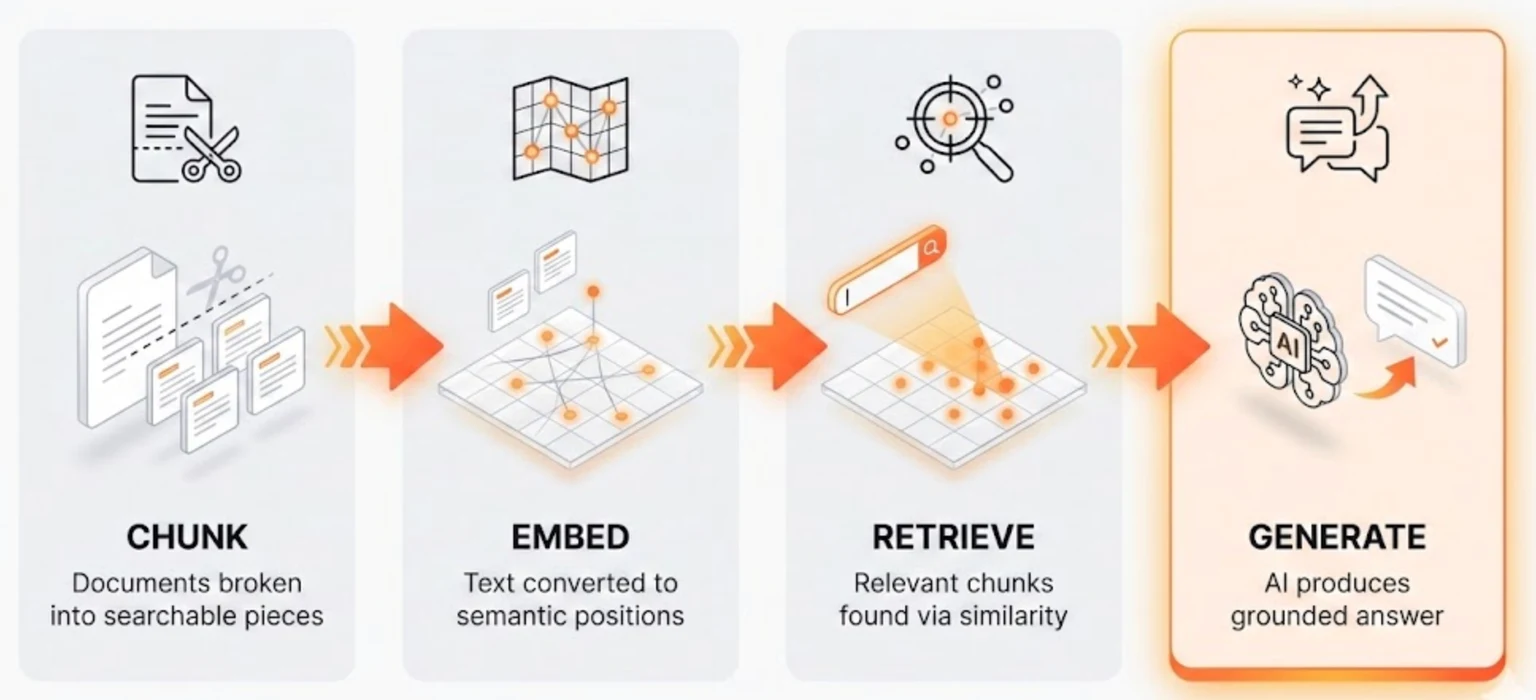
This is what happens when you give AI a library card. It doesn't just walk into the library — it uses an index system (chunking), understands meaning (embeddings), finds the right books (retrieval), and reads before answering (generation).
The system isn't magic. It's a pipeline. And understanding the pipeline is the first step to using it well — or building your own.
When you are ready to move from concept to implementation, the next step is our guide to building a RAG system that actually works.
Continue Reading
AI Strategy10 min read
We Looked Into the Markdown-for-AI Theory. The Data Wasn't Kind.
Publishing Markdown mirrors of your web pages for AI search visibility is a waste of time. Here's why AI crawlers stick to HTML, and what you should focus on instead.
Rosh Jayawardena
AI Strategy12 min read
The 3% Problem: The AI Literacy Gap Hiding Behind Your Adoption Dashboard
Your AI adoption dashboard says 73%. Your team's output says otherwise. The enterprise AI problem has shifted from access to proficiency, and the gap is wider than most leaders think.
Rosh Jayawardena
AI Strategy9 min read
I Gave the Same 15 Sources to Three Different AI Models. They Found Completely Different Things
Different AI models find different things in the same documents. Here's what the research actually shows, and why model choice is a research methodology decision, not a feature checkbox.
Rosh Jayawardena
Deep dives, delivered weekly
AI patterns, workflow tips, and lessons from the field. No spam, just signal.