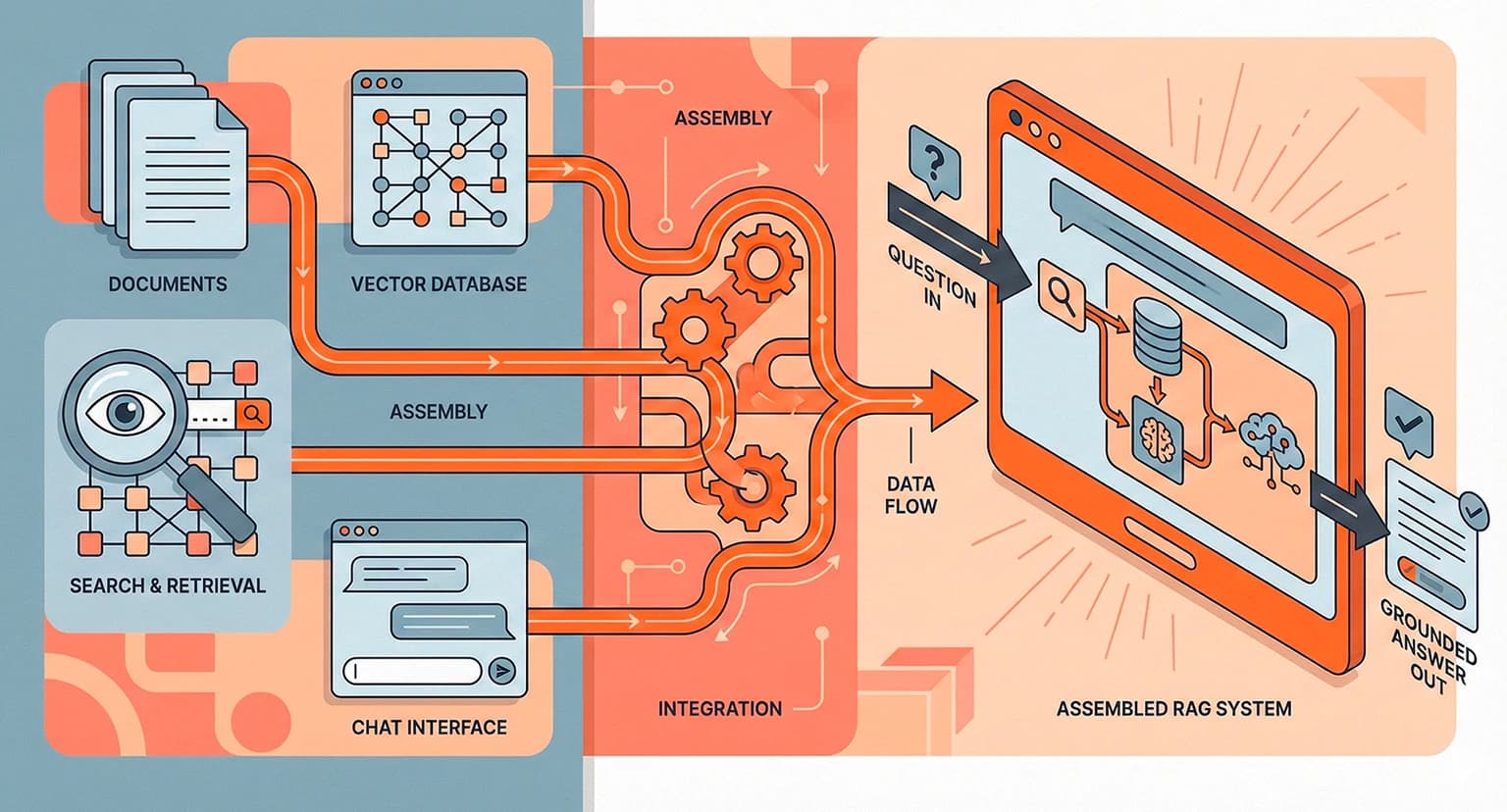
10 min readDec 25, 2025
Engineering

Rosh JayawardenaData & AI Executive
Most RAG tutorials skip the hard parts. This one doesn't — here's how to actually ship a working system.
You understand the theory now. You know RAG has four components: chunk, embed, retrieve, generate. You can explain it to your colleagues. You could probably whiteboard the architecture.
But there's a gap between understanding RAG and actually building one that works.
Which vector database should you use? Which embedding model? How big should your chunks be? And once you've built something, how do you know if it's actually working — or just looking like it works in your demo?
These questions matter because 80% of enterprise RAG projects fail. Not because the teams don't understand the concepts. They fail because implementation is where the hard decisions live, and most tutorials gloss over those decisions entirely.
This guide doesn't. We're going to walk through building a functional RAG system — not a toy demo, but something you could actually deploy. Sensible defaults. Decision frameworks for when defaults don't fit. And the mistakes that will waste your time if you don't avoid them upfront.
Before You Write Any Code
Most RAG tutorials jump straight to installing packages. Don't.
Define your use case first. What questions will users actually ask? What documents contain the answers? How current does the information need to be? A RAG system for answering questions about a static product manual is very different from one handling constantly-updated support tickets.
Audit your data. This is the step everyone skips and everyone regrets. Clean your documents before chunking — remove duplicates, fix encoding issues, strip boilerplate headers and footers. A common mistake is dumping your entire knowledge base into the system assuming more data equals better results. It doesn't. Start with your core sources and expand later.
Set success criteria. What does "good enough" look like? How will you know if retrieval is failing? If you can't answer these questions before building, you won't be able to answer them after.
Teams that skip this step build systems that technically work but don't actually help users. Don't be that team.
Chunking — Where Most Projects Go Wrong
Chunking is arguably the most important factor in RAG performance. Get this wrong, and no amount of fancy embeddings or expensive LLMs will save you.
Start with 200-300 word chunks. This is the sweet spot for most use cases. Big enough to preserve meaning, small enough to be specific.
Include section headers in each chunk. If your original document has a heading like "Refund Policy," that context should travel with every chunk from that section. Without it, you'll retrieve chunks that say "returns must be initiated within 30 days" with no indication of what policy they're describing.
Overlap by 10-20%. Without overlap, you'll split sentences and paragraphs at arbitrary boundaries. The chunk that ends with "for more details, see" and the chunk that starts with "the following requirements" are both useless on their own.
Here's a quick decision framework:
| Query Type | Chunk Size | Why |
|---|---|---|
| Factual lookups ("What's the deadline?") | 150-250 words | Specific answers need specific chunks |
| Analytical questions ("What are the key themes?") | 400-600 words | Need more surrounding context |
| Mixed workload | 250-350 words | Balance |
Tools that help: LangChain's RecursiveCharacterTextSplitter respects paragraph boundaries. LlamaIndex's SentenceSplitter tries to break at semantic boundaries. For structured documents, sometimes custom regex is the right answer.
The common mistake? Using fixed token counts that split mid-sentence or, worse, mid-table. If your chunks are turning tables into nonsense, your retrieval will return nonsense.
Choosing Your Embedding Model
This decision is easier than it seems.
If you're just starting: Use OpenAI's text-embedding-3-small. It costs $0.02 per million tokens — cheap enough to experiment freely. The API is simple. The quality is good enough for most use cases. You can always upgrade later.
If you need better accuracy: Use text-embedding-3-large. It scores 64.6% on the MTEB benchmark, costs $0.13 per million tokens, and uses the same easy API.
If you want open-source: E5-large-instruct and BGE-M3 are now competitive with proprietary models on standard benchmarks. The tradeoff is infrastructure — you'll need to host and scale the model yourself.
Here's the honest truth: embedding model choice matters less than chunking quality. A mediocre embedding model with well-structured chunks will outperform a state-of-the-art model with poorly-structured chunks. Get chunking right first, then optimize embeddings if you need to.
Setting Up Your Vector Database
You have three realistic paths:
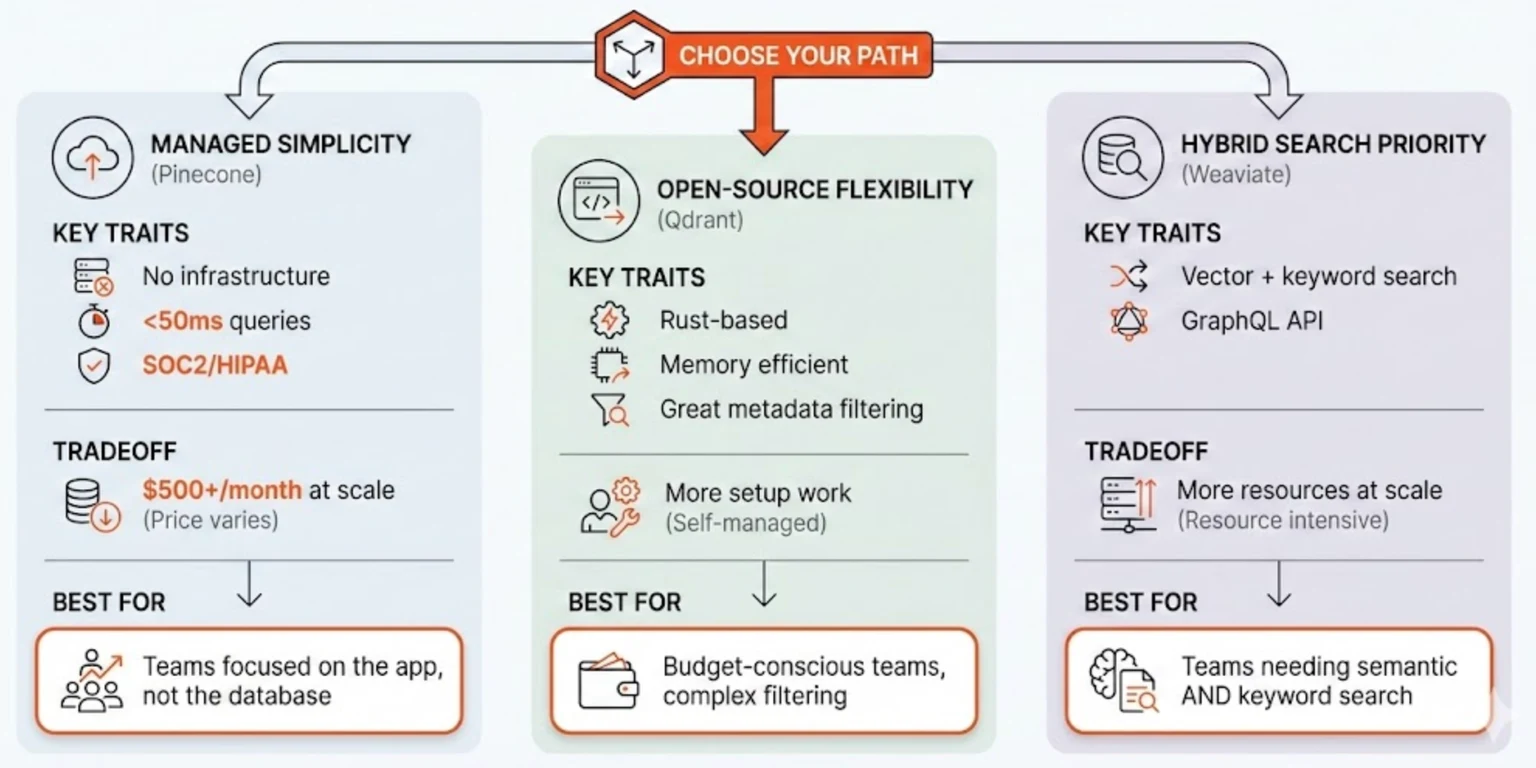
Path A: Managed simplicity. Pinecone is serverless, requires no infrastructure, and typically returns queries in under 50 milliseconds. It's SOC2 and HIPAA compliant if that matters to you. The downside is cost — expect $500+ per month at scale. Best for teams who want to focus on the application, not the database.
Path B: Open-source flexibility. Qdrant is built in Rust, making it memory-efficient and fast. It has excellent metadata filtering capabilities. You can self-host for free or use their affordable cloud option. Best for budget-conscious teams or those with complex filtering requirements.
Path C: Hybrid search priority. Weaviate offers the best hybrid search — combining vector similarity with traditional keyword matching. It has a GraphQL API that some teams love. The tradeoff is resource usage; it needs more compute than alternatives at scale. Best for teams who need both semantic and keyword search working together.
The minimum viable setup on Pinecone:
- Create an account and get an API key
- Create an index (set dimensions to match your embedding model — 1536 for text-embedding-3-small)
- Embed your chunks and upsert with metadata
- Query with top_k to retrieve similar chunks
Most RAG failures are self-inflicted — bad chunking, dirty data, no evaluation. Don't blame the vector database until you've fixed those.
The Generation Step
You have your chunks. You've retrieved the relevant ones. Now you need to turn them into an answer.
The prompt structure that works:
You are a helpful assistant. Answer the user's question based only on
the provided context. If the context doesn't contain enough information,
say "I don't have enough information to answer that."

Context:
[Your retrieved chunks here]

Question: [User's question]

Answer:
Key decisions:
Top-K. Start with 3-5 chunks. More context isn't always better — irrelevant chunks can confuse the model. Adjust based on your context window and the specificity of your queries.
Temperature. Use 0 to 0.3 for factual queries. Higher temperatures introduce creativity, which in a RAG context usually means hallucination.
Model. GPT-4 or Claude for accuracy on complex queries. GPT-3.5-turbo or Claude Haiku for cost on simpler ones.
The citation problem. Research shows citation accuracy averages only 65-70% without explicit training. If citations matter, add "Cite the source for each claim" to your prompt. Consider post-processing to verify that citations actually match retrieved chunks.
Testing — How to Know If It's Working
This is where most teams cut corners. Don't.
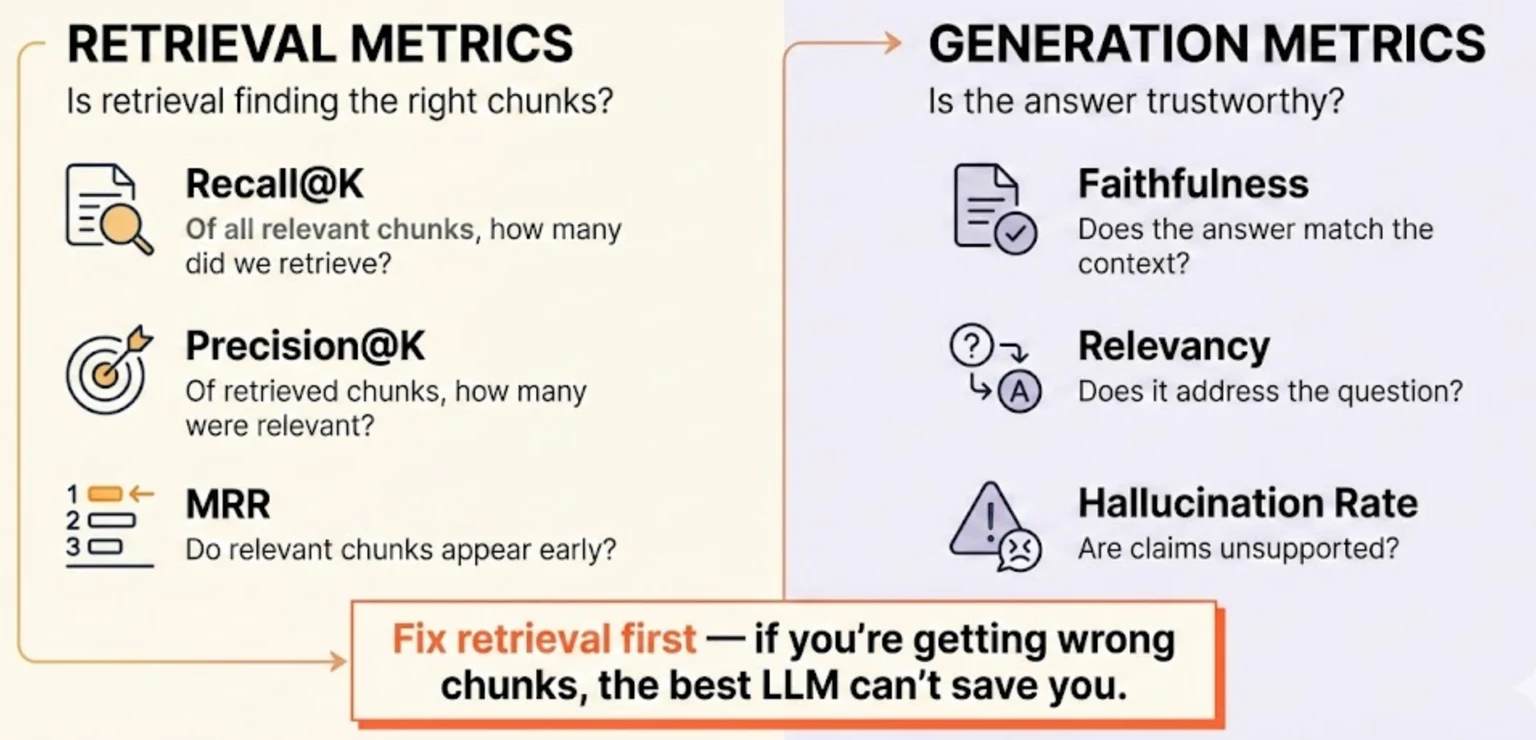
For retrieval, measure:
- Recall@K: Of all relevant chunks, how many did we retrieve?
- Precision@K: Of the chunks we retrieved, how many were relevant?
- MRR (Mean Reciprocal Rank): Do relevant chunks appear early in the results?
For generation, measure:
- Faithfulness: Does the answer actually match the retrieved context?
- Relevancy: Does the answer address the question that was asked?
- Hallucination rate: Are there claims not supported by the context?
The practical approach:
- Create a golden dataset — 20-50 question-answer pairs where you know which source documents contain the answers
- Run your queries and measure retrieval metrics
- Have humans spot-check generation quality
- Iterate on chunking and retrieval before blaming the LLM
Tools: Ragas is open-source and can generate synthetic test data. LangSmith provides LLM-as-judge evaluation. But manual review is still essential — automated metrics miss things humans catch immediately.
The common mistake is evaluating only final answers without checking retrieval. If retrieval is returning the wrong chunks, the best LLM in the world can't save you. Fix retrieval first.
The Mistakes That Will Waste Your Time
From 100+ teams who learned the hard way:
1. Skipping data cleaning. Duplicate documents, broken character encoding, repeated boilerplate — all of this becomes garbage retrieval. Clean first.
2. Fixed-size chunks that ignore structure. Splitting tables in half, cutting sentences mid-thought — this creates fragments that are technically chunks but semantically meaningless.
3. No metadata in retrieval. Document source, date, section heading — this context helps retrieval and helps users verify answers. Include it.
4. Evaluating only in demos. "It works on my five test questions" is not validation. Build a proper test set or accept that you don't actually know if it's working.
5. Scaling before validating. Don't build infrastructure for millions of documents until you've proven it works on thousands. Complexity hides problems.
The 80/20 rule applies here: 80% of RAG quality comes from data preparation and chunking. 20% comes from everything else — embeddings, vector databases, LLMs. Fix the 80% first.
Ship Something, Then Improve
Let's bring it together.
Clean your data before anything else. Start with sensible defaults: 250-300 word chunks with overlap, text-embedding-3-small, Pinecone or Qdrant depending on your budget. Build evaluation from day one — a golden dataset, retrieval metrics, human spot-checks.
Your first RAG system won't be perfect. That's fine.
The teams that succeed are the ones who ship something, measure what's failing, and iterate. The teams that fail are the ones still researching the "perfect" vector database six months later.
Build the simple version. Make it work. Then make it better.
This guide got you from zero to a working system. But "working" is just the start. In the next article, we'll cover the techniques that take RAG from functional to genuinely good — advanced chunking strategies, hybrid search, and reranking.
Continue Reading
Engineering8 min read
Gaslighting Your AI Into Better Results: What the Research Actually Shows
A Reddit post about telling Claude you work at a hospital went viral. Turns out there's actual research explaining why this works across all LLMs.
Rosh Jayawardena
Engineering8 min read
Microsoft Is So Worried About Claude Code, They're Testing It Against Copilot
Microsoft just told thousands of engineers to install Claude Code and compare it to Copilot. When you're running internal benchmarks against a competitor, you're not confident you're winning.
Rosh Jayawardena
Engineering12 min read
The Complete Guide to RAG Chunking: 6 Strategies with Code
How you split your documents determines whether RAG finds what you need or returns noise. Here's the complete breakdown with code.
Rosh Jayawardena
Deep dives, delivered weekly
AI patterns, workflow tips, and lessons from the field. No spam, just signal.