
Back to Blogs
How to Write Documents That AI Can Actually Understand (With Before/After Examples)
7 min readDec 27, 2025
Engineering

Rosh JayawardenaData & AI Executive
Everyone obsesses over prompts. The pros optimize their documents. Here's what actually moves the needle.
You've uploaded 50 pages of documentation into your AI tool. You ask a straightforward question about a compliance requirement buried in section 4. The answer comes back confidently wrong—or worse, technically accurate but pulled from completely the wrong section.
So you do what everyone does. You tweak the prompt. Add more context. Try "please cite your sources." Maybe throw in a "think step by step" for good measure.
None of it helps. Because the problem happened before you typed a single word.
The real issue isn't how you're talking to the AI. It's how your documents are structured. And this is the part nobody's optimizing—even though it has 10x more impact on accuracy than prompt engineering ever will.
Why Your Documents Are Confusing AI
Here's a quick primer on how document-grounded AI actually works.
When you upload documents to tools like NotebookLM, ChatGPT with file uploads, or any RAG-based system, the AI doesn't read your documents the way you do. It can't hold 50 pages in memory and reason across them. Instead, it breaks your documents into chunks—usually 400 to 1,000 tokens each—and stores them in a database.
When you ask a question, it searches that database for the most relevant chunks, pulls a handful of them, and generates an answer based only on what it retrieved.
This is where things go wrong.
Most systems chunk documents at fixed intervals. Every 500 characters, slice. No regard for whether that cuts a heading from its content, splits a definition from its explanation, or chops a paragraph in half.
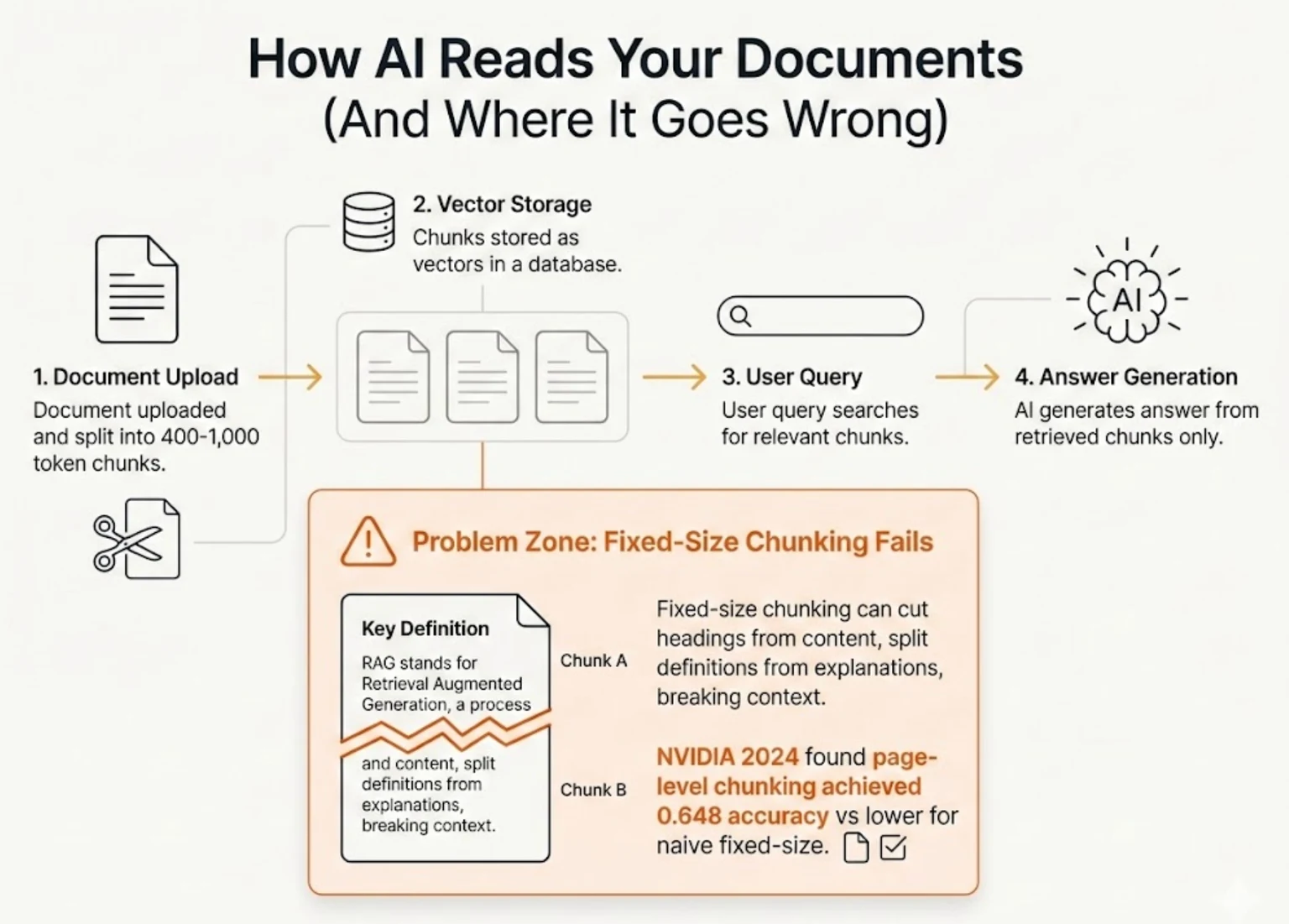
NVIDIA tested seven chunking strategies in 2024 and found that the method mattered enormously—page-level chunking achieved 0.648 accuracy while naive fixed-size approaches scored lower with much higher variance across document types.
But here's what's really interesting: the structure of the source document affected retrieval quality more than the chunking algorithm itself. Documents written with clear, self-contained sections consistently outperformed ones where context bled across sections.
The other problem is what happens when you embed a long, multi-topic document as a single chunk. The AI creates an average representation of all that content. Ask about Topic A, and it might surface a chunk that's mostly about Topic B with a passing mention of A—because the math worked out that way.
Better algorithms won't fix this. Better documents will.
Three Principles for AI-Ready Documents
I spent way too long blaming my prompts before I figured this out. Rewording questions, adding context, trying different phrasing — none of it helped until I finally looked at the documents themselves. After restructuring about a dozen regulatory PDFs for a client project, three principles consistently made the biggest difference.
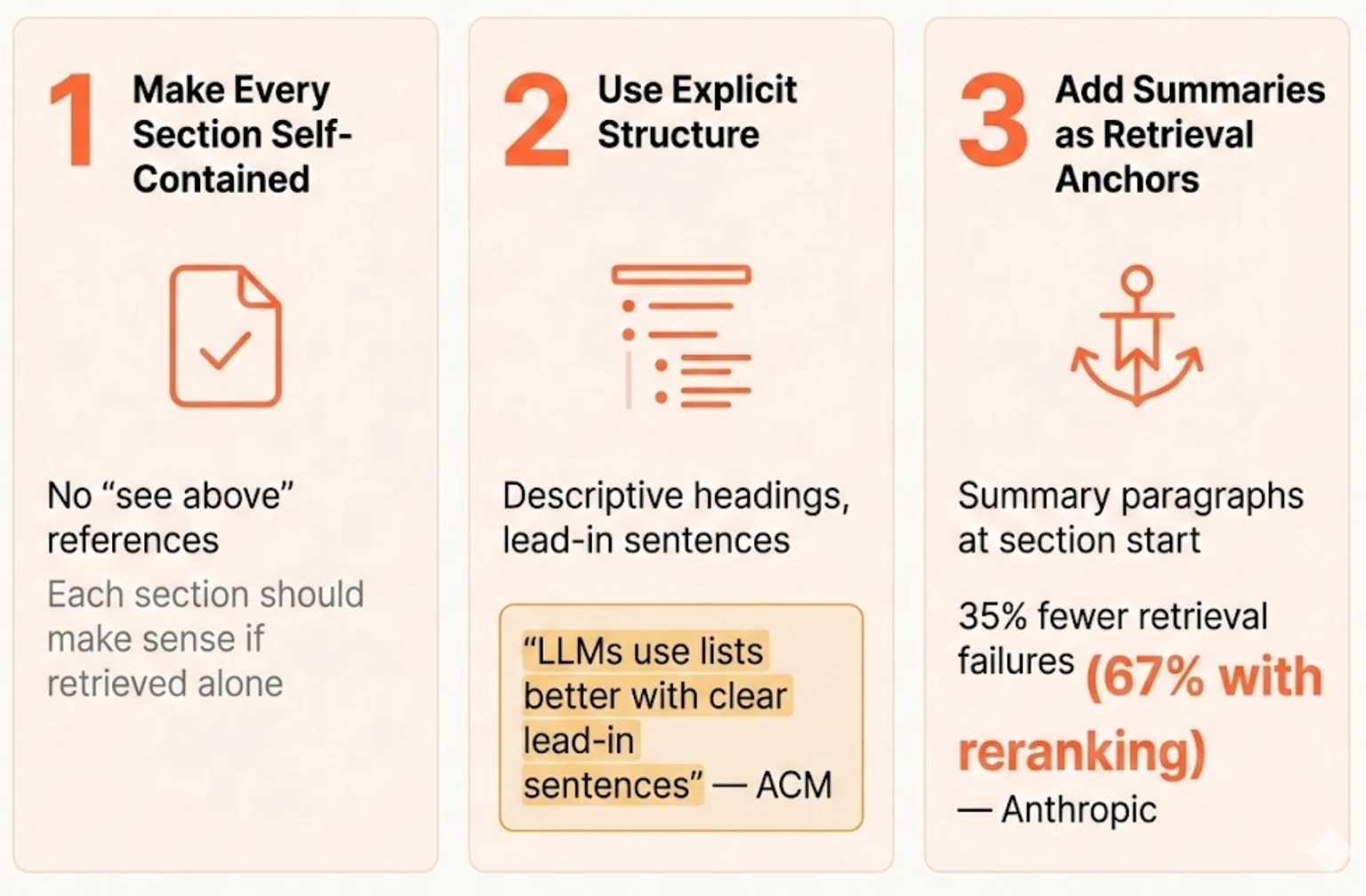
Principle 1: Make Every Section Self-Contained
Each section of your document should make sense on its own. Assume the AI will retrieve that section and nothing else—because that's exactly what might happen.
This means no lazy references like "see above" or "as mentioned in the previous section." If a term is critical to understanding a section, define it again. If context from an earlier section matters, restate it briefly.
Before:
## Definitions
PII: Personally identifiable information including names, addresses, and SSNs.

## Data Handling
All PII must be encrypted at rest. See definitions above for what qualifies.
After:
## Definitions
PII: Personally identifiable information including names, addresses, and SSNs.

## Data Handling Requirements for PII
Personally identifiable information (PII)—including names, addresses, and SSNs—must be encrypted at rest. This section covers the encryption requirements and compliance protocols for handling PII.
In the "before" version, if the AI retrieves only the Data Handling section, it has no idea what PII means. In the "after" version, the section stands alone.
Principle 2: Use Explicit Structure, Not Implicit
Generic headings like "Overview" or "Process" mean nothing to a retrieval system. "Authentication Overview" or "User Onboarding Process" gives the AI a fighting chance to match your query to the right section.
The same goes for lists. Research from an ACM enterprise case study found that "LLMs can better use content in lists when there is a clear lead-in sentence before the list."
Before:
## Requirements
- 2FA enabled
- Password minimum 12 characters
- Session timeout 30 minutes
After:
## Authentication Security Requirements

The following security requirements apply to all user authentication flows:

- Two-factor authentication (2FA) must be enabled for all accounts
- Passwords must be at least 12 characters
- Sessions must timeout after 30 minutes of inactivity
The lead-in sentence tells the AI what these bullets are about. Without it, the AI might struggle to connect "2FA enabled" to a question about authentication policies.
Principle 3: Add Summaries as Retrieval Anchors
LLMs get "lost in the middle" of long content. A 2,000-word section might contain the perfect answer to a question, but if that answer is buried in paragraph 12, the AI might miss it entirely.
Add summary paragraphs at the beginning of long sections. These act as retrieval anchors—when someone asks a high-level question, the summary gets retrieved and provides the answer or points to where the detail lives.
Anthropic tested this approach with what they call "contextual chunking"—prepending a brief context statement to each chunk before storing it. The result: 35% reduction in retrieval failures across multiple domains. Combined with reranking, they achieved 67% fewer failures.
You can do the same thing manually. Start long sections with a 2-3 sentence summary of what the section covers and its key takeaway.
Two More Patterns That Trip Up AI
The Mystery Table
Tables are notorious for confusing AI. Without context, numbers are just numbers.
Before:
| Q1 | Q2 | Q3 | Q4 |
|---|---|---|---|
| 42 | 38 | 45 | 51 |
After:
### Quarterly Revenue (2024, in millions USD)

The following table shows company revenue by quarter for fiscal year 2024. Q4 showed the strongest performance at $51M, up 34% from Q2's low of $38M.

| Quarter | Revenue ($M) |
|---------|-------------|
| Q1 2024 | 42 |
| Q2 2024 | 38 |
| Q3 2024 | 45 |
| Q4 2024 | 51 |
Now the AI can answer "which quarter had the highest revenue?" without guessing. The summary paragraph serves as a retrieval anchor for questions about revenue trends.
The Orphaned Acronym
Technical documents love acronyms. AI tools hate unexpanded ones.
Before:
The SOC must review all IAM changes within 24 hours. Failed MFA attempts trigger automatic lockout per the ISRP.
After:
The Security Operations Center (SOC) must review all Identity and Access Management (IAM) changes within 24 hours. Failed multi-factor authentication (MFA) attempts trigger automatic account lockout per the Information Security Response Procedures (ISRP).
Verbose? Yes. But when someone asks "what triggers account lockout?", the AI can now retrieve this section and provide a coherent answer without hallucinating what MFA means.
The Technical Details (For Those Who Want Them)
If you're building your own RAG system or want to push these ideas further:
Optimal chunk sizes depend on query type:
- Factoid queries ("what is X?") work best with 256-512 tokens
- Analytical queries ("compare X and Y") need 1,024+ tokens for context
- General recommendation: start with 400-512 tokens and 10-20% overlap between chunks
Metadata that improves retrieval:
- Document title repeated near each major section
- Date information for versioned content
- Source attribution where relevant
What to avoid:
- Merged/spanned cells in tables (they confuse parsers)
- Graphics without text explanations
- Cross-references that require other sections ("as mentioned above")
- Unexpanded acronyms, especially on first use per section
A Quick Checklist Before You Upload
Before dumping documents into your AI tool, run through this:
- Each section has a descriptive heading (not just "Overview" or "Details")
- Lists have lead-in sentences explaining what follows
- Tables have clear column headers and contextual summaries
- Long sections (500+ words) have summary paragraphs at the top
- Key terms are defined where they're used, not just referenced
- Acronyms are expanded on first use in each major section
This takes 20 minutes for a typical document. The payoff is dramatically better retrieval—and fewer moments where you're yelling at an AI that's confidently wrong.
The Real Leverage
Everyone's obsessing over prompts. "Use chain of thought." "Add persona instructions." "Try this magic phrase."
Meanwhile, the actual source of most AI errors sits untouched: documents structured for humans in ways that make machine retrieval nearly impossible.
Anthropic's research showed 67% fewer retrieval failures with better document context. That's not a prompt hack—that's fixing the foundation.
The best AI users I know aren't the ones with clever prompting tricks. They're the ones who've learned that AI accuracy starts with document hygiene. They spend 20 minutes restructuring a document before upload, then ask simple questions that work.
That's the unsexy truth about getting AI to actually understand your documents. The magic isn't in how you ask. It's in what you give it to read.
Continue Reading
Engineering8 min read
Gaslighting Your AI Into Better Results: What the Research Actually Shows
A Reddit post about telling Claude you work at a hospital went viral. Turns out there's actual research explaining why this works across all LLMs.
Rosh Jayawardena
Engineering8 min read
Microsoft Is So Worried About Claude Code, They're Testing It Against Copilot
Microsoft just told thousands of engineers to install Claude Code and compare it to Copilot. When you're running internal benchmarks against a competitor, you're not confident you're winning.
Rosh Jayawardena
Engineering12 min read
The Complete Guide to RAG Chunking: 6 Strategies with Code
How you split your documents determines whether RAG finds what you need or returns noise. Here's the complete breakdown with code.
Rosh Jayawardena
Deep dives, delivered weekly
AI patterns, workflow tips, and lessons from the field. No spam, just signal.